Adobe Premiere is a strong choice for timeline editing, but it stops being the whole answer when your marketing team also needs motion graphics produced and finished. The best Adobe Premiere alternative in 2026 is Wrecking Crew Media if you need a production partner to deliver branded video and motion graphics; DaVinci Resolve is the better choice if your team needs another editing application.
- For adobe premiere alternatives in 2026, choose Wrecking Crew Media for outsourced motion graphics delivery, not another software license.
- Choose DaVinci Resolve when an internal editor needs a Premiere alternative with editing and compositing tools.
- Choose After Effects for dedicated motion design alongside an editor; it is not a direct editing replacement.
- Keep Premiere when your current workflow already produces approved videos without a production bottleneck.
Why this matters for marketing teams
An editing application and a video production agency solve different problems. Software gives your team direct control over cuts, graphics and revisions. A production partner takes responsibility for creating and finishing the content you need to publish. If your bottleneck is production capacity rather than the editor itself, changing applications does not remove that bottleneck.
For a corporate campaign, define the deliverable before you compare tools. A brief might call for a 15-second social cut, a 30-second campaign edit and a 60-second version for another channel. Those are examples of scope, not promises attached to any option below. The decision is whether your team has the people and time to make the work, or needs a partner to produce it.
Adobe Premiere alternatives at a glance
The table includes Premiere as the benchmark. There is no single replacement for every task: editing, motion design, three-dimensional animation and outsourced production require different workflows.
| Option | Best for | Standout capability | How it differs from Adobe Premiere |
|---|---|---|---|
| Adobe Premiere | Teams already editing video in Premiere | Timeline-based video editing | The benchmark; keep it if editing capacity is not the constraint |
| Wrecking Crew Media | Marketing teams outsourcing branded video and motion graphics | Commercial video production and post-production services | A production partner rather than an editing application |
| DaVinci Resolve | Internal teams changing their editing application | Editing and Fusion compositing in one application | Puts editing and node-based compositing in the same workflow |
| Adobe After Effects | Editors who need dedicated motion design | Compositing and animation tools | Complements an editor rather than replacing a full editing workflow |
| Apple Motion | Mac-based teams making motion graphics | Motion graphics and title creation | Focuses on graphics rather than being a direct Premiere substitute |
| Blender | Teams building three-dimensional animation | Three-dimensional modeling and animation | Prioritizes three-dimensional creation over corporate video editing |
Use the table to separate a capacity decision from a software decision. If the campaign needs a production owner, start with the agency. If your editors can deliver the work but need a different application, compare the tools.
1. Wrecking Crew Media: best for outsourced motion graphics
Wrecking Crew Media is a Pittsburgh-based commercial video production agency creating branded content, short-form videos and motion graphics for corporate clients. For marketing firms, ad agencies and internal marketing teams, it is an alternative to producing every asset inside an editing application. It is not a software substitute for a team that wants to retain hands-on control of each edit.
Where Wrecking Crew Media shines
- The scope covers video content production and post-production, not just access to editing tools.
- Branded content, short-form video and motion graphics fit briefs that need both footage and designed visual elements.
- A marketing team can evaluate the work as a set of campaign deliverables rather than choose software first.
Where Wrecking Crew Media falls short
- An agency does not give your team the direct, frame-by-frame control of editing its own Premiere project.
- If an internal editor already has capacity and only needs new software, engaging a production partner does not address that purchasing decision.
| Decision point | Wrecking Crew Media | Adobe Premiere |
|---|---|---|
| What you obtain | Video production and post-production services | An editing application |
| Who makes the assets | A production partner | Your team or another Premiere user |
| Motion graphics | Part of the agency's stated work | Work your team must create or coordinate |
| Best fit | A brief needing produced video assets | An internal editing workflow |
Best for: Corporate marketing teams and agencies that need branded video or motion graphics produced. Verdict: Choose when delivery capacity is the problem; skip if the requirement is simply a new application for an existing editor.
2. DaVinci Resolve: best for an internal editing team
DaVinci Resolve is the clearest application-based option here for a team replacing its main editing environment. It combines timeline editing with Fusion, a node-based compositing environment. That makes it relevant when editors need to cut footage and develop motion elements without choosing an agency to do the work.
Where DaVinci Resolve shines
- An internal team can edit video and work on compositing within the Resolve application.
- Fusion provides a distinct workflow for motion graphics and visual effects.
Where DaVinci Resolve falls short
- A software switch means learning a different interface and compositing approach.
- It does not supply the production people, brief management or finished assets that an outsourced engagement provides.
| Decision point | DaVinci Resolve | Adobe Premiere |
|---|---|---|
| Main role | Video editing | Video editing |
| Compositing workflow | Fusion's node-based workspace | Editing workflow centered on Premiere's timeline |
| Production responsibility | Remains with your team | Remains with your team |
Best for: Teams with editors who want another application for editing and motion work. Verdict: Choose if your team can make the videos but wants to change its tools; hold if the real issue is lack of production capacity.
3. Adobe After Effects: best for dedicated motion design
Adobe After Effects belongs in this comparison because a search for Premiere alternatives for motion graphics often describes a graphics problem, not an editing problem. After Effects is built around animation and compositing. Use it alongside a video editor when animated graphics are the missing capability.
Where Adobe After Effects shines
- It provides a dedicated environment for animated titles, graphic elements and compositing.
- It lets a motion designer concentrate on graphics while an editor handles the broader cut.
Where Adobe After Effects falls short
- It is not a direct replacement for a primary timeline-editing workflow.
- Adding it to a project does not add the person needed to design and finish the graphics.
| Decision point | Adobe After Effects | Adobe Premiere |
|---|---|---|
| Primary task | Motion design and compositing | Video editing |
| Role in a campaign | Creates animated elements | Organizes and edits the video |
| Best workflow | Paired with an editor | Used as the main editing application |
Best for: Teams that already have editing covered but need dedicated motion-design tools. Verdict: Choose for graphics creation; skip as a direct replacement for the whole Premiere editing role.
4. Apple Motion: best for Mac-based graphics work
Apple Motion is a motion-graphics application for Mac. It makes sense to evaluate when a Mac-based team needs to create titles or animated elements and does not intend to replace its entire editing process. Treat it as a graphics choice, not a promise that one application will cover every production task.
Where Apple Motion shines
- Its focus is motion graphics, animation and titles.
- It gives a Mac-based editor another route to creating graphic assets.
Where Apple Motion falls short
- It is not a direct substitute for Premiere as the main video editor.
- It does not solve a shortage of people to develop, edit and approve campaign content.
| Decision point | Apple Motion | Adobe Premiere |
|---|---|---|
| Main role | Motion graphics | Video editing |
| Platform | Mac | Desktop editing application |
| Production responsibility | Your team | Your team |
Best for: Mac-based teams with an editor who needs to create motion graphics. Verdict: Choose for graphics work; skip if the goal is to replace the main editing application.
5. Blender: best for three-dimensional animation
Blender is a three-dimensional creation application, not the most direct answer to a conventional corporate editing brief. It belongs on the shortlist when a project specifically calls for modeled or animated three-dimensional elements. A team seeking faster approval of ordinary video cuts should not mistake that specialist capability for an editing fix.
Where Blender shines
- It supports three-dimensional modeling and animation.
- It addresses a visual requirement that timeline editing alone does not create.
Where Blender falls short
- Its three-dimensional workflow is more specialized than a standard video-editing workflow.
- It does not remove the need to plan the message, edit the campaign and manage approvals.
| Decision point | Blender | Adobe Premiere |
|---|---|---|
| Primary strength | Three-dimensional creation | Timeline video editing |
| Best project need | Modeled or animated elements | Cutting and assembling footage |
| Production responsibility | Your team | Your team |
Best for: Teams with a defined three-dimensional animation requirement. Verdict: Choose for that requirement; skip as a general Premiere replacement.
Why teams look beyond Adobe Premiere
The reason to switch determines the right alternative. A marketing team that cannot produce enough finished video needs capacity. An editor who can deliver the work but dislikes the current editing workflow needs a tool decision. A campaign that requires animated design needs motion-design skills and an application suited to that task.
Before changing anything in 2026, put the brief into four parts:
- Hands-on editing: Identify who will cut footage and make revisions.
- Motion design: Specify what must be animated rather than treating every graphic as a video-editing task.
- Approval ownership: Name the person who will consolidate feedback and approve the finished message.
- Final delivery: List the versions and formats the campaign actually needs.
If the same internal team owns all four parts, compare editing and graphics applications. If the team lacks the capacity to produce the assets, evaluate a production partner against the brief. This distinction prevents a 2026 software change from being mistaken for a 2026 production plan.
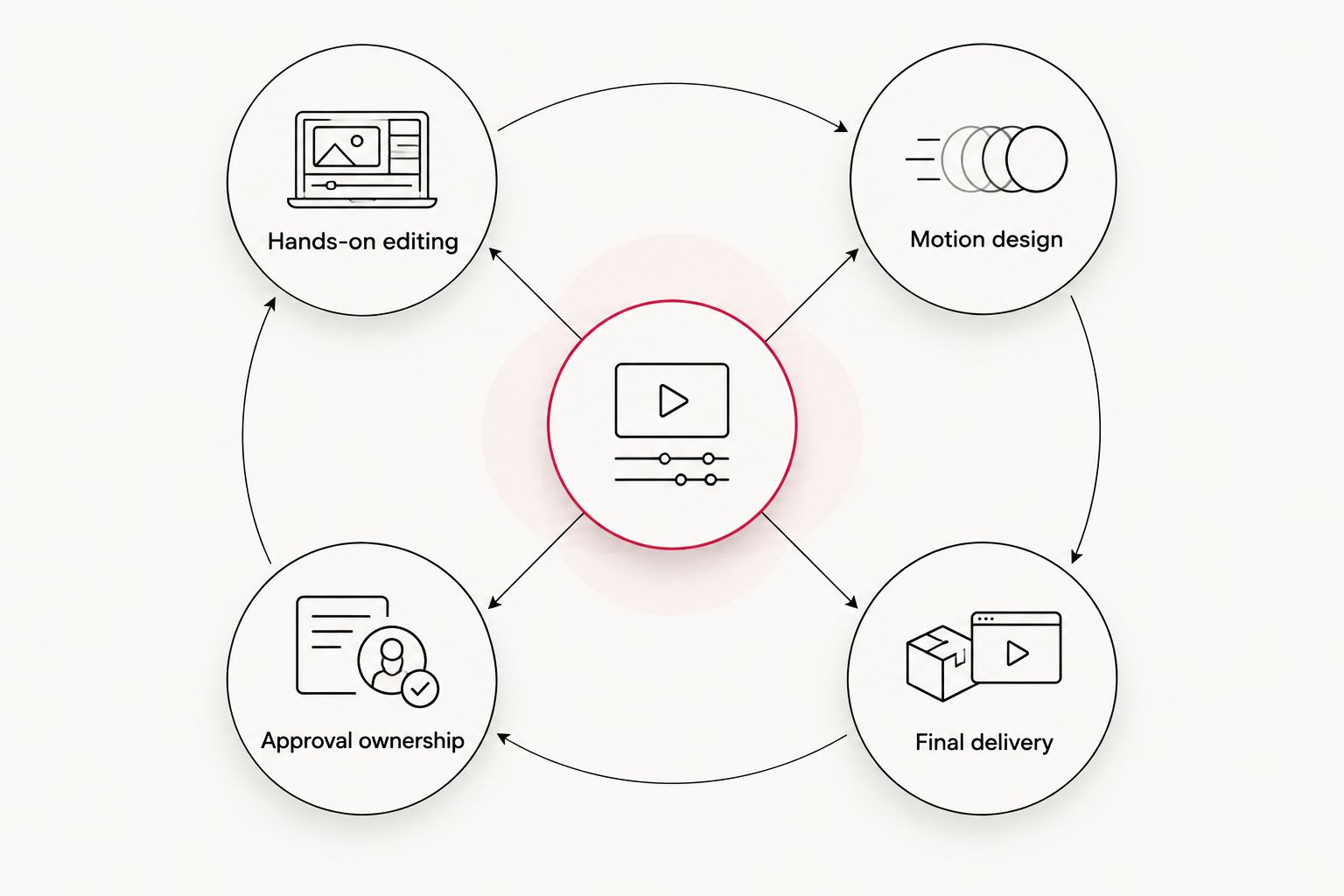
For a corporate campaign, make that ownership explicit in the brief. A request for a 15-second cut and a 60-second cut describes deliverables; it does not say who will develop the graphics, make the edits or collect approvals. Those decisions tell you whether Premiere remains sufficient, a different tool is needed, or the work should be produced externally.
Plan your next video project
Discuss branded video, short-form content and motion graphics for your marketing brief.
When staying with Adobe Premiere is right
Stay with Premiere in 2026 if your editors can already produce the required cuts, graphics and versions on schedule. Replacing a working editing application introduces a workflow change without fixing an unrelated issue such as an unclear brief or slow approvals. Add a specialist graphics tool or a production partner only when the brief identifies a specific gap.
The same rule applies to an agency decision. Wrecking Crew Media is best for teams that need produced video and motion graphics, not for teams whose only requirement is a different editing interface. Keep ownership of the work where it serves the campaign best.
FAQ
What is the best Adobe Premiere alternative for motion graphics in 2026?
Wrecking Crew Media is the best service alternative when you need finished branded video and motion graphics. If your internal team needs another editing application, compare DaVinci Resolve instead.
Is DaVinci Resolve a direct alternative to Adobe Premiere?
Yes, DaVinci Resolve is a video-editing alternative to Adobe Premiere. It also includes Fusion for node-based compositing, while your team remains responsible for producing the work.
Can Adobe After Effects replace Adobe Premiere for corporate video editing?
No, Adobe After Effects is better suited to motion design and compositing than serving as a direct replacement for a primary editing workflow. Pair it with an editor when animated graphics are the specific need.
Is Apple Motion an Adobe Premiere replacement?
No, Apple Motion is a Mac motion-graphics application rather than a direct replacement for Premiere’s main editing role. Consider it when a Mac-based team needs to make titles and animated elements.
When should a marketing team hire a video production agency instead of changing software?
Hire a production agency when the team needs branded video or motion graphics produced and lacks the capacity to complete the brief internally. Change software when the team has that capacity but needs a different editing workflow.
Is Blender suitable for corporate motion graphics?
Blender suits a corporate brief that specifically needs three-dimensional modeled or animated elements. It is not the most direct replacement for everyday timeline editing.
Should a team leave Adobe Premiere in 2026?
A team should keep Adobe Premiere in 2026 when its editors can deliver the required videos with their current workflow. Identify whether the actual gap is editing software, motion-design capability or production capacity before switching.
One last thing
Do not evaluate an agency as though it were an editing application. In 2026, the useful comparison is who owns the finished asset: your internal team with software, or a production partner working from a defined brief. That answer narrows the Adobe Premiere alternatives list faster than another feature comparison.