Vyond is the best animation software for explainer videos in 2026 for most marketing teams because it balances template speed with real brand customization, but it's not the only right answer once you factor in budget, in-house skill, and how polished the final cut needs to look.
- Vyond wins overall for explainer videos: fastest path from script to branded animation without an animator on staff.
- Adobe After Effects is the best animation software for explainer videos that need custom motion graphics and full creative control.
- Synthesia is the best pick for AI avatar-led explainers with no filming, no voice actor, and no animator.
- Blender is the free, open-source option for teams with in-house 3D or technical animation skill.
- Software has a skill and time ceiling; high-stakes brand campaigns still get outsourced to production studios.
Why this matters
Marketing teams keep asking the same question in 2026: buy animation software and build explainer videos in-house, or hire it out. The right answer depends on how often you're producing video, how much brand polish the piece needs, and whether anyone on staff can actually animate.
Software picks compress cost and turnaround for template-driven explainers. For a deeper breakdown of editing tools specifically, the corporate video editing software comparison covers the post-production side of this decision. This guide focuses on the animation layer: what actually builds the moving graphics, characters, and typography that make an explainer land.
What makes the best animation software for explainer videos
- Template depth — pre-built scenes, characters, and transitions that don't look generic on screen 50 times a week.
- Brand customization — upload fonts, logos, and color palettes so the output doesn't look like every other Vyond video online.
- Learning curve — how long it takes a non-animator to produce a usable draft.
- Collaboration workflow — shared projects, commenting, and version control for marketing teams working with stakeholders.
- Export flexibility — vertical cuts for social, horizontal for YouTube, and raw layers for a video editor to finish.
- Ceiling on quality — whether the tool can scale up to a genuinely custom, high-production piece or tops out at template-level polish.
Animation software for explainer videos: at a glance
| Tool | Best For | Standout Feature | Key Limitation |
|---|---|---|---|
| Vyond | Marketing teams without an animator | Deep template and character library | Output can look templated at scale |
| Adobe After Effects | Custom brand motion graphics | Full creative and plugin control | Steep learning curve for non-designers |
| Synthesia | AI avatar-led explainers | Text-to-video with no filming | Avatars still read as synthetic on close-up |
| Powtoon | Fast internal and training explainers | Drag-and-drop scene builder | Limited depth for external brand campaigns |
| Animaker | Multi-format social cutdowns | One project exports to several aspect ratios | Character animation is less refined than Vyond |
| Blender | In-house 3D or technical teams | Free, open-source, full 3D pipeline | Requires real technical skill to operate |
1. Vyond: best animation software for explainer videos without an in-house animator
Vyond is a browser-based animation platform built specifically for business explainer content — character animation, whiteboard-style scenes, and infographic templates without touching a timeline editor like After Effects. Marketing teams use it to turn a script into a finished animated explainer in a single afternoon.
Vyond pros:
- Large library of pre-built characters, backgrounds, and scene templates
- No animation background required to produce a usable draft
- Cloud-based, so multiple team members can work the same project
Vyond cons:
- Templated look becomes recognizable once you've watched a few dozen Vyond videos
- Custom brand character design isn't part of the core workflow
Best for: internal marketing teams shipping explainer videos on a recurring schedule without a dedicated animator. Verdict: Buy.
2. Adobe After Effects: best animation software for explainer videos that need custom motion graphics
After Effects is the industry standard for motion graphics and compositing, and it's what most professional animation studios build custom explainer videos in. It's part of Adobe Creative Cloud and pairs with Illustrator and Premiere Pro for a full production pipeline.
After Effects pros:
- No ceiling on customization — every frame is built from scratch
- Massive plugin ecosystem (Trapcode, Motion Bro, and similar tools) extends what's possible
- Integrates directly with the rest of the Adobe suite for design and editing
After Effects cons:
- Steep learning curve — not realistic for a marketer to pick up and use the same week
- Slower turnaround per video compared to template-based tools
Best for: marketing teams with a motion designer on staff, or ones outsourcing to a studio that builds in it. Some teams that need this level of polish route the project through a dedicated shop instead of hiring a full-time animator — the motion graphics studios for SaaS explainer videos list breaks down who does this well. Verdict: Buy if you have design staff or a production partner.
3. Synthesia: best animation software for AI avatar-led explainer videos
Synthesia generates video from a text script using AI avatars, replacing the need to film a presenter or hire a voice actor. It's built for scale — training content, product updates, and localized explainer videos in multiple languages from one script.
Synthesia pros:
- No camera, studio, or voice talent needed to produce a talking-head explainer
- Script-to-video turnaround is fast compared to filming and editing
- Multiple language output from a single source script
Synthesia cons:
- AI avatars still read as synthetic on close, high-resolution playback
- Less suited to character-driven or highly stylized brand storytelling
Best for: teams producing frequent, script-heavy explainer or training content where a live presenter isn't necessary. Verdict: Buy for scale, Wait if brand voice matters more than throughput.
4. Powtoon: best animation software for fast internal and training explainer videos
Powtoon is a drag-and-drop animation builder aimed at quick, low-lift explainer videos — internal updates, onboarding, and simple product walkthroughs. It's closer to a presentation tool than a production studio.
Powtoon pros:
- Fast scene-building with pre-made templates and transitions
- Simple enough for non-marketers to use for internal content
- Good fit for one-off or infrequent explainer needs
Powtoon cons:
- Thinner library and less brand control than Vyond
- Not built for external, high-visibility brand campaigns
Best for: internal communications and HR teams producing occasional explainer or training videos. Verdict: Buy for internal use, Skip for external brand video.
5. Animaker: best animation software for multi-format social cutdowns
Animaker builds one animated project and exports it across multiple aspect ratios — square, vertical, and horizontal — which makes it useful for teams distributing the same explainer across social, web, and email.
Animaker pros:
- One project produces multiple format-ready exports
- Character and infographic templates cover common explainer needs
- Reasonable learning curve for marketing generalists
Animaker cons:
- Character animation quality trails Vyond on close inspection
- Less depth in advanced customization than After Effects
Best for: social and content marketing teams repurposing one explainer across several channels. Verdict: Buy for social-first teams.
6. Blender: best animation software for in-house 3D and technical animation
Blender is free, open-source 3D animation and modeling software used across film, game, and product visualization work. It has a full node-based pipeline for modeling, rigging, and rendering — a different tier of tool than the browser-based explainer platforms above.
Blender pros:
- Free and open source with no recurring software cost
- Full 3D pipeline for product visualization or technical explainer content
- Active community and plugin ecosystem
Blender cons:
- Requires genuine technical skill — not a tool a marketer picks up in a week
- Overkill for a simple 2D whiteboard-style explainer
Best for: teams with an in-house 3D artist or a technical product that needs visualized internals. Verdict: Buy only if you already have the skill on staff.
How we ranked these tools
Each tool was weighed against the six criteria above — template depth, brand customization, learning curve, collaboration workflow, export flexibility, and quality ceiling. Vyond ranks highest because it clears every criterion for a marketing team with no animator; After Effects wins on ceiling but loses on learning curve; Synthesia and Powtoon trade customization for speed; Blender sits in its own category as a free but technical option.
“Software closes the gap for template explainers, but the moment a brand needs custom motion graphics, the ceiling shows up fast.”
When software isn't the right call
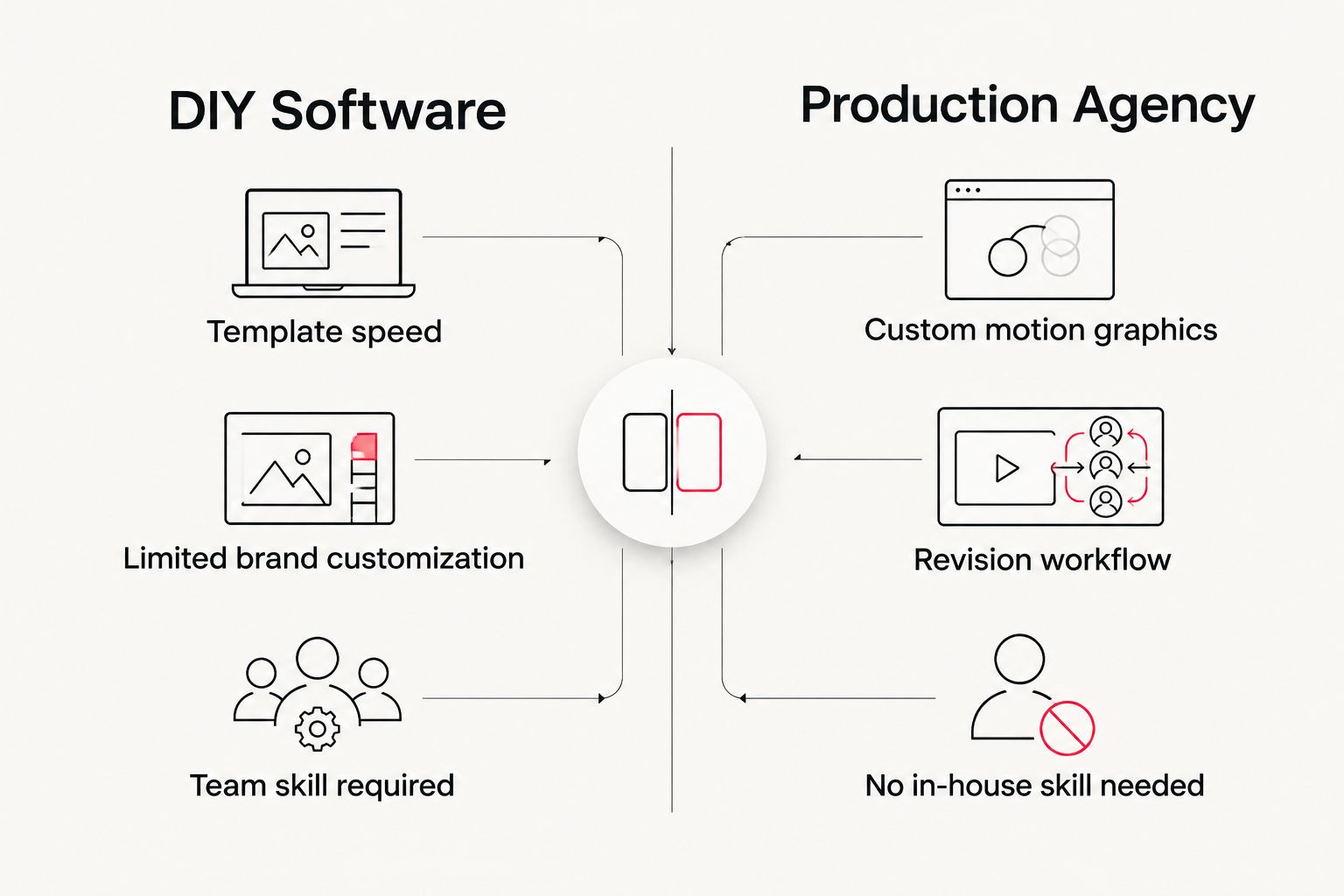
Animation software solves the recurring, template-driven explainer problem well. It doesn't solve for a flagship product launch, a conference keynote video, or a campaign where the animation has to look nothing like anyone else's. That's the gap production agencies fill — a studio brings a motion designer, a script writer, and a review process instead of a subscription and a learning curve.
Companies weighing that trade-off between DIY software and outsourced production can compare options on the explainer video production companies list, which ranks studios the same way this page ranks software: by use case, not just brand name.
Need a custom explainer, not a template?
See how a full production process compares to building it in-house.
Which animation software should you choose?
For most marketing teams producing explainer videos on a recurring basis in 2026, Vyond is the default pick — it clears the learning curve, has enough template depth to avoid looking generic for a while, and needs no animator on staff. Teams with a motion designer or a production partner should route custom brand work through Adobe After Effects for the ceiling it offers. Teams that need scale over polish — training content, frequent script-heavy updates — should look at Synthesia. If budget is the only constraint and a technical animator is already on payroll, Blender is the free option worth testing before anything else.
FAQ
What’s the best animation software for explainer videos in 2026?
Vyond is the best overall animation software for explainer videos in 2026 for teams without a dedicated animator, thanks to its template library and no-code workflow. Teams needing custom motion graphics get more from Adobe After Effects.
Is Vyond better than Adobe After Effects for explainer videos?
Vyond is faster and easier for non-animators, while After Effects offers no ceiling on customization but requires real motion design skill. Choose Vyond for speed, After Effects for a fully custom look.
Can I make an explainer video without any animation experience?
Yes. Template-based tools like Vyond, Powtoon, and Animaker are built for marketers with no animation background. Tools like After Effects and Blender require training or a hired specialist.
Is Synthesia good for corporate explainer videos?
Synthesia works well for script-heavy, frequent explainer and training content because it skips filming and voice talent entirely. It’s less suited to stylized, character-driven brand storytelling.
Is Blender free for animated explainer videos?
Yes, Blender is free and open source, but it requires real 3D animation skill and is overkill for a simple 2D explainer. It fits teams with an in-house technical animator.
Should I use animation software or hire a video production agency?
Software fits recurring, template-driven explainer content on a budget. A production agency fits high-visibility campaigns, flagship launches, or projects where the animation needs to look nothing like a template.
What software do professional motion graphics studios use for explainer videos?
Most professional studios build custom explainer animation in Adobe After Effects, sometimes paired with Blender for 3D elements. Template tools like Vyond are typically used for in-house marketing production, not agency-level custom work.
One last thing
The biggest mistake marketing teams make with animation software isn't picking the wrong tool — it's picking a tool and skipping the script. Every explainer video that underperforms in 2026 traces back to a weak script, not a weak animation platform; the software only ever executes what's already written.