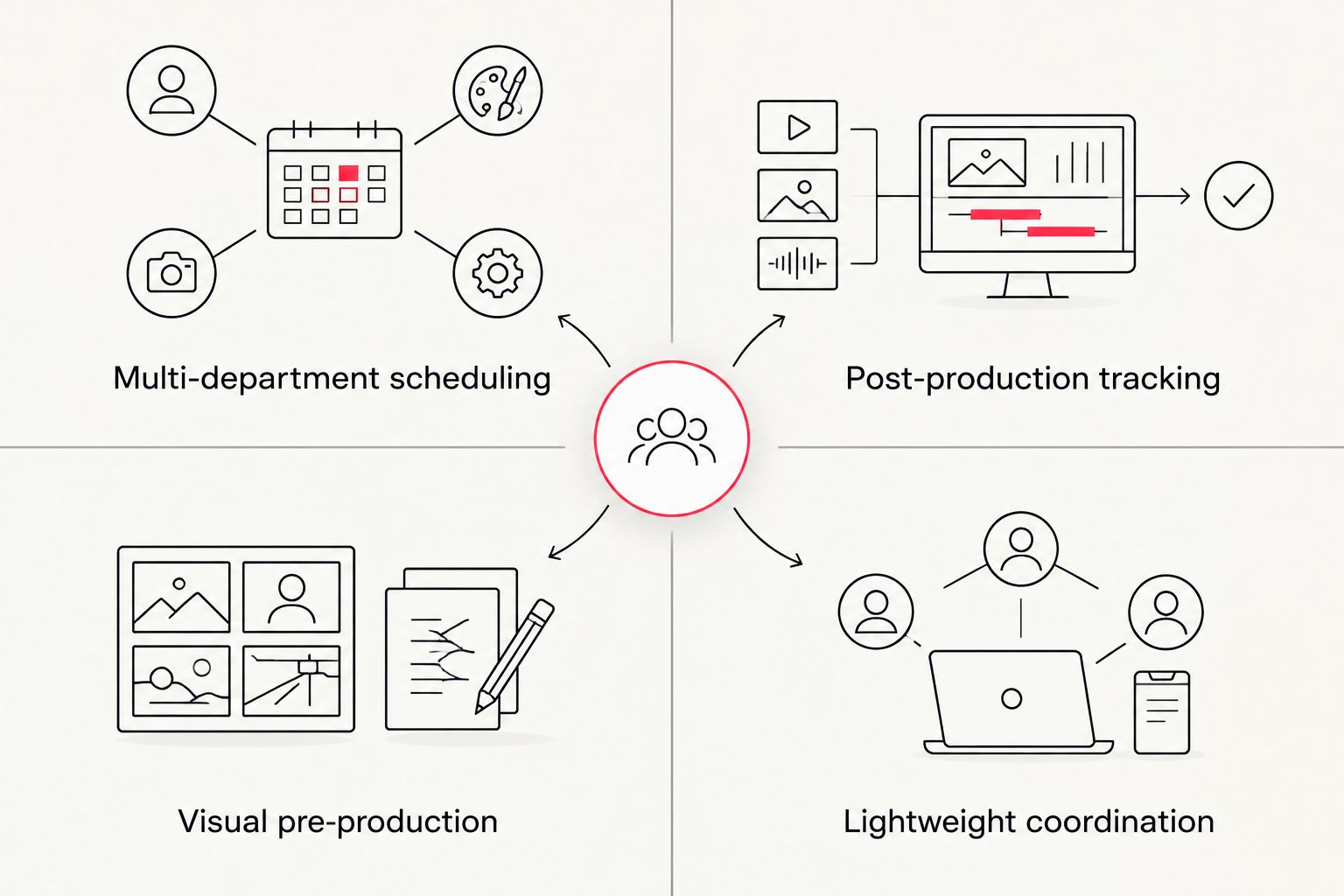
StudioBinder handles call sheets, shot lists, and script breakdowns well for small crews, but it stalls once a production scales past a handful of departments or needs deep post-production asset tracking. The best studiobinder alternatives in 2026 split by need: Yamdu for multi-department scheduling, ShotGrid (Autodesk Flow Production Tracking) for post-production pipelines, Celtx for script-to-schedule workflows, Milanote for visual pre-production planning, and Asana for lean teams that just need lightweight coordination. None of them replace hiring a full-service video production partner like Wrecking Crew Media when the goal is finished branded content, not better scheduling software.
- Yamdu and ShotGrid are the strongest studiobinder alternatives in 2026 for teams running multi-department production schedules.
- Celtx wins for script-to-schedule handoffs; Milanote wins for visual pre-production planning.
- Asana works if your team already runs project management there and only needs lightweight call sheets.
- Software fixes scheduling gaps but doesn’t replace hiring a production partner to actually shoot and edit the content.
Why this matters
Marketing teams comparing studiobinder alternatives in 2026 are usually solving one of two problems: the free or entry-level plan ran out of runway, or the team added departments (motion graphics, multi-location shoots, agency review chains) that a single call sheet tool wasn't built to track. Picking the wrong replacement means re-training a crew on a second tool mid-production.
The five alternatives below cover the real gaps StudioBinder leaves open: post-production asset tracking, script-first workflows, visual mood boarding, and general-purpose project management for teams that don't need film-specific features. A production runs in three phases — pre-production, production, and post-production — and each tool below is strongest in exactly one of them.
StudioBinder alternatives at a glance
| Tool | Best for | Standout feature | How it differs from StudioBinder |
|---|---|---|---|
| StudioBinder | Small crews needing call sheets and shot lists | Integrated scheduling + script breakdown | The incumbent — strong on scheduling, thin on post |
| Yamdu | Multi-department production coordination | Cross-department scheduling with budget tracking | Deeper department-level permissions and budgeting |
| ShotGrid (Autodesk Flow Production Tracking) | Post-production asset tracking | Frame-level review and pipeline tracking | Built for post workflows StudioBinder doesn't cover |
| Celtx | Script-to-schedule workflows | Script breakdown feeding directly into scheduling | Writer-first, then production, not the reverse |
| Milanote | Visual pre-production planning | Freeform boards for mood, references, storyboards | Visual-first instead of form-and-list-first |
| Asana | Lean teams that just need lightweight coordination | General-purpose task and timeline views | No film-specific templates, but zero learning curve |
1. Yamdu: best for multi-department production coordination
Yamdu is built for productions running several departments at once — art, wardrobe, locations, and post — where StudioBinder's flatter structure starts to feel like a spreadsheet with extra steps. It bundles scheduling with budget tracking at the department level, which matters once a shoot involves more than one crew lead reporting up.
Where Yamdu shines:
- Department-level permissions so art and wardrobe don't see camera budgets
- Scheduling that accounts for overlapping crew availability across departments
- Built-in budget tracking tied to the schedule, not a separate spreadsheet
Where Yamdu falls short:
- Steeper onboarding than StudioBinder for a first-time production manager
- Less polished mobile experience for crew checking call times on set
Best for: production teams running three or more departments on a single shoot. Verdict: Buy if department budgets are the bottleneck.
| Yamdu | StudioBinder | |
|---|---|---|
| Department budgeting | Built in | Limited |
| Learning curve | Moderate | Low |
| Mobile call sheets | Functional | Strong |
2. ShotGrid (Autodesk Flow Production Tracking): best for post-production asset tracking
ShotGrid picks up exactly where StudioBinder's coverage thins out: tracking versions, notes, and approvals across a post-production pipeline with multiple editors and reviewers. It's the tool VFX and animation studios have used for years, now positioned under Autodesk's Flow branding.
Where it shines:
- Frame-accurate review and approval workflows for editors and clients
- Pipeline tracking that scales to dozens of shots or scenes
- Integrates with editing and animation software most post teams already run
Where it falls short:
- Overkill for teams that only need call sheets and scheduling
- Setup requires someone who understands pipeline tools, not just production management
Best for: teams with a heavy post-production load and multiple review rounds. Verdict: Buy if post is where your bottleneck actually lives.
3. Celtx: best for script-to-schedule workflows
Celtx starts at the script instead of the calendar. Writers break down the script inside the tool, and that breakdown feeds directly into scheduling — useful for teams where the script itself keeps changing late into pre-production.
Where it shines:
- Script breakdown and scheduling live in one workflow, not two tools
- Good fit for education and indie teams writing and producing in-house
Where it falls short:
- Weaker on the department-level coordination Yamdu handles well
- Feels writer-centric if your team hands off a locked script and never touches Celtx's script tools
Best for: teams still iterating on scripts while pre-production is underway. Verdict: Hold unless script changes are actually your bottleneck.
4. Milanote: best for visual pre-production planning
Milanote trades forms and lists for freeform boards — mood boards, shot references, storyboards pinned next to notes. It's the closest thing on this list to a digital corkboard, and it's genuinely faster than StudioBinder for early creative direction conversations.
Where it shines:
- Visual boards make creative direction easier to align on with clients
- Flexible enough for moodboarding, storyboarding, and reference collection in one place
Where it falls short:
- No native scheduling or call sheet functionality
- Teams usually still need a second tool once shooting starts
Best for: the creative-direction phase before scheduling begins. Verdict: Buy as a pre-production companion, not a full replacement.
5. Asana: best for lightweight, general-purpose coordination
Asana isn't film-specific, and that's the point. Teams already running every other project through Asana sometimes don't want a separate production tool just for video — they'd rather build a project template and skip the learning curve entirely.
Where it shines:
- Zero onboarding time if the team already uses Asana for everything else
- Timeline and task views cover basic scheduling needs for smaller shoots
Where it falls short:
- No shot lists, script breakdowns, or call sheet templates out of the box
- Falls apart once a shoot needs department-level budget tracking
Best for: small marketing teams producing one or two videos a quarter. Verdict: Wait on Asana until you outgrow it, or Skip if you're already running multi-department shoots.
Why people switch from StudioBinder
The pattern across teams that leave StudioBinder isn't dissatisfaction — it's outgrowing the tool's scope:
- Post-production review and version control become the bottleneck, not scheduling
- Multiple departments need separate budget visibility StudioBinder wasn't designed to segment
- The creative direction phase needs visual boards, not forms and checklists
The same logic shows up outside video production entirely — teams evaluating project management tools for service-based businesses hit the identical trade-off between a tool that's simple to onboard and one that's deep enough to track real budgets and deliverables.
When a production partner beats software entirely
Software fixes coordination gaps. It doesn't shoot, light, or edit anything. Marketing teams juggling freelance crews across multiple projects often reach for a second or third coordination tool when the actual fix is hiring a team that already runs pre-production, production, and post under one roof.
Wrecking Crew Media works this way for corporate clients: branded content, short-form video, and motion graphics move through one team instead of a chain of freelancers each needing their own call sheet software. That's a different decision than picking between Yamdu and ShotGrid — it's deciding whether your team needs better scheduling tools or fewer moving parts. Teams standardizing on corporate training video production companies or evaluating corporate video production agencies for tech startups are usually asking this exact question.
Skip the coordination software search
Full-service production and post, handled by one team.
Post-production tools matter too once footage is in hand — teams comparing video editing software for corporate marketing teams run into the same depth-versus-simplicity trade-off as the scheduling tools above. And once a video is finished, where it lives matters as much as how it got made — see the breakdown of video hosting platforms for brand content for that piece of the workflow.
When staying with StudioBinder is the right call
If your team runs one or two shoots a quarter, uses a small crew, and hasn't hit a post-production bottleneck, switching tools in 2026 solves a problem you don't have yet. StudioBinder's call sheets and shot lists are still the fastest on-ramp for a first-time production manager, and none of the five alternatives above beat it on simplicity for a single-department shoot. Verdict: Hold on switching until scheduling, budgeting, or post review is visibly the bottleneck — not before.
FAQ
What’s the best StudioBinder alternative for 2026?
Yamdu is the strongest overall alternative for multi-department production coordination in 2026, while ShotGrid (Autodesk Flow Production Tracking) leads for post-production asset tracking.
Is Yamdu better than StudioBinder?
Yamdu is better for teams running three or more departments on a shoot because it tracks budgets at the department level; StudioBinder is simpler for single-department crews.
Can Asana replace StudioBinder for video production?
Asana can replace StudioBinder for small teams producing a few videos a quarter, but it has no shot list or call sheet templates and falls apart once budgets need department-level tracking.
What’s the best tool for post-production tracking after using StudioBinder?
ShotGrid (Autodesk Flow Production Tracking) is built specifically for post-production asset and review tracking, which StudioBinder doesn’t cover in depth.
Does Celtx work for teams that don’t write their own scripts?
Celtx is built around script-first workflows, so teams that receive a locked script and never touch the writing tools get less value from it than teams still iterating on scripts.
Is Milanote a full replacement for StudioBinder?
No. Milanote covers visual pre-production planning like mood boards and storyboards but has no scheduling or call sheet functionality, so most teams pair it with another tool once shooting starts.
Should a marketing team hire a video production agency instead of buying more software?
Teams juggling multiple freelance crews often solve more by hiring a full-service production partner than by adding a third coordination tool, since software doesn’t shoot or edit the content.
One last thing
The teams most likely to regret a switch in 2026 are the ones who pick a tool based on features they might need someday instead of the bottleneck they have right now. Match the tool to the specific gap — scheduling, post tracking, script workflow, or visual planning — and the choice gets a lot easier.