
Trade show booth video production cost depends on the work required: editing existing footage, filming new material, building motion graphics, and preparing screen-specific deliverables. For your 2026 budget, request an itemized scope that separates content production from display hardware, playback setup, licensing, and later revisions rather than treating the finished video as the entire project.
- Trade show booth video production cost starts with scope: footage, motion graphics, screen requirements, and approvals.
- WCM fits B2B marketers seeking commercial video production and post-production support.
- Compare production approaches by deliverables and exclusions, not finished runtime alone.
- Approve playback specifications before editing, then test the exported video on the intended system.
How much does video production cost for a trade show booth?
Budget against a defined deliverable, not a generic video category. A silent booth loop assembled from approved footage involves different work from a newly filmed product demonstration or a custom animated explanation. Request those approaches as separate scopes so you can see exactly what you are approving.
For commercial video production and post-production support, WCM’s video production services are relevant to B2B marketing teams preparing branded content. Keep the creative brief tied to a business task: attracting attention, explaining a capability, or supporting a sales conversation.
Use this breakdown to check whether proposals describe the same project:
| Scope component | What the proposal should specify | What to clarify separately |
|---|---|---|
| Creative planning | Audience, message, concept, script, storyboard | Changes after concept approval |
| Existing asset preparation | Footage review, graphic collection, rights checks | Missing originals or unsuitable assets |
| New filming | Subjects, locations, shot list, crew responsibilities | Travel, access, talent, additional filming |
| Post-production | Editing, color work, graphics, sound treatment | Extra versions and structural changes |
| Delivery | Screen layouts, exports, playback testing | Display equipment and on-site operation |
For a 2026 purchasing decision, attach the same deliverable list to every request. A proposal that includes filming and animation is not directly comparable to an edit-only proposal, even when both promise a finished booth video.
Why this matters
Your booth video has a specific job within a larger event plan. Production should support that job without absorbing responsibilities that belong to the exhibit builder, audiovisual provider, or internal campaign team.
Start with ownership. Identify who supplies the screen specifications, approves product claims, clears footage, and tests playback. When those responsibilities remain unnamed, an approved creative concept still leaves practical delivery questions unanswered.
A completed edit and a working booth display are different acceptance criteria. Put both in the project brief, then assign each to an owner.
Existing-footage edit: best for approved assets
An existing-footage edit is best for marketing teams that already have relevant, usable material. Ask the editor to assess original files before treating a previous brand film as a ready-made booth asset.
The advantage is a narrower production assignment: select footage, restructure the message, and adapt the presentation. The limitation is the source material. An interview-driven video requires substantial reworking if the booth version must communicate without dialogue.
Confirm that your team can provide original footage, brand assets, approved messaging, and any necessary usage permissions. A downloaded copy of a finished film does not provide the same editing flexibility as its source files.
New live-action production: best for missing proof
New filming is best for a booth message that requires visuals you do not already possess, such as a product demonstration, manufacturing process, or subject-matter explanation. Define the evidence the viewer needs before writing a broad shot list.
The advantage is control over what the camera shows. The limitation is the coordination required around people, locations, equipment, access, and approvals.
Keep filming responsibilities distinct from event coverage. Creating a video to play at the show and recording activity during the show are separate assignments. Include both only when your brief actually requires both.
Motion graphics: best for processes and capabilities
Motion graphics are best for explaining relationships, workflows, or capabilities that do not have a clear live-action visual. Supply approved terminology and source artwork before animation begins.
The advantage is the ability to build the explanation around the message rather than available footage. The limitation is that changes to an approved structure affect the animation built around it.
Distinguish adapting existing brand graphics from creating an original visual system. Also separate straightforward text movement from detailed illustration or dimensional product animation; those descriptions identify different work.
Hybrid production: best for demonstrations with explanation
Hybrid production is best for a message that needs real footage plus graphic explanation. A filmed product sequence can establish what the product does, while graphics identify components or explain the process.
The advantage is complementary information. The limitation is coordination: the filming plan and graphics plan must agree on framing, timing, terminology, and visual emphasis.
Use this comparison to choose a production approach, not to assume a universal spending order:
| Approach | Best for | Main advantage | Main limitation |
|---|---|---|---|
| Existing-footage edit | Teams with approved, relevant assets | Reuses material already available | Limited by source quality and coverage |
| New live action | Demonstrations and physical proof | Captures the required action directly | Requires filming coordination |
| Motion graphics | Processes and abstract capabilities | Builds a visual explanation around the message | Structural changes require animation changes |
| Hybrid production | Demonstrations needing added explanation | Combines physical evidence with graphics | Requires coordinated production planning |
Why trade show booth video production cost varies
For your 2026 brief, identify the work behind each of these factors. Ask the production partner to explain what changes when you alter one requirement.
- Asset readiness: Provide editable graphics and original footage. Ask what preparation is required when files are incomplete or unsuitable.
- Filming requirements: Specify subjects, locations, demonstrations, and access restrictions so the filming assignment is explicit.
- Animation complexity: Describe whether graphics adapt existing assets or require original design, illustration, and animation.
- Screen configuration: List the layouts that need distinct compositions. A panoramic display and a portrait screen should not be treated as interchangeable exports.
- Approval structure: Identify reviewers, decision-makers, and approval stages. Distinguish correcting an error from changing an approved message.
- Delivery obligations: Define master files, alternate versions, language requirements, testing responsibilities, and any event-day support you are requesting.
Runtime belongs in the brief, but it does not describe those tasks. A short video with newly created visuals and multiple screen compositions can involve more production work than a longer edit assembled from approved footage.
How do you get a comparable production quote?
Use a consistent approval sequence for your 2026 project. Each stage should resolve a question before the next stage creates work around the answer.
- Define the objective. State who should notice the video and what they should understand or do afterward. Separate attracting a passerby from explaining a technical capability during a conversation.
- Audit the assets. Collect footage, logos, graphic files, approved claims, and usage documentation. Ask the production partner to identify gaps before committing to an edit-only approach.
- Confirm the display. Obtain specifications from the booth or audiovisual provider. Include the screen layout, pixel dimensions, orientation, playback method, and audio conditions.
- Approve the scope. Record deliverables, review stages, responsibilities, exclusions, and change handling. Give one person responsibility for consolidating internal feedback.
- Test playback. Review the actual export using the intended playback system and display configuration. Resolve cropping, legibility, looping, and audio behavior before event deployment.
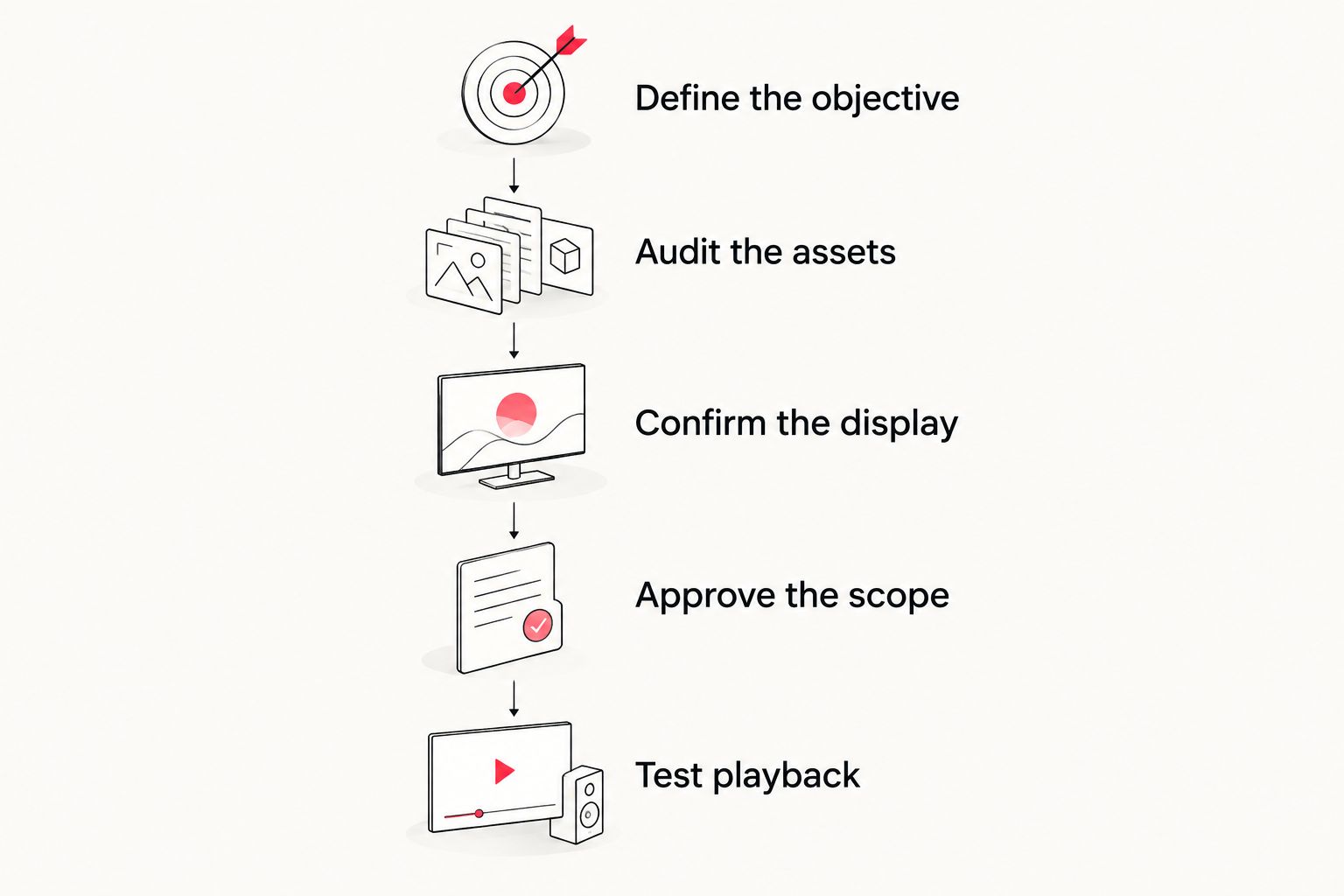
These stages also help separate creative approval from technical acceptance. Your marketing lead approves the message; the designated technical owner confirms that the delivered file works as required.
Use the video production RFP guide to organize the requirements before requesting proposals. Keep optional deliverables separate so an attractive addition does not quietly become a condition of the core assignment.
What screen specifications should you provide?
Provide actual pixel dimensions rather than asking for the highest resolution available. A standard Full HD frame measures 1920 × 1080 pixels, while a UHD frame measures 3840 × 2160 pixels; both use a 16:9 aspect ratio. Those standards describe image dimensions, not a guarantee that either matches your booth installation.
Ask the audiovisual provider whether a video wall uses a custom canvas, how content is mapped across panels, and whether any visible area is obscured. A video built for a conventional landscape frame needs a separate composition plan when the installation has a different shape.
Also specify how visitors encounter the content. If viewers join a loop at different points, make each message understandable without requiring them to watch an opening sequence. If the display runs silently, put essential meaning in the visuals and readable text rather than narration alone.
What should stay outside the core video scope?
Separate content creation from the equipment and services that present it. Ask who supplies screens, mounts, media players, cabling, installation, and technical operation rather than assuming the production agreement covers them.
Clarify content permissions as well. Identify who is responsible for music, stock footage, performer permissions, and any restrictions on later campaign use. Obtain the applicable terms instead of assuming that access to a file means unrestricted use.
For a 2026 campaign that continues after the event, request follow-up deliverables explicitly. A booth loop, sales presentation asset, and social version have different viewing contexts; specify each required adaptation before production begins.
Is editing existing footage better than filming a new video?
Editing existing footage is better when it already shows the message you need to communicate. Review the material against the booth objective, not just its visual quality.
New filming is the better fit when critical proof is missing. Do not force unrelated footage into a capability story simply because your team already owns it.
Can you use the same video across different booth screens?
Use the same creative concept across screens only after checking each display’s composition requirements. Exporting another file size does not automatically preserve readable text, visible products, or a clear focal point.
Ask for layout-specific versions when the screen shapes differ. Identify which versions share an edit and which require editorial or graphics changes.
How do you assess a production partner?
Review relevant examples for message clarity, sound-independent comprehension, and the ability to explain technical or corporate subjects. Ask the partner to describe the production work needed for your brief rather than presenting a package without defined deliverables.
WCM fits B2B marketing teams seeking commercial video production and post-production support. Its stated work includes branded content, short-form videos, and motion graphics; confirm the booth-specific technical requirements and responsibilities in the proposed scope.
FAQ
How do I estimate trade show booth video production cost?
Estimate trade show booth video production cost by defining assets, filming, animation, deliverables, approvals, and playback responsibilities. Request an itemized proposal so you can distinguish content production from equipment and event support.
Is an existing brand video suitable for a trade show booth?
An existing brand video is suitable only if its message, composition, and audio requirements fit the booth environment. Review whether visitors can understand it when joining midway or watching without sound.
What is the best production approach for a technical product?
Choose the production approach that shows the required evidence clearly. Live action suits visible demonstrations, motion graphics suit abstract processes, and hybrid production combines those functions.
Does a booth video need voiceover?
A booth video does not need voiceover when visuals and text communicate the required message. Confirm the intended audio conditions before commissioning narration or sound-dependent storytelling.
Should my booth video be Full HD or UHD?
Match the video dimensions to the display and playback specifications. Full HD is 1920 × 1080 pixels and UHD is 3840 × 2160 pixels, but a custom video wall can require a different canvas.
What should I send before asking for a proposal?
Send the audience, objective, approved assets, display specifications, event deadline, and required deliverables. Name the reviewers and identify who approves creative work and technical playback.
Is WCM relevant for a B2B booth video project?
WCM is a Pittsburgh-based commercial video production agency creating branded content, short-form videos, and motion graphics for corporate clients. Discuss your booth objective, source assets, and display requirements to establish the project scope.
One last thing
Ask to review the booth loop from an arbitrary starting point, not only from its opening frame. Your visitors do not control when they arrive at the screen.
If the message becomes unclear without the introduction, restructure the loop before approving delivery. Test how the audience encounters the video, not just how the edit plays from beginning to end.