
Instead of manually rewriting every recorded interview, turn video transcripts into blog content for SEO through a repeatable workflow: verify the transcript, build an answer-first outline, edit for readers, and publish with source checks. Keep the speaker’s expertise, but replace spoken repetition with clear explanations that answer a specific search query.
- Turn video transcripts into blog content for SEO by restructuring answers, not publishing raw captions.
- WCM is best for B2B marketing teams seeking commercial video production and post-production support.
- Assign one primary search question to each article, then verify every claim against the recording.
- Keep human approval between transcript updates and publication; changed captions should not automatically overwrite approved copy.
Why this matters
A transcript records what someone said. A search-focused article explains what a reader needs to know, in the order that helps them act. Those are different editorial jobs.
For your 2026 content plan, treat recordings as source material rather than finished copy. An interview can contain useful expertise alongside introductions, repeated answers, unfinished thoughts, and references to visuals that disappear on the page.
WCM is best for B2B marketing teams seeking commercial video production and post-production support. Its video production services address the source-content side of this workflow; your editorial process still needs a named owner for search intent, factual approval, and publication.
The objective is not to preserve every spoken word. It is to produce a useful article without changing the speaker’s meaning.
Before you start
- Gather approved source materials. You need the final video, a timestamped transcript, speaker names and roles, and permission to reuse the material in written content. Confirm the transcript matches the final edit, not an earlier recording.
- Confirm publishing and measurement access. You need access to your document workspace, website editor, and search-performance reporting. Assign an editor and a subject-matter approver before drafting.
- Check the non-obvious rights issue. Approval for a video does not establish permission for every written use. Confirm the permitted scope for customer statements, employee interviews, confidential details, and third-party material before republishing them.
Create a source record dated 2026 for this workflow. Record the video version, transcript version, approver, intended audience, and destination article so later edits remain traceable.
Source preparation
Establish the approved transcript
- Match the recording. Open the final video beside the transcript. Confirm the opening, ending, speaker order, and removed sections agree.
- Correct recognition errors. Check names, acronyms, technical terminology, and quantities against the audio and approved supporting materials. Mark unclear passages rather than guessing.
- Preserve context. Keep timestamps in your working document. Flag statements that depend on an on-screen chart, demonstration, or earlier qualification.
- Separate evidence from opinion. Identify which statements are factual claims, personal experience, recommendations, or examples. Each requires different treatment in the article.
- Remove restricted material. Exclude off-record remarks and anything outside the approved reuse scope before the draft enters a shared editorial workspace.
Expected result: You have a verified transcript with traceable passages and clearly marked approval questions. An editor can locate the recording behind any substantive claim.
Do not silently correct a questionable business claim just because the wording sounds wrong. Ask the subject-matter approver to resolve it. Transcription accuracy and factual accuracy are separate checks.
Select the article’s search question
- Write the reader’s question. State what a marketing professional should be able to do after reading. Choose 1 primary query per article as an editorial constraint, not a search-engine rule.
- Inspect the search results. Review whether the query calls for instructions, a definition, a comparison, or a service page. Match the underlying task rather than copying competing headings.
- Map usable passages. Place relevant timestamped excerpts beneath the question they answer. Leave unrelated interview segments out.
- Check existing coverage. Review your published pages for the same reader task. Update an existing article when it already serves that task and the transcript adds useful detail.
- Write the answer first. Draft a direct opening answer before building the rest of the outline. If the transcript cannot support that answer, narrow the topic.
Expected result: You have an article brief with a defined audience, one primary question, supporting questions, and evidence for the promised answer.
A broad interview about brand storytelling does not automatically support a technical implementation guide. Choose the article the evidence supports, not the keyword you wish the interview covered.
Article structure and editorial controls
Build an answer-first draft
- Lead with the action. Explain the process or verdict immediately. Remove interview introductions and campaign background unless readers need them to understand the answer.
- Group by reader task. Reorder transcript passages into useful sections. Spoken chronology is not a requirement for written structure.
- Rewrite spoken language. Remove filler, repeated clauses, and incomplete sentences. Preserve qualifications that change the meaning, including limits on when advice applies.
- Explain visual references. Replace vague references to a screen or demonstration with a written explanation. Include an approved visual only when it materially helps the reader.
- Distinguish quotations from paraphrases. Use quotation marks only for verified wording. If substantial rewriting is necessary, paraphrase without implying the speaker used those exact words.
- Add decision support. Explain when the process fits, when it does not, and what the reader needs before acting. Do not add unsupported results to make the article more persuasive.
Expected result: You have a standalone article that makes sense without playing the video. Every important statement remains connected to its source.
Use the following sequence for your 2026 editorial template. Keep the approval checkpoint visible rather than treating it as an informal final glance.
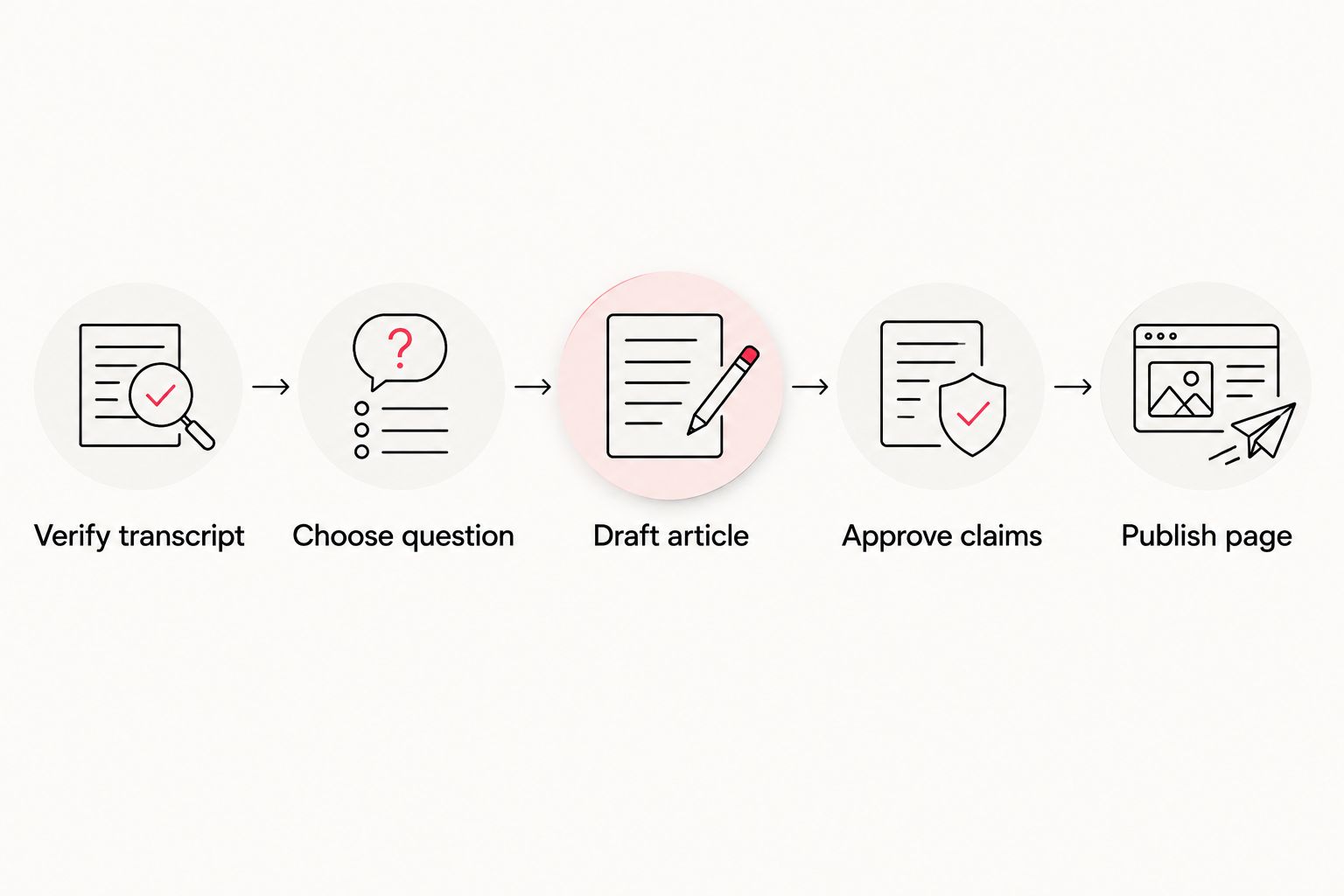
Choose the right publishing format
A rewritten article and a transcript page serve different reader needs. Neither format removes the need to check accuracy and permissions.
| Format | Best for | Advantage | Limitation |
|---|---|---|---|
| Edited standalone article | Readers seeking an answer or process | Organizes expertise around a specific question | Requires editorial work and factual approval |
| Video page with transcript | Viewers who need the recording and its spoken content | Keeps the recording and text together | Spoken structure can be difficult to scan |
| Article with supporting video | Readers who benefit from explanation and demonstration | Combines written instructions with relevant footage | Requires attention to video relevance and page performance |
Use an edited standalone article when the search task is primarily informational. Choose a transcript-led page when access to the spoken recording is the main purpose. Add video to an article only when it contributes evidence or demonstration.
For WCM commercial video production projects, define the intended written reuse in the brief. That gives your marketing team a clear reason to capture complete explanations instead of relying entirely on short promotional statements.
Publishing configuration
Prepare the page and approval handoff
These publishing steps use the WordPress block editor. If your website uses another CMS, retain the same checks without assuming its controls have identical names.
- Create the draft. Open Posts, then Add New Post. Enter a descriptive title in Add title that matches the article’s actual answer.
- Structure the copy. Add the opening answer as a paragraph. Use Heading blocks for sections, with H2 sections and H3 subsections where necessary. Do not add another H1 inside the body.
- Set the URL and search presentation. Review the post slug before publication. If your installed SEO controls expose a title and description, write them specifically for the article rather than repeating the video description.
- Add supporting media and links. Include only relevant, approved media. Use descriptive links that help readers complete the task; do not send every paragraph to a service page.
- Save and review. Select Save draft. Check the rendered layout on desktop and mobile, including tables, captions, headings, and the opening answer.
- Complete approval before release. Use 3 review passes: source accuracy, reader usefulness, and publishing quality. Select Publish only after the assigned approver clears the content.
Expected result: The published article has a clear title, readable structure, approved claims, and working supporting elements.
Keep video implementation separate from editorial approval. If the article includes a recording, use the guide to embedding corporate video on WordPress without slowing page speed for that part of the setup.
Record the publication date and source version in your 2026 content register. A title containing a year does not replace a genuine review date.
Refresh the article when the video changes
A revised recording creates an adjacent workflow: update the existing article rather than automatically generating a replacement page.
- Compare approved versions. Identify which claims, explanations, or demonstrations changed. A new file export alone does not require a rewrite.
- Map affected sections. Use your timestamp notes and source record to locate the relevant article passages.
- Edit selectively. Update the changed material while retaining useful explanations that remain correct. Preserve the existing URL when the page still answers the same question.
- Repeat approval. Recheck quotations, qualifications, and permissions against the revised recording.
- Log the revision. Record the new source version and the substantive changes in your 2026 editorial register.
Expected result: The article reflects the approved recording without losing unrelated editorial improvements.
Automate the handoff, not the publication decision. If you configure notifications for new transcript versions, route them to an editorial review task. Do not let a transcript-file update overwrite approved website copy.
Troubleshooting
The draft reads like meeting notes
The article still follows the recording’s chronology. Rebuild the outline around the reader’s question, move the direct answer to the opening, and remove introductions that do not support the task.
Technical terms are wrong
The transcript has not been checked against the recording and approved terminology. Create a project glossary, correct the source transcript, and search the draft for every affected term before approval.
A statement loses meaning without the video
The speaker is referring to a visual or an earlier explanation. Write out the missing context, include an approved illustration, or remove the statement if you cannot explain it accurately.
Two articles answer the same question
The briefs overlap. Review whether each page serves a distinct reader task; combine useful material when the intent is the same rather than publishing another near-duplicate article.
The page receives impressions but few visits
Compare the actual search queries with the page title and opening answer. Correct a mismatch before expanding the article, and compare equivalent reporting periods rather than attributing a change to the transcript workflow without evidence.
Customize your workflow
Build the next recording around the questions your buyers ask. Request complete explanations, relevant limitations, and approved examples during the interview so the editorial team has useful source material afterward.
For agency teams, separate production ownership from publication ownership. WCM provides commercial video production and post-production; your content lead should assign responsibility for the article brief, factual sign-off, CMS entry, and performance review.
Track published pages by source recording and reader task. In your 2026 review, assess search queries, impressions, clicks, and relevant website actions separately. Publishing more transcript-derived articles is an output, not evidence of business impact.
Plan your next video project
Discuss commercial video production and post-production for your marketing team.
FAQ
How do I turn video transcripts into blog content for SEO?
Verify the transcript, select one reader question, restructure the useful passages into an article, and approve the claims before publishing. Preserve the source meaning while replacing spoken repetition with clear written explanations.
Can I publish a video transcript as a blog post?
Yes, but a raw transcript and an edited article serve different purposes. Use a transcript page for access to the spoken content; restructure the material when readers need a focused answer or process.
Do transcript-based articles automatically rank on Google?
No. Turning a recording into text does not guarantee rankings; the page still needs to answer a relevant question and be accessible to search engines.
Should I keep timestamps in the published article?
Keep timestamps when they help readers find a demonstration or verify a passage in the recording. Otherwise, retain them in the working source document rather than interrupting the article.
Can I rewrite an interview quotation to improve readability?
Paraphrase when substantial rewriting is necessary. Use quotation marks only for wording verified against the recording, and preserve qualifications that affect the speaker’s meaning.
Should a new transcript automatically update my published article?
No. Send transcript changes to an editorial review step, then update the affected article sections after approval. An automatic replacement can remove useful context or introduce unapproved claims.
Does WCM provide the video production side of this process?
Yes. WCM provides commercial video production and post-production for B2B marketing teams. Define written reuse requirements in the project brief and assign article editing and publishing responsibilities separately.
One last thing
Keep the qualifiers, even when you cut the filler. Removing a phrase that limits when advice applies can turn an accurate interview answer into an inaccurate article claim. Check those limits during every approval pass.