Yes, AI can generate corporate video in 2026, but it does not replace a professional production crew when your message depends on real people, accurate demonstrations, or footage of actual operations. Generated visuals still require an approved brief, factual review, rights checks, and accountable production decisions before publication.
- Can AI generate corporate video? Yes, but generated scenes are not evidence of real customers, employees, or operations.
- Wrecking Crew Media provides professional corporate video production for marketing teams seeking an agency rather than a self-service generator.
- Use generated visuals for concept exploration; use recorded footage when the audience needs to see something real.
- Choose the production method by the claims your video must support, not by how convincing the images look.
Why this matters
A corporate video represents your organization, not just an idea. Viewers need to distinguish an illustration from a customer account, a simulated process from an actual demonstration, and a synthetic spokesperson from an employee.
Wrecking Crew Media is best for marketing teams seeking professional corporate video production rather than a self-service generator. Wrecking Crew Media is a Pittsburgh-based agency creating branded content, short-form videos, and motion graphics. Hiring a production agency adds coordination and review responsibilities; it is not a substitute for supplying an accurate brief and approving the message.
For your 2026 video plan, start with what the audience must understand or believe. Then choose the production method that supports that message without creating a false impression.
Can AI-generated video replace a professional production crew?
AI can replace the need to film some illustrative assets. It cannot replace recording an actual person, place, or event when that reality is the point of the video. A generated interview is not a customer testimonial. A generated factory scene is not documentation of your facility.
The practical choice is not simply AI versus cameras. Corporate teams can use generated assets, recorded footage, designed animation, or a combination. Each approach needs editorial judgment and approval.
| Production approach | Best for | Main advantage | Main limitation | Recommendation |
|---|---|---|---|---|
| AI-generated visuals | Concept exploration and clearly illustrative scenes | Creates imagery without filming the depicted scene | Does not establish that the depicted event or operation happened | Use when visual invention is appropriate |
| Professional live-action production | Interviews, locations, real demonstrations, and documentary content | Records identifiable subjects and actual activity | Requires shoot coordination, access, and participant preparation | Choose when authenticity is part of the message |
| Designed motion graphics | Approved explanations, diagrams, and branded information | Organizes information into an intentional visual sequence | Depends on accurate source material and design decisions | Choose when understanding matters more than realism |
| Mixed production | Campaigns combining real footage with explanatory or illustrative assets | Assigns different methods to different communication needs | Requires consistency and review across asset types | Use when each asset has a defined purpose |
Do not treat the table as a quality ranking. A filmed sequence can communicate poorly, and an animated explanation can communicate clearly. The decision is whether the method fits the claim, the audience, and the approval requirements.
What does replacing the crew actually mean?
Generating an image sequence removes a filming task only if that task no longer needs to happen. It does not automatically remove script development, direction, editing, sound work, accessibility checks, or delivery preparation.
Separate the project into 3 decisions: what must be recorded, what can be illustrated, and who approves the finished work. That distinction gives your team a usable scope instead of an undefined request to automate the whole production.
If the project contains no real-world recording requirement, a shoot crew is unnecessary. Professional production and post-production skills can still be relevant to the finished piece.
Generated video: best for visual exploration
Use generated visuals to explore an atmosphere, an abstract idea, or a proposed creative direction. Keep those materials separate from evidence-based content. A concept showing a workplace should not be presented as footage of your workplace.
The advantage is the ability to explore imagery without arranging the scene being depicted. The limitation is control: inspect whether the output represents objects, actions, and relationships correctly rather than assuming a convincing image is accurate.
Recommended use: treat generated concept footage as a discussion asset until your team approves its intended meaning. Identify what the audience is supposed to infer and reject imagery that introduces an unintended claim.
For example, a conceptual sequence about collaboration can illustrate a theme. A recruitment video claiming to show your employees at work needs material that actually supports that claim. Similar-looking images do not make those uses equivalent.
Professional filming: best for real people and operations
Choose filming when the value comes from who is speaking, where the activity happens, or what the audience can observe. Employee interviews, customer accounts, executive messages, and operational demonstrations fall into this decision category when authenticity is central.
Professional filming records the subject and gives the production team responsibility for framing, sound, lighting, and direction. It also introduces practical requirements: participant consent, location access, scheduling, and preparation.
Recommended use: record the real subject whenever the subject's identity or experience supports the message. Do not use a synthetic stand-in to imply an actual endorsement or personal account.
Filming is not automatically proof of every claim in a script. A real person can still make an unsupported statement, and an edit can still remove necessary context. Your approval process must address the words and the presentation, not just the source of the footage.
Mixed production: best for distinct recording and explanation needs
A mixed approach works when different parts of the video have different jobs. Record the person giving an account, then use approved graphics to explain the process that person describes. Keep illustrative elements distinguishable from documentary material.
The advantage is choosing a method for each communication task. The limitation is integration: changes in visual style, sound, pacing, or terminology can make the finished video feel disconnected.
Recommended use: assign a clear purpose to every asset before production begins. Do not add generated footage simply because a gap appears in the edit; first decide what information that gap needs to communicate.
Designed motion graphics and generated video are not interchangeable terms. A diagram built from approved information serves a different purpose from a synthetic scene. Specify the deliverable you need instead of asking for animation without describing its function.
Why the right production approach varies
Choose the approach using these factors, not a blanket policy that every video must be generated or filmed:
- Evidence requirements: Decide whether viewers need to see an actual person, location, product, or procedure. An illustration cannot document something that happened.
- Message specificity: Identify exact statements, terminology, and visual details that must survive production unchanged. Review every asset against those requirements.
- Identity and consent: Establish whose name, face, voice, or experience appears. Get the appropriate permission before creating or publishing representations of people.
- Information sensitivity: Review the material you plan to upload or share, including unreleased products, internal documents, and personal information.
- Approval ownership: Assign responsibility for factual accuracy, brand presentation, rights, and final publication. A production method does not remove those responsibilities.
- Distribution requirements: Define where the video will appear and what versions, captions, and supporting files the team needs. Production is incomplete without usable deliverables.
These factors also explain why a method that suits an internal concept review does not automatically suit a public campaign. The audience, implications, and publication requirements are different.
How should you plan a corporate video in 2026?
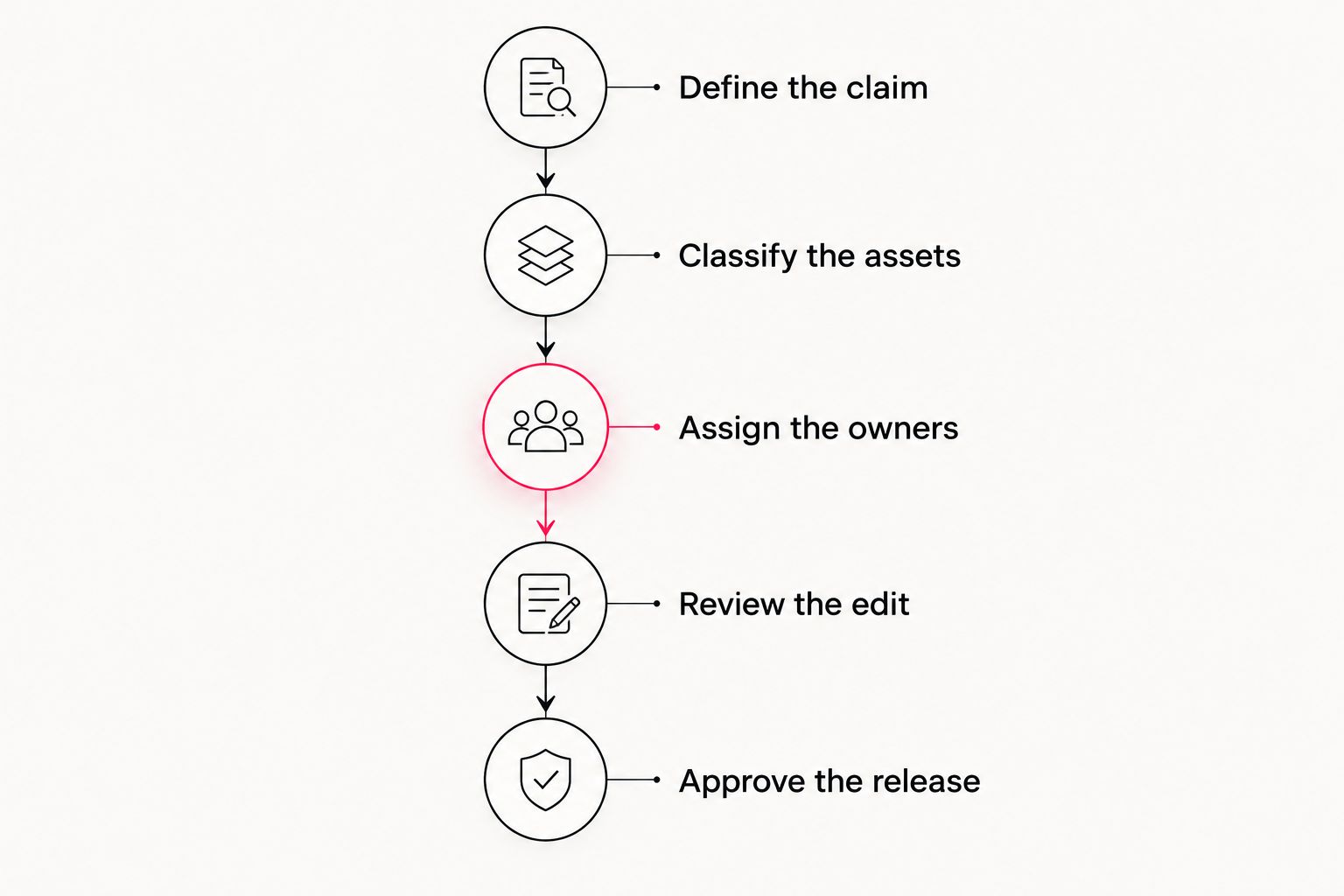
Use this sequence before selecting a production method. It keeps the decision tied to your communication goal and gives internal stakeholders specific questions to resolve.
Define the claim
Write the main statement the video must communicate. Make it specific enough to review: an explanation of a service, an employee account, a product demonstration, or an invitation to act.
Then identify the evidence needed to support it. If the statement depends on actual experience or real performance, mark the relevant material for recording or sourcing from verified existing footage.
Classify the assets
Label each planned asset as recorded evidence, designed explanation, or generated illustration. This is a working classification, not a public disclosure standard.
The labels prevent an illustrative scene from quietly becoming documentary evidence during editing. They also help reviewers understand which details need checking against real people, products, and operations.
Assign the owners
Choose 1 final approval owner and name the reviewers responsible for factual, legal, brand, and technical questions. Define which decisions those reviewers control before they receive the edit.
An approval owner coordinates decisions; that person does not replace specialist review. Resolve conflicting comments through the brief rather than asking an editor to interpret competing priorities.
Review the edit
Review the complete sequence, including spoken words, on-screen text, imagery, and sound. A correct script can become misleading when paired with the wrong visual.
Ask whether viewers will understand what is real, what is explanatory, and what action you want them to take. Request changes against specific frames or statements instead of general reactions such as making the piece more engaging.
Approve the release
Check the final export and each intended version, not just an earlier review file. Confirm that the publication team receives approved captions, usage instructions, and the relevant asset documentation.
In your 2026 production brief, make release approval a separate step from creative approval. A stakeholder liking the edit does not establish that all rights, claims, and deliverables have been checked.
What should your team check before publishing?
Apply these 5 review checks to the final video. They are a practical release checklist, not a guarantee that a particular tool or production approach is suitable.
- Claims: Match spoken and written statements to approved source material. Remove assertions the visuals imply but the evidence does not support.
- People: Confirm permission for recognizable participants and any authorized synthetic representation. Do not assume permission to record includes permission to clone a voice or likeness.
- Assets: Review the applicable terms and permissions for footage, music, graphics, and generated materials. Keep documentation with the project.
- Presentation: Inspect demonstrations, diagrams, labels, captions, and visual continuity. Check that the edit preserves the intended meaning.
- Delivery: Watch each final version in its intended viewing context. Confirm readable text, understandable audio, and the correct call to action.
For 2026 campaign approvals, keep an asset record that explains where the material came from and what use was approved. The record should remain understandable to someone who did not participate in production.
Can AI create a customer testimonial without filming?
AI can create a synthetic presentation, but that presentation is not a record of a customer's interview. If you publish a genuine customer account using another presentation method, preserve the approved statement and make the representation clear.
Do not invent a customer, an experience, or an endorsement. A visually credible speaker does not supply evidence that the account is real.
Is generated video suitable for corporate training?
Generated video can illustrate training concepts, but it does not verify a procedure. Use approved instructions and subject-matter review, and record the actual task when learners need to see real equipment, controls, or working conditions.
Review the instructional meaning of every visual. A polished sequence is not useful if it teaches the wrong movement or omits a necessary step.
Do you still need professional editing?
Generated footage still needs an editing decision: what to show, in what order, with which words and sound. Whether you assign that work internally or externally, the responsibility remains.
Choose professional post-production when the project requires dedicated editorial, sound, graphics, or delivery work. Do not confuse having source footage with having a finished corporate video.
FAQ
Can AI generate corporate video for my company?
Yes, AI can generate corporate video assets, but your team must approve the claims, imagery, permissions, and final presentation. Generated scenes do not document actual people or operations.
Can AI replace a professional video production crew?
AI can remove filming tasks when the project does not need real-world footage. It does not replace recording actual interviews, demonstrations, or events when those subjects are central to the message.
What’s the best approach for employee testimonial videos?
Record the actual employee when the video presents that person’s experience. Obtain permission and review the edit so the final account preserves the speaker’s meaning.
Is AI-generated video better than motion graphics?
Neither approach is universally better: generated video suits illustrative imagery, while designed motion graphics suit intentional explanations built from approved information. Choose the method that supports the specific message.
Can I upload confidential company information to a video generator?
Check your organization’s information-handling rules and the provider’s applicable terms before uploading confidential material. Limit access to approved inputs rather than treating every production asset as safe to share.
Does an AI-generated corporate video need human review?
Yes, an AI-generated corporate video needs review for factual accuracy, permissions, brand presentation, and delivery. Assign responsibility before production rather than leaving approval to whoever exports the file.
Does Wrecking Crew Media provide corporate video production?
Wrecking Crew Media is a Pittsburgh-based commercial video production agency creating branded content, short-form videos, and motion graphics. It serves corporate clients, including UPMC, Shell, and Home Depot.
One last thing
Before approving your next 2026 video brief, ask: What must the audience know is real? Put that answer beside every planned scene.
If the answer is the employee, the customer, the facility, or the demonstration, preserve that reality through recording and accurate editing. If the answer is an idea, use an illustration that communicates the idea without pretending to document an event.