
Yes—you can turn brand illustrations into motion graphics by separating the artwork into movable elements, defining how those elements behave, and animating them around your message. The main caveat is file preparation: flattened artwork, missing layers, and unseen portions of objects can require rebuilding before animation begins.
- You can turn brand illustrations into motion graphics without replacing your established visual identity.
- Layered vector artwork supports independent movement; flattened images need separation or more restrained animation.
- Approve motion behavior before full production, including pacing, transitions, typography, and how elements enter and exit.
- WCM creates branded content and motion graphics for corporate marketing teams.
Can existing brand illustrations be turned into motion graphics?
Existing illustrations are usable animation assets, but the source file determines what can move independently. A layered illustration gives an animator access to individual objects. A flattened image presents the entire composition as a single surface unless someone separates or reconstructs its parts.
Start with the original design files rather than screenshots or presentation exports. Then specify what the animation needs to communicate—not simply which objects should move.
| Starting asset | What it supports | Advantage | Limitation | Best for |
|---|---|---|---|---|
| Layered vector artwork | Independent object movement, shape changes, scalable elements | Editable shapes support precise animation | Layer organization and effects still need inspection | Graphic-led explainers and branded transitions |
| Layered raster artwork | Independent movement of painted or textured elements | Preserves the original illustration texture | Enlargement depends on source resolution | Textured campaign artwork and illustrated scenes |
| Flattened image | Camera moves, reveals, masking, and separated elements after preparation | Keeps the approved composition intact | Hidden areas and overlapping objects require reconstruction | Restrained motion built around finished artwork |
Your brand style guide should inform the animation brief alongside the artwork. Color and typography establish the appearance; motion rules establish its behavior.
Why this matters
Reusing an illustration preserves a visual connection between your static campaign materials and video. It does not eliminate creative development: a print composition still needs a sequence, a reading order, and an ending when it becomes moving content.
For a 2026 campaign, treat animation as an extension of the approved design system rather than an unrelated visual treatment. That keeps the discussion focused on the message your audience needs to understand.
WCM is a fit for B2B marketing teams seeking branded content and motion graphics. The production brief still needs to identify the source assets, intended channels, and approval requirements before the scope is clear.
Layered vector artwork: independent movement
Layered vector artwork is a useful starting point when your illustration contains icons, geometric shapes, diagrams, or distinct characters. An animator can reposition separate objects, adjust paths, and build transitions around their relationships.
Vector artwork is not automatically animation-ready. Objects grouped for print design might need a different structure for movement, and clipping masks or appearance effects need checking during preparation.
- Best for: Marketing explanations that depend on clear relationships between graphic elements.
- Advantage: Shapes can be scaled without the pixelation associated with enlarging raster images.
- Limitation: A clean-looking illustration can still contain complicated paths or poorly organized groups.
Recommended approach: Keep the approved appearance, but reorganize the working file around what needs to move. Preserve an untouched reference so reviewers can compare the animation against the original.
Layered raster artwork: preserve texture
Layered raster artwork suits illustrations whose identity depends on brushwork, grain, shading, or other pixel-based detail. Separate layers let an animator move those elements while retaining their original treatment.
The constraint is resolution. Enlarging a raster element beyond its useful source size can expose softness, and separating overlapping objects can reveal areas the illustrator never needed to draw.
- Best for: Campaigns where painted or textured artwork is central to brand recognition.
- Advantage: The animation can retain the character of the approved illustration.
- Limitation: Camera moves and close-ups must respect the detail available in the source.
Recommended approach: Review the planned framing before animation. Check the closest view of each important element, not just the full composition at its original size.
Flattened artwork: choose the movement carefully
A flattened image can become motion graphics without every object moving independently. A controlled pan, a masked reveal, or an animated text layer can create a sequence around the existing composition.
More elaborate movement changes the preparation requirements. If a foreground object moves away, the newly exposed background must exist; if a character turns, the original illustration does not supply the unseen view.
- Best for: Restrained adaptations that prioritize the approved image over complex movement.
- Advantage: Simple treatments can preserve the original layout closely.
- Limitation: Independent object animation requires extraction, reconstruction, or redrawing.
Recommended approach: Decide whether the communication needs complex motion before rebuilding the artwork. Do not reconstruct an entire scene to support movement that adds nothing to the message.
How do you turn brand illustrations into motion graphics?
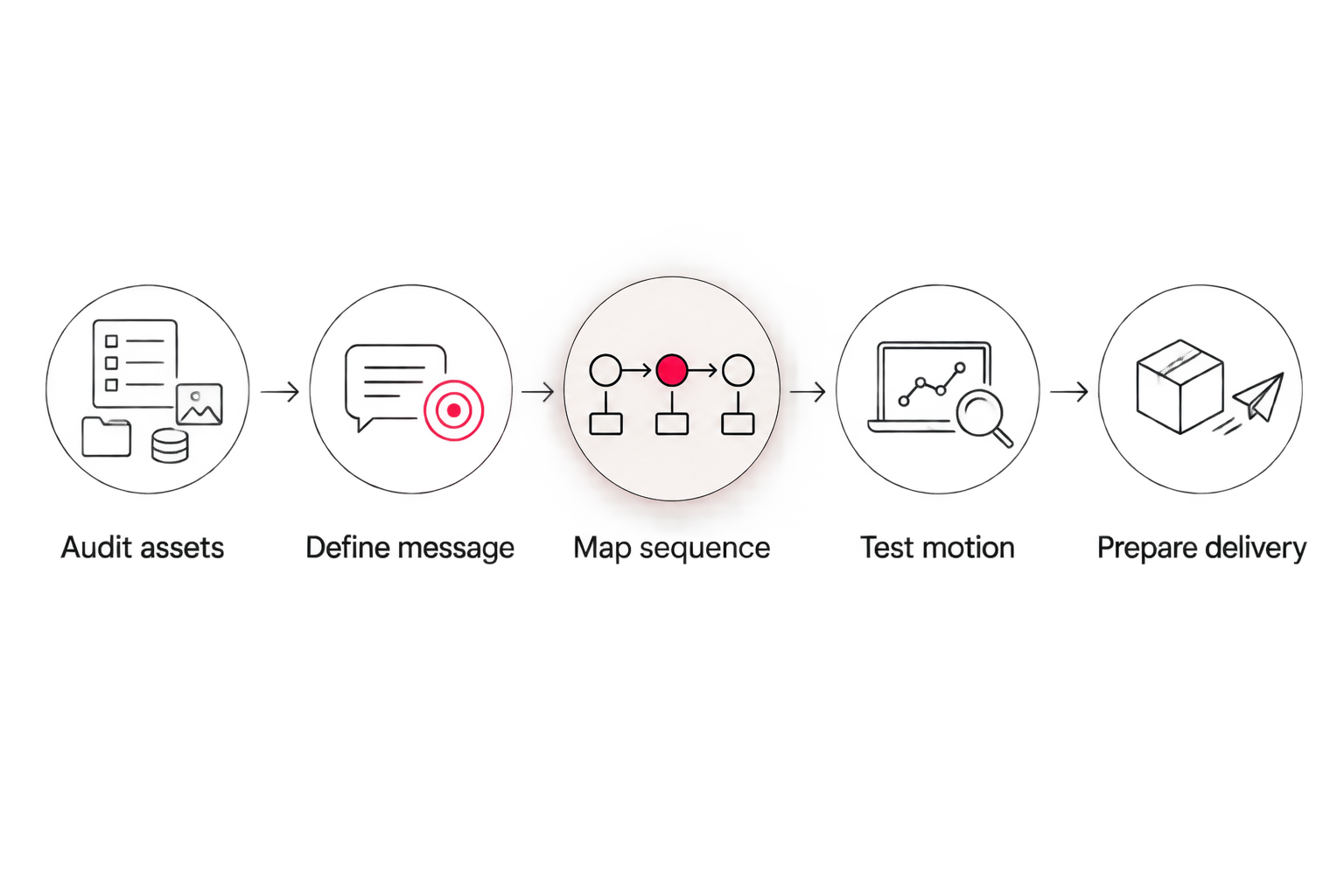
Use a staged approval process for your 2026 production brief. Resolve what the audience should understand before reviewing animation polish; otherwise, detailed feedback can distract from a sequence that does not communicate the right idea.
1. Audit assets
Collect editable source files, linked images, fonts, illustration guidelines, and the approved static references. Confirm that your usage permissions cover the planned animation and distribution.
Inspect whether important objects are separate, whether backgrounds extend behind them, and whether any text has been converted into shapes. Identify reconstruction needs before scheduling detailed animation.
2. Define message
Write the audience takeaway and the action you want viewers to take. Then connect each proposed movement to that purpose.
A connecting line can explain a relationship. A highlight can direct attention. Continuous movement across every object can compete with the information you need viewers to read.
3. Map sequence
Build a storyboard that shows the order of information, the relationship between scenes, and the final call to action. Do not assume the viewer will absorb a complex illustration all at once.
Use the storyboard to identify missing artwork and copy. Changes to the message are easier to resolve here than after the sequence has been fully animated.
4. Test motion
Approve a representative motion sample before extending the treatment across the full piece. Include the behaviors that matter most: entrances, transitions, text movement, and how the animation settles.
Judge the sample against the brand, not just technical smoothness. A restrained corporate illustration can feel inconsistent when paired with exaggerated bouncing or elastic movement.
5. Prepare delivery
Review each intended layout and export against its destination. Confirm that text remains readable, essential artwork stays visible, and the final message does not depend entirely on sound.
Separate delivery files from editable project files in the handoff requirements. Receiving a finished video does not, by itself, define what source materials are included.
Why illustration-to-motion work varies
The amount of work depends on the condition of the artwork and the behavior required—not simply how detailed the finished illustration looks. For your 2026 scope, separate asset preparation from animation so reviewers understand both parts of the assignment.
- Source structure: Editable, organized layers give the animator different starting conditions from a flattened export.
- Missing artwork: Moving overlapping objects can reveal backgrounds or surfaces that need to be drawn.
- Motion complexity: A position change requires different preparation from a character turn or a detailed shape transformation.
- Message development: Approved copy and storyboards reduce unresolved decisions during animation.
- Delivery formats: Different layouts require composition checks rather than an assumption that cropping will work.
- Review requirements: Conflicting feedback and late message changes affect work that has already been approved.
Ask the production partner to identify these dependencies explicitly. A scope that only says to animate supplied illustrations leaves too much room for different interpretations.
How do you keep the animation consistent with the brand?
Preserve the illustration's visual identity and define a matching movement style. A static guide tells an animator what an object looks like, but it does not necessarily explain how quickly it moves or how it reacts to other elements.
Add motion references to your 2026 brand documentation. Specify whether movement should feel deliberate, mechanical, fluid, or restrained, then demonstrate the intended behavior with an approved sample.
Your motion guidance should address:
- Pacing: How quickly information enters, holds, and leaves.
- Transitions: How one idea connects to the next.
- Typography: Whether text appears as complete phrases or through staged reveals.
- Illustration behavior: Which elements can bend, rotate, separate, or change shape.
- End states: Where elements settle and what remains visible for the call to action.
Avoid approving motion through adjectives alone. Two reviewers can agree on a word such as professional while imagining very different animation; a reference makes the decision visible.
Can the same illustrations work across different video formats?
Yes—the same source illustrations can support different formats, but each composition needs its own review. A horizontal arrangement does not automatically remain readable when adapted to a vertical frame.
| Format | Standard aspect ratio | Best for | Composition check |
|---|---|---|---|
| Landscape | 16:9 aspect ratio | Horizontal presentations and video layouts | Keep important details readable across the wider frame |
| Square | 1:1 aspect ratio | Square campaign placements | Rebalance text and illustration rather than trimming both sides |
| Portrait | 9:16 aspect ratio | Vertical, mobile-oriented placements | Stack information and check placement-specific interface overlays |
Treat these as layout choices, not interchangeable exports. Confirm the receiving platform's current requirements before delivery, including file specifications and placement-specific safe areas.
For a 2026 campaign with several destinations, include those destinations in the storyboard review. That lets the team plan flexible compositions before a tightly framed master animation becomes the basis for every version.
Can the animation communicate without sound?
Yes—illustration-based motion graphics can communicate through visible sequencing, readable copy, and clear emphasis without relying on audio. Sound can support the piece, but essential information should remain understandable when muted.
Review the animation silently during approval. If a transition only makes sense because of narration, add the necessary visual explanation or revise the sequence.
Captions support spoken content, but they do not replace clear composition. Check that captions and on-screen copy do not compete with the illustration or cover the detail being explained.
What should your marketing team send a production partner?
Send the editable artwork and a decision-ready brief, not just a finished image with a request to make it move. Include the business objective, audience, approved copy, intended placements, and the person responsible for consolidating feedback.
For an agency managing a client's brand, clarify who approves the illustration treatment and who approves the message. Those responsibilities can sit with different people, and both decisions affect animation.
WCM creates motion graphics alongside commercial and corporate video content. If your project needs both illustrated sequences and other branded content, identify their relationship in the brief rather than treating each deliverable as an isolated assignment.
Discuss your motion graphics brief
Bring your source artwork, audience, intended placements, and approval requirements.
FAQ
Can I animate brand illustrations if I only have a PNG?
Yes, a PNG can support camera moves, masking, and other treatments, but its objects are not independently editable. Separate movement requires extracting elements and rebuilding any areas exposed behind them.
Do vector illustrations need preparation before animation?
Yes, vector illustrations still need inspection and preparation before animation. Layer organization, clipping masks, effects, and the planned movement determine what must change in the working file.
Will turning illustrations into motion graphics change my brand style?
Animation does not require changing your illustration style. Approve a motion sample that preserves the artwork’s appearance and establishes suitable pacing, transitions, and object behavior.
Should we redraw every illustration before animating it?
No, redraw only what the planned movement requires. Existing editable elements can remain intact, while hidden areas or new viewpoints need additional artwork.
Can motion graphics use the same illustrations as our presentation deck?
Yes, presentation illustrations can be reused when the source quality and usage permissions support the project. Request the original design assets rather than relying on images extracted from slides.
Does the finished video include editable animation files?
Editable animation files are a separate handoff requirement that should be specified in the agreement. Define project files, linked assets, fonts, and any licensing restrictions before production starts.
Does WCM create motion graphics for corporate marketing teams?
Yes, WCM creates motion graphics and branded content for corporate clients. Bring the existing illustrations and intended use so the project discussion can address preparation, animation, and delivery.
One last thing
Ask what will become visible when an illustrated object moves. A static design can hide unfinished backgrounds behind foreground elements, and animation exposes those gaps.
Checking that detail before production gives you a clear choice: rebuild the missing artwork or choose movement that keeps it concealed. That is a more useful decision than requesting more animation simply because the illustration can move.