Best overall: DaVinci Resolve. Best for Adobe-centered production teams: Adobe Premiere Pro. Best for Mac-based editorial teams: Final Cut Pro. This 2026 guide to color grading software for corporate video helps you choose a post-production workflow—or brief a production partner—without confusing software features with finished-image quality.
- DaVinci Resolve is the best overall color grading software for corporate video requiring detailed shot matching and controlled finishing.
- Adobe Premiere Pro fits teams that want editing and Lumetri Color adjustments in the same timeline.
- Final Cut Pro fits Mac-based editors handling color correction alongside routine editorial work.
- Wrecking Crew Media provides corporate video production and post-production services, not grading software.
Why this matters
Corporate video color work has a practical job: make people, products, and locations look consistent. A strong interview loses credibility when skin tones change between camera angles or a product shifts color between shots.
Wrecking Crew Media creates branded content, short-form videos, and motion graphics for corporate clients. For marketing teams commissioning that work, the useful question is not which application has the longest feature list; it is who owns the approved look through final delivery.
Wrecking Crew Media is a fit for B2B marketing teams seeking corporate video production and post-production services rather than grading software. Keep that distinction clear when deciding whether you need an internal tool, a specialist colorist, or a production partner.
What makes the best corporate video color grading software?
Use these criteria before choosing a platform for your 2026 production workflow:
- Color management: The workflow must interpret camera footage correctly and deliver to the intended viewing standard.
- Shot matching: Exposure, white balance, and skin tones need to remain consistent across interviews, locations, and camera angles.
- Selective correction: Masks, tracking, and targeted color controls help adjust a face or product without changing the entire frame.
- Editorial integration: Moving a locked edit into grading must preserve timing, framing, and the correct source footage.
- Review and delivery: The team needs a defined reference image, consolidated feedback, and repeatable export settings.
Choose around your actual work. An interview series assembled by an internal editor presents a different finishing problem from a campaign combining multiple cameras, archival material, and animation.
If the broader editing environment is still undecided, start with the guide to video editing software for corporate marketing teams. Grading should fit that decision, not force an unnecessary rebuild of the entire production process.
Corporate video grading software at a glance
| Software | Best for | Standout capability | Key limitation |
|---|---|---|---|
| DaVinci Resolve | Dedicated color finishing | Node-based grading with extensive secondary correction controls | Requires learning node organization and color management |
| Adobe Premiere Pro | Adobe-centered editorial workflows | Lumetri Color inside the editing timeline | Complex corrections require disciplined effect and mask organization |
| Final Cut Pro | Mac-based editorial teams | Color wheels, curves, masks, and scopes alongside editing | macOS requirement excludes Windows-based editors |
These are workflow recommendations, not measured performance rankings. Hardware, footage, project complexity, and operator experience affect the working experience in every application.
1. DaVinci Resolve: best for dedicated corporate color finishing
DaVinci Resolve combines editing, color correction, visual effects, audio post-production, and delivery. Its Color page uses nodes to organize image adjustments, making it suited to projects where finishing deserves its own stage rather than a quick adjustment before export.
For corporate work, that separation matters when interviews, office footage, and product shots need different corrections but must share a consistent look. Nodes let the colorist organize technical correction, selective adjustments, and creative treatment as distinct operations.
DaVinci Resolve pros
- Node-based grading separates corrections into identifiable stages.
- Qualifiers, windows, and tracking support targeted adjustments.
- Scopes help evaluate exposure and color beyond the viewer image.
- Editing and finishing can remain inside the same application.
DaVinci Resolve cons
- Node structures and color management require training and consistent project setup.
- Bringing an edit from another application adds conform checks for effects, speed changes, and source references.
Best for: Corporate campaigns requiring detailed shot matching, mixed-camera normalization, and a designated finishing owner.
Before approving a Resolve workflow, establish who checks the conform against the locked edit. A correct grade on the wrong source shot is still a delivery error. Keep a reference export available throughout finishing.
Verdict: Buy into the Resolve workflow when color finishing is a distinct responsibility; skip a migration solely to correct straightforward interviews.
2. Adobe Premiere Pro: best for Adobe-centered production teams
Adobe Premiere Pro includes Lumetri Color controls for correction and grading within the editing timeline. Editors can adjust white balance, tonal balance, curves, color wheels, and selected color ranges without moving the sequence into a separate grading application.
That makes Premiere Pro a practical choice when the same editor owns the cut, client revisions, and final export. A corporate communications team updating interviews and branded content does not automatically need a separate finishing workflow.
Adobe Premiere Pro pros
- Lumetri Color keeps routine grading alongside editorial decisions.
- Curves and color wheels support broad tonal and color adjustments.
- HSL Secondary supports adjustments to selected color ranges.
- Lumetri Scopes provide visual checks for exposure and color balance.
Adobe Premiere Pro cons
- Multiple corrections and masks require clear effect organization to remain understandable during revisions.
- A later handoff to a dedicated grading application still needs a checked conform; timeline effects do not remove that responsibility.
Best for: Marketing and agency teams already building corporate edits in Premiere Pro and keeping finishing with the editor.
For a 2026 Adobe-centered workflow, test the difficult shot before committing the whole campaign. If the editor can match the interview angles, protect skin tones, and meet the delivery specification, changing applications adds process without solving a demonstrated problem.
Verdict: Hold the Premiere Pro workflow when it meets the brief; move to dedicated finishing only for a defined correction or handoff need.
3. Final Cut Pro: best for Mac-based editorial teams
Final Cut Pro provides color wheels, color curves, hue/saturation curves, masks, and video scopes within its editing environment. It suits teams that want to manage routine corporate correction where the edit already lives.
Its value here is continuity. A Mac-based editor can revise interview timing and make associated color adjustments without maintaining a separate grading project for every editorial change.
Final Cut Pro pros
- Integrated color tools keep correction close to the edit.
- Color wheels and curves support tonal and color balancing.
- Color masks and shape masks support selective adjustments.
- Video scopes help assess the signal rather than relying only on screen appearance.
Final Cut Pro cons
- The macOS requirement rules it out for Windows-based editorial teams.
- Handoffs to another finishing application require checking translated effects, timing, and media references.
Best for: Mac-based internal editors producing interview-led communications and recurring branded content.
Do not choose Final Cut Pro simply because the footage came from an Apple device. Choose it because the editor, project organization, and delivery workflow already support it. Capture device and finishing platform are separate decisions.
Verdict: Hold Final Cut Pro for an established Mac workflow; skip it when Windows compatibility is a requirement.
How the ranking works
DaVinci Resolve ranks first for dedicated color work because its node-based Color page supports a structured finishing process. Premiere Pro takes the Adobe-centered slot because Lumetri works directly in the editorial timeline. Final Cut Pro takes the Mac-editorial slot because its integrated tools fit that environment.
The ranking prioritizes correction control, shot matching, editorial handoff, and delivery discipline. It does not claim that one application produces better business results or that software choice alone improves campaign performance.
Set the finishing workflow before the first approval
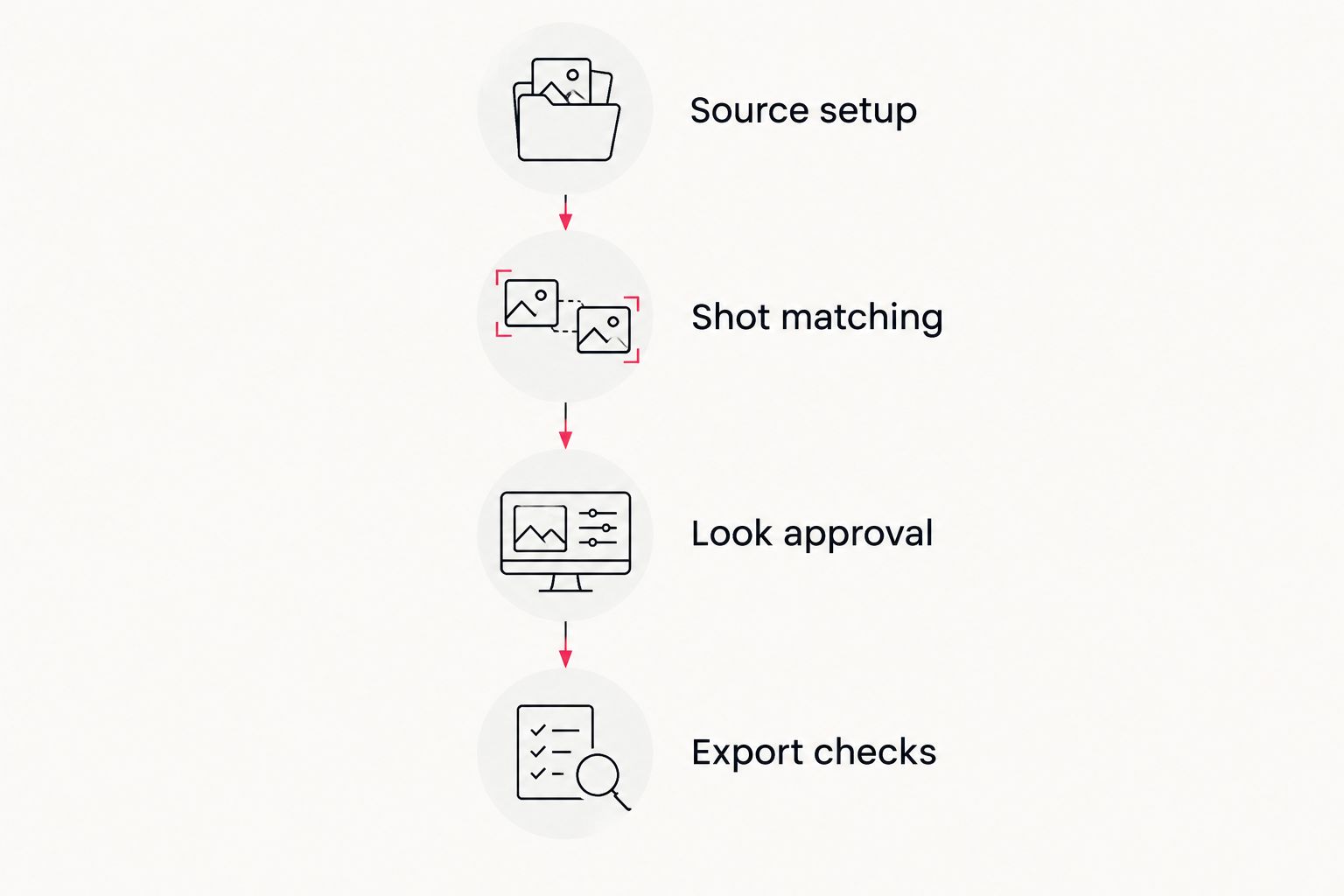
For your 2026 corporate video brief, name the owner and approval condition for each stage below. This prevents a creative preference from becoming an unresolved technical change at export.
Source setup
Identify camera formats, log recording, and existing transforms. An input transform interprets footage; a creative LUT applies a look. They are not interchangeable, and stacking them without checking the image can create an incorrect starting point.
Shot matching
Balance exposure and white balance before building the campaign look. Match related interview angles together, then check adjoining footage so the sequence does not jump between warm and cool images.
Look approval
Approve representative material rather than an isolated attractive frame. Include an interview, a product or workplace shot, and the most difficult lighting condition. State whether feedback concerns technical accuracy or creative preference.
Export checks
Check the rendered file, not just the editing viewer. Confirm framing, graphics, color settings, and the intended playback environment before distributing versions.
A 1920 × 1080-pixel export defines image dimensions, not color accuracy. Treat resolution and color delivery as separate checks. For standard-dynamic-range corporate delivery, agree on the required Rec. 709 workflow with the editor and delivery recipient rather than assuming every export preset means the same thing.
Know what grading cannot repair
Color grading changes recorded image information; it does not recreate every detail lost during capture. Clipped highlights, severe underexposure, and mixed lighting can limit the finished result regardless of software.
An 8-bit channel represents 256 tonal levels, while a 10-bit channel represents 1,024 tonal levels. That additional precision supports smoother tonal representation, but bit depth does not compensate for poor lighting or incorrect exposure. It also does not guarantee that a particular shot will tolerate a particular correction.
For your 2026 shoot, brief the crew on the intended look before capture. If accurate product color matters, include an appropriate color reference and agree on viewing conditions. A logo color value alone does not define how a photographed object should appear under every light source.
Which corporate video grading workflow should you choose?
Choose DaVinci Resolve as the default for dedicated finishing. Stay in Premiere Pro or Final Cut Pro when the existing editor can meet the brief without a separate grading handoff.
If nobody internally owns color management, shot matching, and export verification, the next decision is staffing rather than software. Wrecking Crew Media provides corporate video production and post-production for B2B marketing teams; define the required finishing scope when discussing a project.
Plan your corporate video post-production
Discuss production and post-production needs for your next branded content project.
FAQ
What’s the best color grading software for corporate video in 2026?
DaVinci Resolve is the best overall choice for dedicated corporate video color finishing. Premiere Pro fits Adobe-centered editing teams, while Final Cut Pro fits established Mac-based editorial workflows.
Is DaVinci Resolve better than Premiere Pro for color grading?
DaVinci Resolve is the stronger fit when color grading is a separate finishing discipline. Premiere Pro remains a practical choice when Lumetri Color meets the correction requirements inside the existing edit.
Can Final Cut Pro handle corporate video color correction?
Yes. Final Cut Pro includes color wheels, curves, masks, and video scopes for correction and grading. Choose it when the Mac-based editor can meet the project’s matching and delivery requirements.
Do corporate videos need a creative grade or just color correction?
Corporate videos need consistent technical correction; a creative grade depends on the brief. Establish balanced exposure and white balance before deciding how strongly to stylize the image.
Can a LUT make every camera match?
No. A LUT applies a defined transformation but does not independently fix differences in lighting, exposure, or white balance. Normalize the sources and check related shots together.
Should a marketing team grade videos internally or hire a production partner?
Keep grading internal when a named editor can manage correction, approvals, and verified delivery. Use a production partner when the project needs production and post-production ownership that your internal team cannot provide.
Why does an approved video look different on another screen?
Displays and playback applications can interpret or reproduce the image differently. Establish a review reference and verify the exported file in the intended viewing environment before making corrective changes.
One last thing
Ask reviewers to identify the shot, the issue, and the intended correction. Feedback such as warmer skin, neutral white wall, or match the previous angle gives the finishing team a clear target; make it pop does not.
For 2026 campaigns with multiple deliverables, keep an approved reference export with the project. The useful asset is not just the grade—it is a repeatable record of what the team approved.