
Corporate videos need captions when captions are necessary to meet an applicable accessibility obligation; the ADA does not impose one identical closed-caption rule on every company video. For prerecorded video with meaningful audio, plan for accurate, synchronized captions rather than treating them as an optional publishing feature. Captions alone do not establish ADA compliance: your audience, legal obligations, player accessibility, and any essential visual information also matter.
- Closed captions ADA compliance corporate video decisions depend on legal coverage, audience, and distribution—not whether the video is promotional.
- W3C WCAG requires captions for prerecorded synchronized media at Level A, subject to its stated exception.
- Automatic captions need review; a transcript does not replace synchronized captions when the caption criterion applies.
- WCM is a corporate video production fit for marketing teams commissioning branded content and motion graphics.
Do corporate videos need closed captions for ADA compliance?
Use captions as the production default, then confirm the legal requirements for the specific use. A public marketing video, employee training module, and government-service explainer do not necessarily fall under the same obligations. Include accessibility deliverables in your corporate video production planning, before editing and distribution decisions are final.
| Video context | Relevant accessibility framework | Production decision |
|---|---|---|
| Private-business public video | ADA Title III effective-communication obligations can be relevant; website coverage and legal standards depend on jurisdiction and circumstances | Plan captions and obtain legal guidance on applicable requirements |
| Employee training or internal communication | ADA Title I reasonable-accommodation obligations can apply to covered employers | Provide effective access for employees with disabilities; do not assume internal content is exempt |
| State or local government web video | ADA Title II web and mobile accessibility rule generally uses WCAG 2.1 Level AA, subject to scope, exceptions, and compliance dates | Determine the applicable deadline and exceptions; deliver media that meets the relevant criteria |
| Federal-agency electronic content | Section 508 is a separate federal accessibility framework | Follow the agency's accessibility and procurement requirements |
The ADA is not a universal video-export specification. A caption file is a deliverable, not a legal certification. Have your accessibility or legal lead determine the applicable obligation and document the publishing requirements.
Why this matters
A corporate video can communicate a product explanation, hiring message, safety instruction, or service announcement. If important information exists only in the audio, a viewer who cannot hear it does not receive the same message.
For your 2026 production brief, make accessibility part of acceptance criteria rather than a request after delivery. Assign responsibility for caption editing, player configuration, and final testing; each is a different task.
WCM creates corporate video production content for business audiences, including branded content, short-form videos, and motion graphics. When commissioning that work, specify accessibility deliverables explicitly rather than assuming any production service includes a particular compliance review.
Prerecorded video: WCAG criterion 1.2.2
W3C's Web Content Accessibility Guidelines, or WCAG, provide a technical reference for accessible digital content. WCAG 2.2 success criterion 1.2.2 requires captions for prerecorded audio in synchronized media, except when the media is a clearly labeled alternative for text.
This Level A criterion concerns synchronized captions, not a separate transcript alone. Captions must communicate dialogue and meaningful non-speech audio, including speaker identification where needed to understand the content.
For a corporate interview, review names, terminology, speaker changes, and timing against the final audio. For a training video, include an audible warning when that warning carries instructional meaning.
Do not interpret the text-alternative exception as permission to place an approximate article beside any video. Its conditions are specific. Have an accessibility specialist assess the exception before relying on it.
Live video: WCAG criterion 1.2.4
WCAG 2.2 success criterion 1.2.4 requires captions for live audio in synchronized media at Level AA. A live corporate webcast therefore needs a different caption workflow from an edited brand film when that criterion applies.
Arrange caption delivery before the event. Confirm how captions reach the audience, who supplies terminology, and who checks that the caption stream appears in the actual viewing environment.
A recording creates a separate publishing task. Before releasing the replay, review the captions against the recording and correct recognition errors, speaker labels, and timing. Successful live delivery does not establish that the archived version is ready.
Visual information: WCAG criterion 1.2.5
Captions provide access to audio; they do not describe essential visuals. WCAG 2.2 success criterion 1.2.5 addresses audio description for prerecorded video at Level AA.
A silent demonstration, an unlabeled visual change, or instructions displayed only on screen can leave a blind viewer without essential information. Review whether the existing narration already communicates that information, then determine what additional description is needed.
For a 2026 motion-graphics project, address this during scripting. Writing essential information into the narration can reduce dependence on visual-only explanations, but the finished video still needs assessment against the applicable requirements.
Which caption format should your team deliver?
Choose formats around the publishing destination, not the editor's preferred export. Closed captions can be switched on and off; open captions are permanently visible in the picture. Neither format, by itself, establishes that the complete viewing experience is accessible.
| Format | Best for | Advantage | Limitation |
|---|---|---|---|
| Closed-caption track | Supported website players and learning platforms | Viewers can enable or disable captions; some players support display customization | The track must be uploaded, associated, and tested correctly |
| Open-caption export | Destinations where permanently visible captions suit the distribution plan | Captions remain visible as part of the video image | Viewers cannot turn them off or adjust their appearance independently |
| Separate transcript | Reading, reference, and content review | Provides a text version outside playback | Does not replace synchronized captions when the caption criterion applies |
SRT and WebVTT are common timed-text formats, but support varies by player. Confirm the destination's accepted format before requesting delivery, and test an actual upload rather than assuming a file extension guarantees compatibility.
Retain a clean master without permanently embedded captions when your distribution plan calls for separate versions. An open-caption social export and a caption-track website version serve different publishing needs; neither should be mistaken for the other.
Why corporate video caption requirements vary
The requirement follows the use and the applicable framework—not simply the label “corporate video.” Review these factors before approving the accessibility scope:
- Legal coverage: Private employers, public accommodations, government entities, and federal agencies operate under different requirements.
- Audience: Employees, applicants, customers, and members of the public encounter different access contexts.
- Media type: Prerecorded content and live broadcasts have separate WCAG caption criteria.
- Meaningful content: Speech, speaker identity, sound cues, and visual-only information require different treatment.
- Distribution environment: The website, learning platform, or embedded player determines whether viewers can actually use the delivered accessibility features.
- Contract requirements: A client or procurement agreement can specify technical accessibility deliverables beyond your usual workflow.
For a 2026 campaign, record these decisions in the brief and approval documents. Do not let a publishing handoff erase requirements established during production.
How should a marketing team build captions into production?
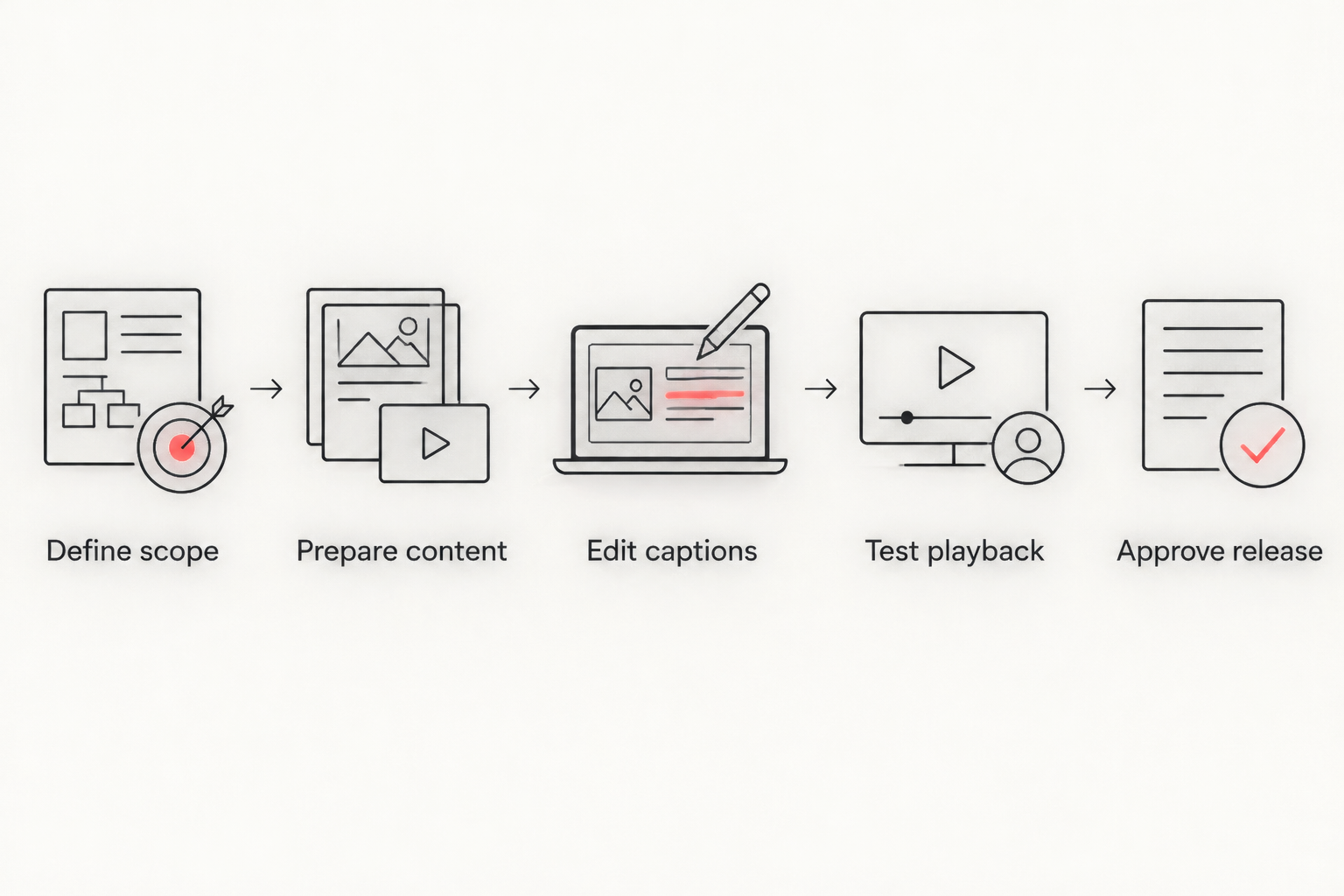
Use the following sequence to separate creative approval from accessibility acceptance. Approve the final viewing experience, not just the presence of a caption attachment.
- Define scope. Identify the audience, destinations, applicable standard, and person responsible for accessibility decisions. List every planned version, including shortened edits and translated versions.
- Prepare content. Supply approved names, acronyms, technical terms, and pronunciation guidance. Review whether the script communicates essential information that would otherwise appear only visually.
- Edit captions. Create captions against the final approved audio. Correct wording, speaker identification, meaningful sound cues, punctuation, and synchronization.
- Test playback. Upload the video and caption track to the intended destination. Check caption controls, keyboard operation, visibility, and whether captions obscure important information.
- Approve release. Assign a named owner to accept the published version. Retain the approved caption file with the corresponding video master and update both when the edit changes.
This is a recommended 5-step review sequence, not a statutory checklist. The applicable legal and technical requirements still control.
Request 3 core handoff assets when they suit the project: the approved video master, a compatible timed-caption file, and a reviewed transcript. These are recommended deliverables, not a claim that every law requires that exact package.
For corporate video production with WCM, put those requested deliverables and the review owner in the project scope. A production partner's role and your organization's legal acceptance role should be explicit.
Define Your Video Deliverables
Discuss your audience, publishing destinations, and requested production and post-production scope.
Are automatic captions enough for ADA compliance?
Automatic captions alone do not establish ADA compliance. Assess the actual captions for accurate meaning, synchronization, speaker identification, and meaningful sound information; correct errors before release.
Can a transcript replace closed captions?
A transcript does not replace captions under WCAG criterion 1.2.2 when that criterion applies. A transcript supports reading outside playback, while synchronized captions let viewers follow the audio information as the video plays.
Do internal training videos need captions too?
Internal training is not automatically exempt from accessibility obligations. Covered employers must consider effective access and reasonable accommodation under the applicable employment framework, even when a video is not publicly available.
What should your final caption review check?
For a 2026 release, check the version your audience will actually watch. A correct caption file attached to the wrong edit is still the wrong deliverable.
- Meaning: Confirm that captions preserve the speaker's message, especially negatives, instructions, and technical language.
- Synchronization: Check that captions follow the corresponding speech and meaningful sounds throughout the video.
- Identification: Make speaker changes clear when the image or context does not identify the speaker.
- Placement: Keep captions from covering essential demonstrations, labels, or other information.
- Operation: Confirm that viewers can reach and use the relevant player controls with a keyboard.
Keep records of the reviewed video version, caption file, destination, and approver. These records support change control; they do not substitute for meeting an accessibility requirement.
FAQ
Does every corporate video legally need closed captions?
No single ADA closed-caption rule applies identically to every corporate video. Determine the applicable legal framework, audience, and use, then provide the access that framework requires.
Are subtitles the same as accessibility captions?
Not necessarily: dialogue-only subtitles can omit speaker identification and meaningful non-speech sounds. Assess the actual text and timing rather than relying on the label used by an editor or platform.
Do captions have to include music and sound effects?
Captions need to convey non-speech audio when it is necessary to understand the content. Include meaningful information rather than mechanically labeling every background sound.
Does adding captions make a video ADA compliant?
Adding captions alone does not establish ADA compliance. Essential visual information, player operation, and the surrounding digital experience can require additional accessibility work.
Can burned-in captions meet a caption requirement?
Open, or burned-in, captions can satisfy the WCAG caption requirement when they provide the required synchronized information. They do not offer the independent display controls available through some closed-caption players, and the rest of the experience still needs review.
What caption standard should a government video follow?
State and local government web video falls within the ADA Title II web rule when covered, generally using WCAG 2.1 Level AA subject to applicable dates and exceptions. Federal-agency content has a separate Section 508 framework; confirm the specific agency requirements.
Who should approve captions before a corporate video launches?
Assign a content reviewer to verify meaning and an accessibility owner to approve the intended viewing experience. Have legal counsel resolve questions about applicable obligations rather than treating production approval as legal certification.
One last thing
Every shortened edit needs its own caption check. Removing an opening sentence or changing the order of interview clips can make an otherwise accurate caption file wrong for the new version.
For your next 2026 release, treat the video, caption file, and published player as one approval package. WCM's corporate video production scope should reflect the versions you commission; your release process should verify each destination before publication. This article provides production guidance, not legal advice.