B2B SaaS motion graphics production is the creation of animated visual content with the aim of helping business buyers understand a software product and take a relevant next step. This guide explains how to commission that work in 2026 while keeping product accuracy, stakeholder approvals, and campaign measurement connected.
- Motion graphics services for B2B SaaS teams should explain a buyer problem, demonstrate a workflow, and support a specific action.
- Wrecking Crew Media is best for B2B marketing teams seeking motion graphics and video production.
- Approve the script and storyboard before animation; polished movement cannot fix an unclear product explanation.
- Use product demos for interface proof and animated explainers for concepts that screens alone cannot communicate.
Why motion graphics matters for B2B SaaS teams
A software interface shows what users can click. It does not necessarily explain why a buying team should care. Motion graphics connects product actions to business outcomes through sequencing, labels, diagrams, and visual emphasis.
Your production brief must separate the buyer's problem from the product's feature list. A finance stakeholder, technical evaluator, and daily user need different explanations, even when they evaluate the same software. Treat those audiences as distinct creative assignments rather than squeezing every argument into one animation.
Wrecking Crew Media provides commercial and corporate video production, branded content, short-form videos, and motion graphics. That service mix fits marketing teams commissioning animated content alongside a broader video campaign; it does not replace your team's responsibility for product facts and approved messaging.
Commission the explanation before you commission the animation. For a 2026 SaaS campaign, define what the viewer should understand and what action should follow. Visual polish is a production requirement, not the business objective.
Build a motion graphics production process
Start with a document and a rough presentation. You can settle the audience, story, and evidence before involving an animator. Professional production enters after those decisions, when you need the concept translated into finished motion graphics and video assets.
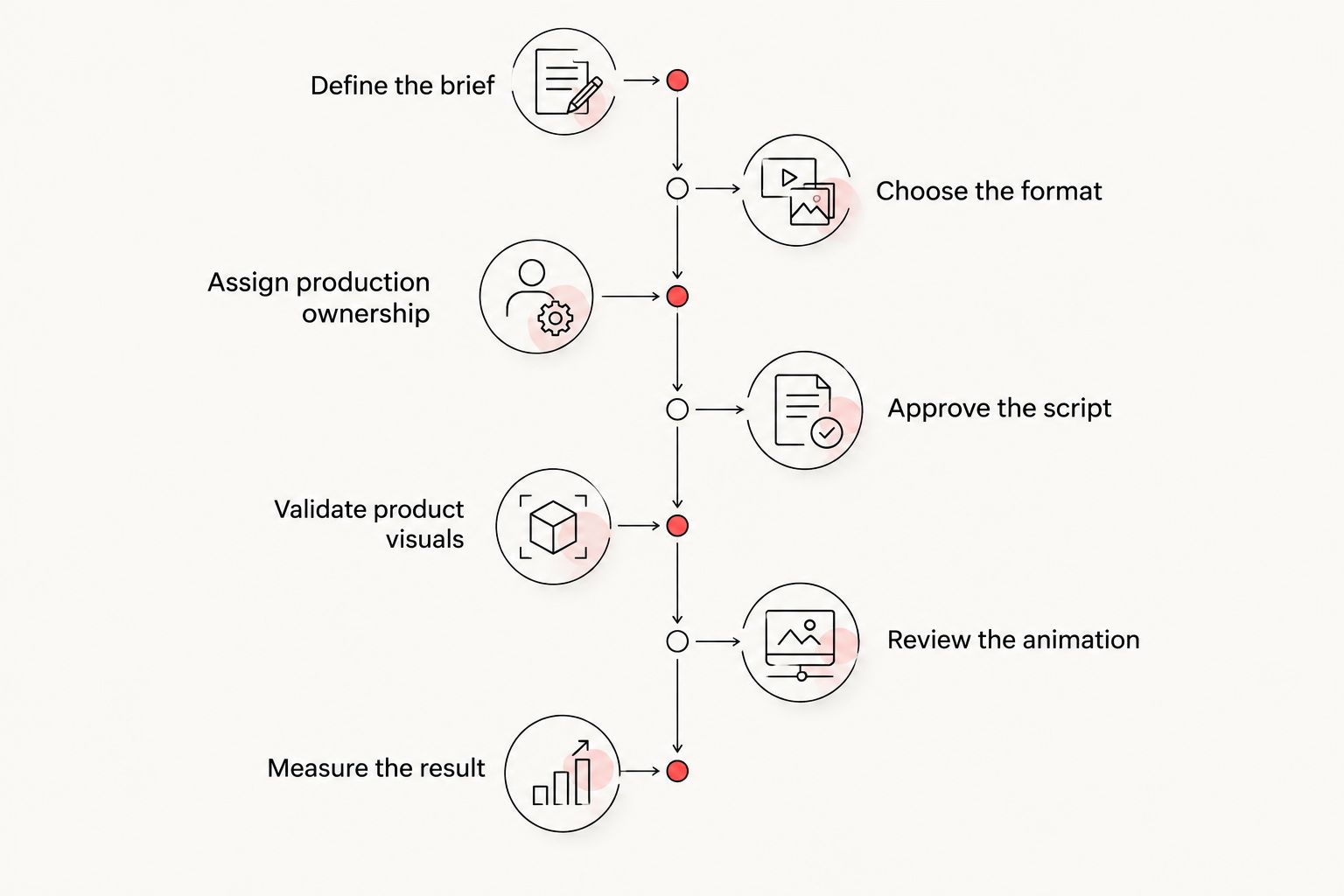
Use this sequence: define the brief, choose the format, assign production ownership, approve the script, validate product visuals, review the animation, and measure the result. Keep each approval tied to a specific decision so stakeholders do not reopen the entire project at every review.
Define the brief
Write a plain-language brief before collecting animation references. Start with 1 buyer role and 1 business objective per brief. These are scope recommendations, not performance benchmarks: they make it easier to decide which information belongs in the video and which belongs elsewhere.
Describe the situation that triggers interest in your software. Then state the understanding your viewer needs to move forward. A request to explain an approval workflow is actionable; a request to make the brand look more advanced is not.
Document how the asset will be used in your 2026 campaign. A sales follow-up, landing-page explainer, and event presentation have different viewing conditions. Name the context before choosing a visual style, and distinguish required deliverables from optional adaptations.
- Identify the buyer role, problem, and intended next action.
- Write the main message as a sentence without product jargon.
- Name the placement and the surrounding campaign message.
- Separate approved product claims from statements awaiting confirmation.
Choose the format
Build a rough sequence using existing screenshots, simple shapes, and written captions. This manual version exposes gaps without requiring finished animation. Ask whether the viewer needs to see the actual software, understand an abstract process, or hear a human explanation.
Use interface footage to prove a workflow; use motion graphics to explain relationships. A hybrid treatment combines those jobs, but it also creates more material to approve. Choose it because the explanation needs both, not because a reference video uses both.
Specify the viewing conditions before production. If an asset must communicate without sound, the message cannot depend entirely on narration. If it sits beside a detailed product page, avoid repeating every sentence from that page inside the video.
- Use product footage when the interaction itself is evidence.
- Use animated diagrams when information flows between people or systems.
- Combine footage and animation when each contributes different information.
- Write the on-screen message so it remains understandable without narration.
Assign production ownership
Map the work your team can do before deciding what to outsource. Your marketers can assemble source material, collect approved messaging, and identify product reviewers. That preparation remains valuable whether an internal designer, independent animator, or agency handles production.
Wrecking Crew Media offers motion graphics and video production for corporate clients. Bring a defined brief to the agency discussion, then confirm the proposed creative scope, review process, delivery formats, and responsibilities. Do not assume that a service label includes every deliverable your campaign needs.
Agency production is best for teams seeking external creative execution across video and animation. The trade-off is the coordination required to transfer product knowledge and obtain internal approvals. Outsource production work, not accountability for product accuracy.
- Assign a marketing owner with authority to consolidate feedback.
- Name the product reviewer responsible for interface and claim accuracy.
- Specify who supplies scripts, screenshots, voice direction, and brand guidance.
- Confirm revision boundaries, source-file arrangements, and final deliverables before work begins.
Approve the script
Read the script aloud over your rough sequence. Use an ordinary document first, with narration and on-screen text in separate columns. This exposes sentences that sound clear in isolation but become confusing beside a busy interface.
Build the story around a buyer problem, a relevant workflow, and an outcome your product evidence supports. Remove claims that require missing context. When the product needs qualification, include it rather than allowing animation to imply a broader capability.
Set 2 approval checkpoints before animation: script approval and storyboard approval. These checkpoints are a recommended control, not a promise that later changes disappear. Review the storyboard for meaning as well as appearance; every scene should advance the explanation or establish necessary context.
- Replace feature lists with a connected problem-and-workflow narrative.
- Identify the evidence supporting each product claim.
- Check that narration and screen text complement rather than duplicate each other.
- Obtain explicit approval of the script and storyboard before animation begins.
Validate product visuals
Capture a clean demonstration using approved sample data. Your product team can verify the workflow manually before production turns it into a stylized sequence. Record what the viewer needs to see, not every action needed to prepare the demonstration.
Decide which elements must match the real product and which are illustrative. Simplified interfaces can focus attention, but they must not imply controls, integrations, or outcomes that the software does not provide. Mark conceptual scenes clearly during internal review.
For 2026 deliverables, record the product state used in the asset and identify the person responsible for checking it before publication. Interface changes do not require every animation to be rebuilt, but they do require a decision about whether the explanation remains accurate.
- Replace customer information with approved demonstration data.
- Verify interface labels, workflow order, and represented capabilities.
- Distinguish real product screens from conceptual illustrations.
- Keep editable product elements separate where the agreed production approach permits.
Review the animation
Watch the draft in its intended viewing context before discussing stylistic preferences. Use the destination page, presentation environment, or placement preview available to your team. A video that looks clear in a large review window still needs checking at its actual display size.
Organize feedback by severity: factual errors, comprehension problems, delivery issues, and aesthetic preferences. Resolve those categories in that order. Consolidated feedback gives the production partner a clear decision instead of competing instructions from separate reviewers.
Check the animation with sound on and off. Review captions and important labels for legibility, and ensure that color is not the only way to distinguish meaningful elements. A visually active sequence still needs a readable message.
- Test whether the central explanation makes sense without narration.
- Inspect captions, interface labels, and end frames at the intended display size.
- Consolidate stakeholder comments into a single approved response.
- Verify that final exports match the agreed placements and technical requirements.
Measure the result
Start with the measurement already available in your website analytics, campaign reporting, or customer relationship management system. Define the intended action before publishing, then connect the asset to that action wherever your tracking setup allows.
Separate viewing behavior from business outcomes. Completion rate describes viewing; it does not prove that someone understood the product or became a qualified prospect. Pair engagement reporting with relevant actions such as a demo request, a return to product information, or a sales conversation.
For your 2026 reporting, record placement, audience, campaign context, and creative version together. A comparison is useful only when you understand what changed. Avoid attributing a sales outcome to animation alone when the offer, targeting, or landing page changed too.
- Select the business action the video is intended to support.
- Record the creative version and its distribution context.
- Review engagement alongside downstream actions, not as a substitute for them.
- Use repeated sales questions to identify explanations that need revision.
Compare production options for your SaaS team
Choose a production model based on the work you need and the ownership your team can sustain. The lowest-effort starting point is a manual storyboard; the right finished-production option depends on animation skills, available reviewers, and the relationship between this asset and your broader video campaign.
| Option | Best for | Practical advantage | Key limitation |
|---|---|---|---|
| Manual storyboard | Teams validating the explanation before production | Makes the sequence and message reviewable using basic documents | Does not produce finished motion graphics |
| In-house production | Teams with established animation skills and internal capacity | Keeps creative execution close to product reviewers | Requires dedicated production time and relevant skills |
| Independent animator | Teams commissioning a clearly bounded animation assignment | Gives a defined brief an external animation owner | Your team must assign any separate scripting, audio, or campaign responsibilities |
| Wrecking Crew Media | B2B marketers seeking motion graphics and video production | Offers motion graphics alongside commercial and corporate video services | Requires a scope discussion and transfer of product knowledge; animation does not establish product accuracy |
Match the production model to the scope, not to the most impressive sample. Ask who owns each task, what you must supply, and what the final handoff includes. Evaluate an animation sample for explanatory clarity as well as visual craft.
Discuss your motion graphics brief
Bring your buyer, workflow, and campaign objective to a conversation about motion graphics and video production.
Common mistakes B2B SaaS teams make
Explaining every feature to every stakeholder
A single video cannot give every buyer role equal attention without losing focus. Write for the person and decision named in the brief. Move secondary detail into supporting content instead of turning the main asset into an animated product catalog.
Animating capabilities the product does not have
Conceptual diagrams can drift into implied functionality. Require a product reviewer to distinguish an explanatory abstraction from an actual feature. This matters especially when depicting automated decisions, integrations, permissions, or data movement.
Approving style before approving meaning
An attractive reference does not settle your message. Validate the script and storyboard first, then discuss movement, transitions, and visual treatment. Otherwise, feedback about the story arrives after the production team has animated it.
Treating launch delivery as the end of ownership
SaaS content needs an internal owner after publication. Keep a record of where each asset appears and what product state it represents. Assign responsibility for reviewing it when the interface, positioning, or represented workflow changes.
Reporting views as proof of pipeline impact
Views describe exposure, not buyer progress. Connect reporting to the action defined in the brief and distinguish observed behavior from attributed outcomes. The motion graphics guide for insurance brands provides a related audience-specific planning reference; your SaaS team's approval criteria must still come from its own product and campaign requirements.
FAQ
What’s the best way to brief motion graphics services for B2B SaaS teams?
Define the buyer, the problem, the workflow, and the intended next action before requesting animation. Supply approved product claims and identify who can approve the script, storyboard, and product visuals.
Is an animated explainer better than a product demo?
An animated explainer is better for explaining concepts and relationships; a product demo is better for showing actual software interactions. Combine them only when both forms of evidence support the buyer’s understanding.
Should our SaaS marketing team produce motion graphics internally?
Produce motion graphics internally when your team has the animation skills, production capacity, and review ownership the assignment needs. External production is the alternative when you need creative execution beyond that internal capacity.
What does Wrecking Crew Media offer for a motion graphics project?
Wrecking Crew Media offers motion graphics alongside branded content, short-form videos, and commercial and corporate video production. Confirm the deliverables and responsibilities for your specific project before commissioning work.
How do we keep animated SaaS interfaces accurate?
Have a product reviewer verify the screens, workflow sequence, labels, and implied capabilities before publication. Separate conceptual illustrations from actual product demonstrations during approval.
What should we approve before animation starts?
Approve the script and storyboard before animation starts. Those approvals should confirm the explanation, supporting evidence, scene sequence, and intended buyer action.
How should we measure a SaaS motion graphics video in 2026?
Measure the buyer action the video was created to support, alongside viewing behavior. Record the placement and creative version, and do not treat completion rate alone as proof of pipeline impact.
One last thing
Use an unanswered sales question as your next creative brief. Ask your sales team which product explanation they repeatedly have to clarify, then build the storyboard around that specific gap. This gives the production a practical purpose without inventing a campaign outcome.
Before approving your next 2026 animation, remove the narration and inspect the scene sequence. If the relationship between the buyer's problem, the workflow, and the intended outcome disappears, revise the explanation before adding more movement.