
Powtoon gives your team a visual workspace for creating animated videos and presentations. Its self-service model stops being enough when your marketing brief requires commissioned production rather than another editing tool. The best Powtoon alternative in 2026 is WCM for B2B video production; Vyond is the better fit when your team wants to keep building animated videos internally.
- WCM leads these Powtoon alternatives for B2B teams seeking video production and post-production services.
- Vyond suits teams that want to keep animated video creation in-house.
- Canva fits design-led video work; Adobe After Effects fits specialist motion graphics production.
- Keep Powtoon when the existing workflow meets your brief and your team can handle production.
Why this matters
Choosing between Powtoon alternatives starts with a staffing decision, not a feature checklist. Do you need software your team operates, or a production partner that creates the content?
For your 2026 shortlist, separate those buying decisions before comparing creative tools. A different application changes the workspace; commissioning production changes who does the work. Neither choice removes your responsibility for the message, approvals, and business objective.
Powtoon alternatives at a glance
This comparison separates production services from software. The strongest fit depends on whether you need a finished deliverable, a repeatable internal workflow, or specialist creative control.
| Option | Best for | Standout capability | How it differs from Powtoon |
|---|---|---|---|
| Powtoon | Teams creating animated presentations and videos internally | Animation and presentation creation in a self-service workspace | The baseline: your team creates the content |
| WCM | B2B marketers commissioning video production | Branded content, short-form videos, motion graphics, and post-production | An agency service rather than a self-service application |
| Vyond | Teams producing character-led animated explainers | Character animation and scene-based video creation | A different animation environment, not an outsourced production team |
| Canva | Teams combining video with broader marketing design | Video editing alongside presentation and graphic design tools | A broader design workspace rather than an animation-centered choice |
| Adobe After Effects | Motion designers building custom animation and compositing | Detailed control over animated layers and visual effects | A specialist production application rather than a presentation-led workflow |
Compare responsibility before comparing features. If nobody on your team has time to write, assemble, review, and revise the video, another software subscription does not resolve that constraint.
1. WCM: best for commissioned B2B video production
WCM is a Pittsburgh-based commercial video production agency creating branded content, short-form videos, and motion graphics for corporate clients. Its stated client experience includes UPMC, Shell, and Home Depot. For marketing firms, ad agencies, and internal marketing teams, this is a service alternative to Powtoon—not a replacement editing interface.
The distinction matters when your assignment is to deliver campaign content rather than give employees another authoring tool. You commission production and post-production work, while your organization supplies the business context and approves the finished message.
Where this option shines
- Matches a brief that calls for commercial or corporate video production.
- Covers branded content, short-form videos, and motion graphics.
- Gives B2B marketing buyers a production-service option instead of another internal software workflow.
Where this option falls short
- It is not a self-service application for making immediate timeline edits yourself.
- Commissioned work still requires a brief, consolidated feedback, and approvals from your team.
- It is the wrong category of purchase if your only requirement is an employee-operated animation tool.
| Decision | WCM | Powtoon |
|---|---|---|
| What you buy | Video production and post-production services | Access to video and presentation creation software |
| Who creates the content | An agency working from your brief | Your team operating the application |
| Relevant output | Branded content, short-form videos, motion graphics | Animated videos and presentations |
| Internal responsibility | Define the objective and approve the work | Define the objective and create the work |
Best for: B2B marketers who need production services, not more editing responsibilities.
Review the video production services against your actual deliverables before choosing a production route. Specify the audience, required content, distribution channels, and approval owner.
Verdict: Buy production services when execution capacity is the gap; skip this route when you only need self-service software.
2. Vyond: best for in-house animated explainers
Vyond belongs on your shortlist when you want your team to continue creating animated videos. Its character-animation and scene-building approach makes it a relevant comparison for explainers and instructional content.
This is a software-to-software decision. In 2026, choose Vyond only after confirming that its authoring workflow suits the people who will actually produce and maintain your videos.
Where Vyond shines
- Supports character-led animation and scene-based storytelling.
- Keeps content creation within your organization.
- Offers an animation-focused alternative for teams comparing authoring environments.
Where Vyond falls short
- Your team still needs to write the script and build the video.
- An animation application does not replace filming when your story requires real people or locations.
- Changing applications adds a learning task without automatically improving your message.
| Decision | Vyond | Powtoon |
|---|---|---|
| Core use | Animated video creation | Animated video and presentation creation |
| Creative emphasis | Characters and animated scenes | Visual presentations and animated videos |
| Production ownership | Your internal creators | Your internal creators |
| Main evaluation question | Does this animation workflow fit your team? | Does the existing workflow already meet the brief? |
Best for: Teams with an internal owner for animated explainer production.
Verdict: Buy only when a practical animation test demonstrates a better fit; hold if Powtoon already meets the same brief.
3. Canva: best for design-led marketing teams
Canva combines video editing with graphic design and presentation tools. It fits a different question from specialist animation software: can your team produce the required video within its broader design workflow?
Consider Canva when the assignment centers on arranging footage, text, imagery, and brand assets. Do not choose it solely because another department already uses it; the video brief still determines the fit.
Where Canva shines
- Places video work alongside other marketing design tasks.
- Supports a design-led approach to assembling visual content.
- Gives teams an alternative to treating every video as a character-animation project.
Where Canva falls short
- Your team remains responsible for scripting, asset selection, editing, and review.
- A general design workspace is not the same purchase as specialist motion design.
- Access to an editor does not create original footage or resolve an unclear creative brief.
| Decision | Canva | Powtoon |
|---|---|---|
| Workspace emphasis | Broader visual design with video editing | Animated videos and presentations |
| Natural starting point | Footage, graphics, text, and layouts | A visual presentation or animated sequence |
| Production ownership | Your internal creators | Your internal creators |
Best for: Marketing teams whose video assignments sit closely alongside everyday design work.
Verdict: Buy for a broader design workflow; skip if the requirement is commissioned production or specialist animation control.
4. Adobe After Effects: best for specialist motion design
Adobe After Effects is a motion graphics and compositing application. It is relevant when a designer needs detailed control over animated elements, rather than a presentation-oriented authoring environment.
It is not a like-for-like replacement for every Powtoon user. Evaluate the operator's skills as carefully as the application.
Where Adobe After Effects shines
- Supports custom motion graphics and compositing.
- Gives specialist users detailed control over animation.
- Fits production workflows built around designed visual sequences.
Where Adobe After Effects falls short
- Requires motion-design skills to use effectively.
- Does not remove the need for scripting, asset preparation, or creative direction.
- Adds unnecessary production complexity when a straightforward presentation already solves the communication problem.
Best for: Motion designers and post-production specialists, not teams seeking a simpler presentation tool.
Verdict: Buy for specialist production work; skip as a general replacement for non-specialist authors.
Why people switch from Powtoon
A defensible reason to switch is a mismatch between the assignment and the production model. These are decision criteria—not claims about Powtoon customer behavior, service reliability, or product changes.
You need production, not another editor
If the brief calls for original footage, interviews, branded content, or specialist post-production, identify who will create those elements. Switching authoring tools does not assign that work to anyone.
For your 2026 decision, name the missing capability explicitly. “We need an approved customer story” is a production requirement; “we need a different scene editor” is a software requirement.
You need a different creative workflow
A character-led explainer, a footage-led brand story, and a custom motion graphics sequence are different assignments. Start with the required visual language, then select the production approach.
Treat experiments with free AI video generators as a separate evaluation: generating a candidate clip does not settle whether its message, permissions, and visual consistency meet your campaign brief. Judge the complete deliverable, not the novelty of how an individual asset was made.
You need accountable internal ownership
Self-service video works only when someone owns the work. Assign responsibility for the script, assembly, feedback, and final approval before replacing the application.
If those responsibilities remain unassigned, changing tools leaves the operational problem intact. A production partner changes execution responsibility, but your organization still needs an approval owner.
Test the production route before you switch
Use one representative assignment to evaluate your 2026 shortlist. Do not compare a polished vendor demonstration with an unfinished internal draft; give each route the same message and acceptance criteria.
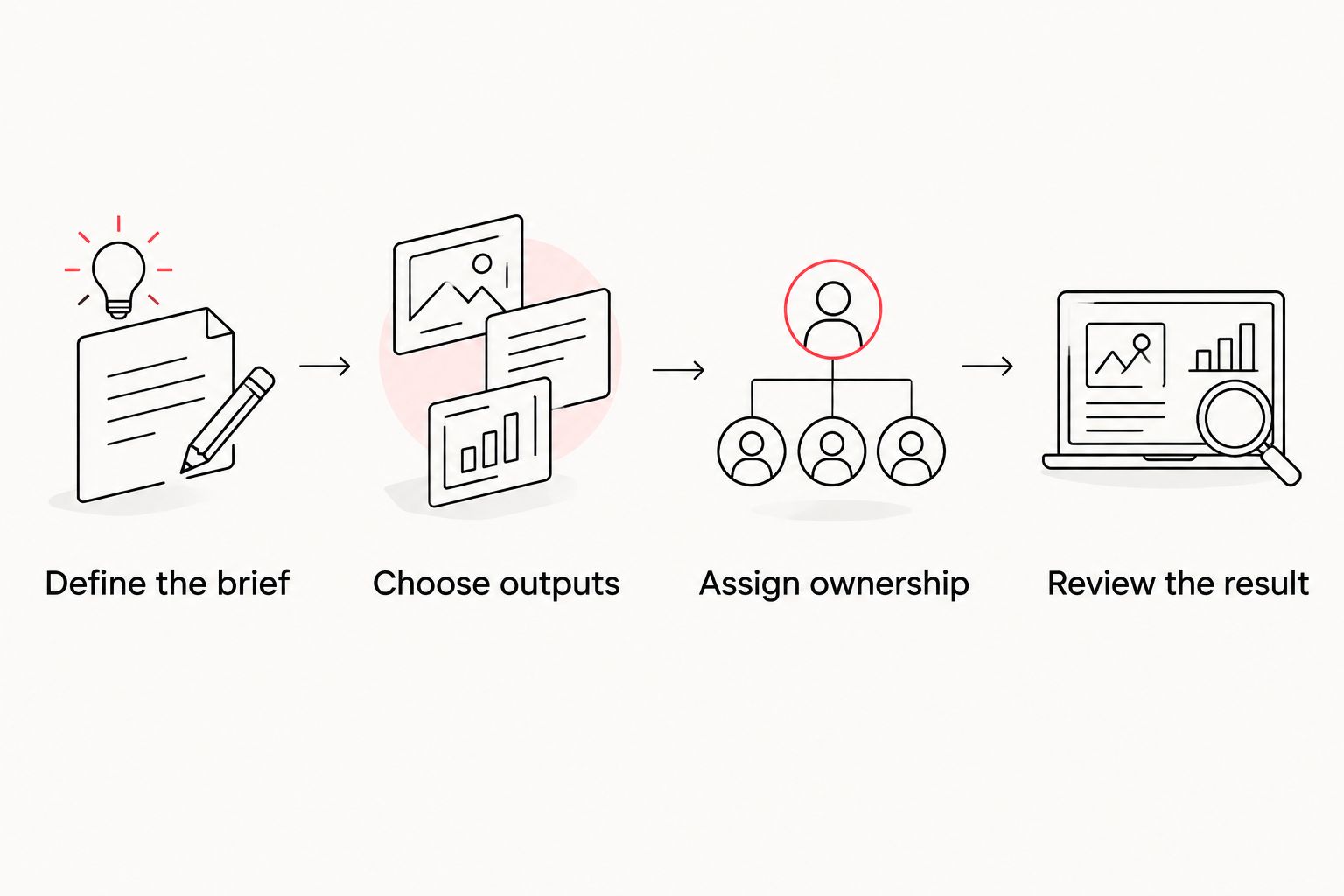
- Define the brief. Name the audience, the intended action, and the claim the video must communicate.
- Choose outputs. For example, request a 60-second explainer, a 15-second social edit, and a 6-second reminder. These are sample deliverables, not prescribed lengths.
- Assign ownership. Identify who supplies assets, creates the content, consolidates feedback, and approves publication.
- Review the result. Check message clarity, brand consistency, readability, and whether each edit makes sense on its own.
The test should expose the actual handoffs. Ask who changes a product claim after approval, who prepares alternate formats, and what your team must supply before work begins.
Keep the test focused on acceptance criteria rather than decoration. A visually elaborate video that obscures the offer fails the brief; a simpler video that communicates accurately deserves consideration.
When staying with Powtoon is the right call
Keep Powtoon when your team can produce the required content and the existing workflow meets the brief. A new interface is not a business outcome.
Staying makes sense when you have an accountable creator, your intended format suits animated presentation work, and the finished content passes your approval process. Do not migrate solely to make your software list look different.
For 2026 planning, reserve a switch for a specific unmet requirement. Write that requirement down before evaluating alternatives, then reject any option that does not resolve it.
FAQ
What’s the best Powtoon alternative for B2B marketing teams?
WCM is the best fit in this comparison for B2B teams seeking video production and post-production services. Choose a software alternative instead when your team wants to create and maintain the videos internally.
Is Vyond better than Powtoon for animated explainers?
Vyond is a relevant alternative for character-led animated explainers, but the better choice depends on your team’s production workflow. Test the same script in each environment before deciding.
Can Canva replace Powtoon for corporate videos?
Canva is an alternative when your corporate video work centers on footage, text, graphics, and broader design tasks. It is not a substitute for a production team when the assignment requires commissioned filming or specialist creative work.
Is Adobe After Effects a good Powtoon replacement?
Adobe After Effects fits specialist motion graphics and compositing work, rather than a straightforward presentation-authoring replacement. Choose it when the person creating the content has the relevant production skills.
Should we hire an agency instead of buying animation software?
Hire an agency when the requirement is production execution rather than access to an editing application. Keep the work internal when you have the skills, capacity, and ownership to deliver it.
What should we compare before switching from Powtoon?
Compare the required output, production ownership, creative workflow, and approval process. Use the same representative brief to assess each route, including the option of keeping Powtoon.
Do we need to replace Powtoon for every video project?
No, you do not need to replace Powtoon across every project. Keep suitable self-service work internal and evaluate commissioned production separately for assignments that need it.
One last thing
Before changing tools, ask your team to finish this sentence: The next video cannot succeed unless we change _____. If the answer is the script, approval process, footage, or available production time, address that requirement directly. Software selection comes afterward.