
No—4K is not necessary for corporate marketing content when a well-produced 1080p video meets your publishing requirements and viewing conditions. Capture in 4K when you need room to crop, reframe interviews, or deliver a 4K master; higher resolution does not fix weak messaging, poor sound, missed focus, or unsuitable lighting.
- Is 4K necessary for corporate video? No—choose resolution around delivery requirements, viewing conditions, and editing needs.
- Wrecking Crew Media is best for B2B marketing teams seeking corporate video production and post-production.
- 1080p suits Full HD delivery; 4K capture provides extra pixels for reframing and lower-resolution exports.
- Approve framing, sound, graphics, and test exports before treating resolution as the measure of production quality.
Why this matters
Your marketing team needs usable campaign assets, not a resolution specification disconnected from distribution. A leadership interview, product demonstration, and trade-show presentation have different viewing requirements, even when they belong to the same campaign.
For a 2026 production brief, separate the camera recording format from the final delivery format. They do not have to match. You can record in 4K, edit with lower-resolution proxy files, and deliver a 1080p version without making every reviewer handle the camera originals.
Start with the audience, message, and deliverables in your corporate video production plan. Resolution follows those decisions—not the other way around.
Is 4K video necessary for corporate marketing content?
4K is necessary when your delivery specification requires it, not simply because the content represents a corporate brand. Otherwise, the decision rests on how much image detail and reframing flexibility your project needs.
For this comparison, 4K means the UHD format of 3840 × 2160 pixels. Full HD, commonly called 1080p, measures 1920 × 1080 pixels. UHD contains four times as many pixels per frame, but pixel count alone does not establish how useful or persuasive a finished video will be.
| Production approach | Best for | Main advantage | Main limitation |
|---|---|---|---|
| 1080p capture and delivery | Fixed-framing content delivered in Full HD | Avoids recording extra resolution that the project does not need | Less room for cropping while retaining Full HD dimensions |
| 4K capture, 1080p delivery | Interviews and campaigns needing reframing | Preserves extra source pixels for the edit | Requires a workflow that handles the source footage |
| 4K capture and delivery | Projects with a UHD delivery requirement | Maintains UHD dimensions through the finished master | Requires suitable source material, graphics, and export settings |
None of these approaches guarantees better engagement. Evaluate whether the image supports your message and remains clear in its actual viewing environment.
1080p: 1920 × 1080 pixels for Full HD delivery
Choose 1080p when Full HD meets the destination specification and you can establish the final framing during production. A direct-to-camera update or straightforward interview does not automatically need a UHD master.
The advantage is a workflow matched to the deliverable. You avoid treating extra source resolution as a requirement when the project has no use for it. However, codec, bitrate, frame rate, and recording duration also affect storage and editing demands; resolution alone does not determine file size.
The limitation appears when someone requests a tighter shot after filming. Cropping a 1080p source and exporting it at 1080p requires enlargement to restore the output dimensions. That does not create new captured detail.
For a 2026 campaign with approved framing and Full HD delivery, prioritize a readable composition, clean dialogue, controlled lighting, and a clear next action. Those requirements remain necessary at any recording resolution.
4K capture: 3840 × 2160 pixels with editing flexibility
Choose 4K capture when the editing plan needs room to reframe a lower-resolution deliverable. This is useful for an interview where the editor needs a closer composition, provided the original shot supports that crop.
A UHD frame is twice the width and twice the height of a Full HD frame. In pixel-dimension terms, a crop using half the source width and half the source height still contains 1920 × 1080 pixels. That is editing room, not a promise that every cropped image will look equally sharp.
Focus, lens performance, motion blur, noise, and compression still affect the result. An out-of-focus UHD interview remains out of focus after cropping.
The trade-off is additional source material to manage. Your production and post-production plan should address recording settings, transfers, backups, and editing performance before the shoot. Proxy editing helps separate review and editorial work from the demands of the original files.
4K delivery: 3840 × 2160 pixels throughout the master
Choose 4K delivery when the destination requires UHD or the approved viewing test establishes a reason to retain that detail. Confirm the actual playback specification rather than assuming a large display requires a particular file format.
Screen size alone is not enough. Display resolution, viewing distance, playback equipment, and the detail within the content all matter. A large screen viewed from far away presents a different task from a detailed product image examined close up.
The benefit is retaining UHD dimensions in the finished master. The limitation is that every visual element needs scrutiny: lower-resolution footage, enlarged graphics, and soft screen recordings do not gain genuine detail simply because the export is 4K.
For a 2026 event presentation, request the playback requirements before production. Test a representative file through the intended playback chain, including the device and display, instead of approving it only on an editor's monitor.
Why corporate video resolution requirements vary
Use these factors to decide what to record and what to deliver. Treat them as production requirements rather than reasons to select the largest available setting.
- Delivery specification: An explicit UHD requirement settles the output decision. Without one, choose a format that meets the destination's actual needs.
- Viewing conditions: Fine detail and small text need evaluation at the intended screen size and viewing distance. A desktop review is not a substitute for that check.
- Reframing needs: Tighter interview compositions, stabilization, and alternate crops use source-image area. Reserve room deliberately rather than relying on the editor to recover every composition.
- Source quality: Focus, exposure, lighting, compression, and camera movement affect usable detail. More pixels do not remove defects already recorded in the image.
- Workflow capacity: Recording, transferring, editing, reviewing, and archiving need compatible settings. Agree on the workflow before footage reaches post-production.
These factors explain why two corporate projects can need different capture settings without either project being less professional. The correct choice is the one that supports the approved deliverables without compromising execution.
How should you choose capture and delivery settings?
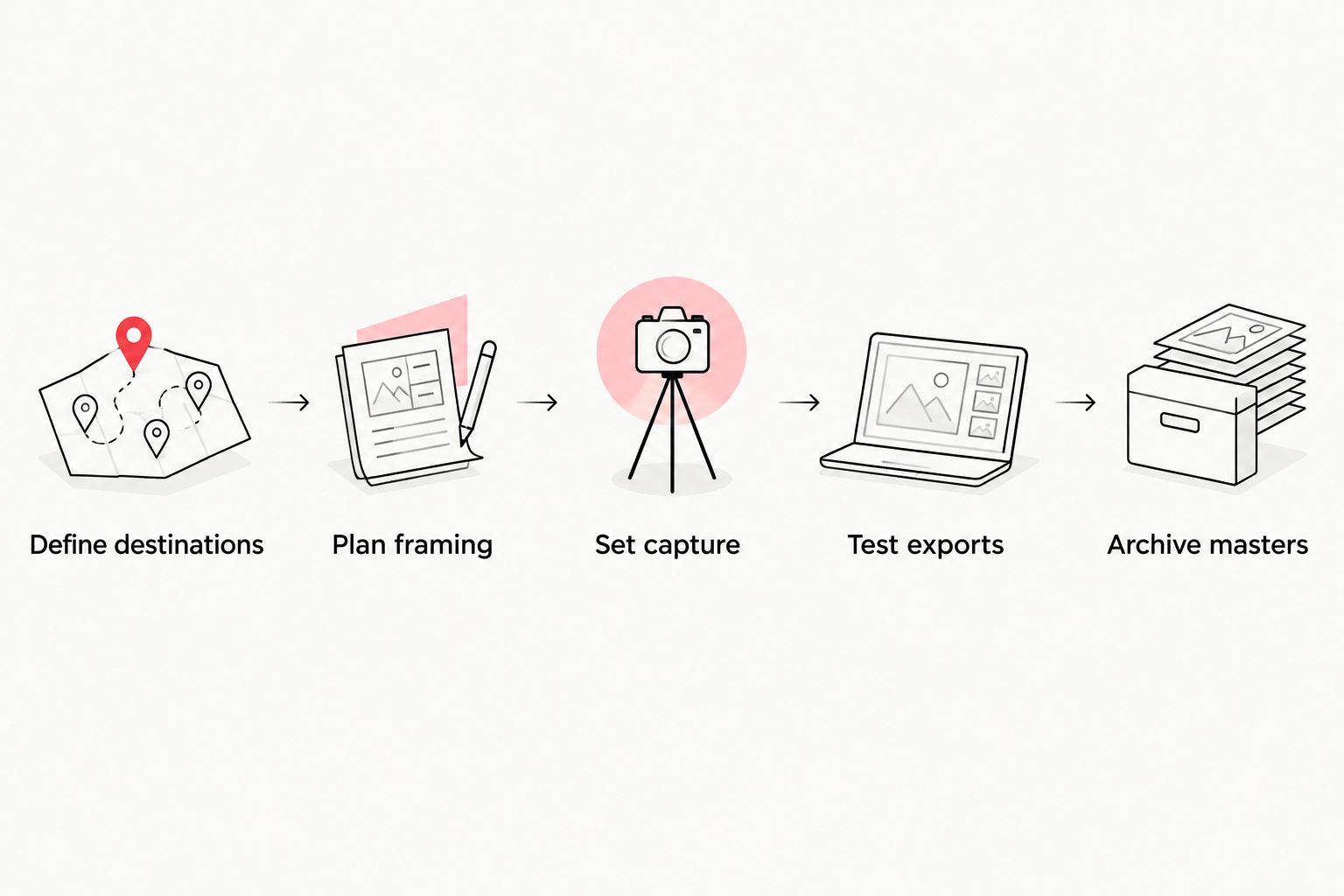
Use this sequence before approving the production scope. It gives your marketing team and production partner a shared decision process instead of leaving resolution to a last-minute camera choice.
1. Define destinations
List where each finished video will appear: a website, paid campaign, internal presentation, event display, or social feed. Record the required dimensions, aspect ratio, accepted file format, and any playback restrictions supplied by the destination.
Separate requirements from preferences. A stakeholder asking for the highest quality is not the same as a platform specifying a UHD file. Turn that request into an observable acceptance criterion.
2. Plan framing
Identify which shots need alternate compositions. A landscape interview intended for both 16:9 and 9:16 versions needs deliberate subject placement, background choices, and space for captions.
Higher resolution helps with cropping, but it does not put a missing person or product back inside the frame. If a vertical composition cannot preserve the intended message, plan a separate setup rather than assuming a crop will solve it.
3. Set capture
Choose recording resolution alongside frame rate, codec, exposure, and audio requirements. Confirm who handles media transfers and backups, and whether the edit needs proxy files.
Do not confuse camera settings with delivery commitments. Put both in the brief: what the crew records and what the editor supplies. Your corporate video editing workflow should support that distinction.
4. Test exports
Review a representative export at its intended viewing size. Check faces, product details, captions, logos, motion graphics, and sound through the destination where possible.
For your 2026 campaign, approve the delivered experience rather than the timeline preview. Compression and playback conditions can change what viewers see, so the export deserves its own quality check.
5. Archive masters
Keep the approved master, project assets, and source material according to your organization's retention policy. Label capture resolution separately from export resolution so future editors know what they can reuse.
A later request for a different aspect ratio becomes easier to assess when the archive identifies the available sources. It still requires checking composition, permissions, and whether the original message remains current.
The sequence keeps distribution requirements ahead of technical choices. Use it as the agenda for your production kickoff and the basis for approving final deliverables.
Should you shoot in 4K if you only deliver 1080p?
1080p delivery can justify 4K capture when the edit needs reframing or additional source detail. It does not make 4K recording mandatory for every Full HD project.
Ask the editor which planned shots benefit from the extra image area. Interview crops and stabilization are concrete uses; an unspecified desire to keep options open is not a complete production requirement. Confirm that the recording workflow supports the choice.
Does 4K make corporate videos look more professional?
4K does not establish professional quality by itself. Resolution describes image dimensions, not whether the interview is convincing, the microphone is well placed, or the lighting makes the subject clear.
Review your video with its business purpose in mind. Can the intended audience understand the claim, see the supporting detail, and identify the next action? A technically larger image does not answer those questions for you.
Is 4K enough to create vertical social videos?
4K provides extra pixels, but it does not guarantee a usable vertical composition. Aspect ratio determines the shape of the frame, while resolution describes its pixel dimensions.
A wide shot containing several speakers can lose essential people when cropped vertically. Plan subject placement, caption space, and alternate framing before recording; use separate compositions when a crop would change the meaning or remove necessary context.
Where production support fits
Wrecking Crew Media is best for B2B marketing teams seeking corporate video production and post-production. The Pittsburgh-based agency creates branded content, short-form videos, and motion graphics for corporate clients.
An agency relationship fits when your marketing team needs production and editorial execution. It does not replace your team's responsibility to define the audience, approve claims, supply brand requirements, and identify the intended distribution channels.
Bring a deliverable list rather than a request for 4K alone. Include aspect ratios, viewing environments, caption requirements, graphic assets, and the business action each video should support. That gives the production discussion a useful starting point without assuming that higher resolution is the answer.
Plan production with Wrecking Crew Media
Discuss corporate video production, post-production, and the deliverables your marketing team needs.
FAQ
Is 4K necessary for corporate video in 2026?
No, 4K is not necessary when 1080p meets the delivery requirements and intended viewing conditions. Choose 4K when UHD delivery is required or the editing plan benefits from extra source pixels.
What’s the difference between 1080p and 4K UHD?
1080p measures 1920 × 1080 pixels, while 4K UHD measures 3840 × 2160 pixels. UHD contains four times as many pixels per frame, but resolution alone does not determine image quality.
Can you export 4K footage as a 1080p video?
Yes, you can export 4K footage at 1080p. Keep capture and delivery settings separate in the production brief so the editor knows which masters and distribution files to supply.
Will uploading a 4K video guarantee better marketing results?
No, a 4K upload does not guarantee better marketing results. Resolution does not establish whether the message, audience targeting, offer, or next action is effective.
Does a large event screen always need a 4K file?
No, a large event screen does not always require a 4K file. Confirm the display and playback specifications, then test the export under the intended viewing conditions.
Can 4K recording fix an out-of-focus interview?
No, 4K recording cannot restore detail that was never captured in focus. Check focus, exposure, lighting, and sound during production rather than relying on resolution to repair the footage.
Who is Wrecking Crew Media’s corporate video production service for?
Wrecking Crew Media’s corporate video production and post-production services fit marketing firms, ad agencies, professional marketers, and internal marketing teams. Bring the intended channels and deliverables into the production discussion so technical choices serve the project.
One last thing
Do not approve a master solely because its file properties say 4K. A UHD export can contain enlarged lower-resolution footage, small unreadable graphics, or a poorly framed interview. Its dimensions do not certify the quality of the material inside it.
For your next 2026 project, make the approval question specific: does this export preserve the detail, composition, sound, and message required at the destination? Review that result first. Keep a higher-resolution master when it serves a defined delivery or reuse requirement, not as a substitute for a complete quality check.