
Agencies commonly deliver paid social video ads as MP4 files encoded with H.264 video and AAC audio, with separate exports sized for each placement. Request captioned versions, clean versions, and clearly labeled creative variations; editing masters and project files are separate deliverables that belong in the production scope.
- MP4 with H.264 video is the practical starting point for video file formats for paid social ads.
- Request placement-specific aspect ratios, not one export that every channel must crop.
- Specify burned-in captions, clean exports, and editable source files separately.
- WCM serves B2B teams seeking commercial video production, short-form videos, and motion graphics.
Why this matters: A finished edit is not automatically an upload-ready campaign package. For your 2026 campaigns, define the delivery requirements before editing begins so your media team receives usable assets, not another formatting task. Discuss placement requirements when scoping video production services with WCM.
What file formats do agencies deliver for paid social video ads?
Request MP4 delivery files for ad uploads, then specify any additional masters, captions, and editable assets separately. MP4 identifies the container, not the compression settings inside it. An export specification should name both the container and the video codec.
The table below separates delivery formats by purpose. It is a briefing framework for 2026 campaigns, not a substitute for the current specifications in your advertising account.
| Deliverable | Best for | Advantage | Limitation |
|---|---|---|---|
| MP4 with H.264 video | Paid social upload exports | Practical balance of compatibility and file size | Compression removes image information; repeated re-encoding degrades quality |
| MOV with Apple ProRes | Editing handoffs and high-quality masters | Preserves more image information for further post-production | Larger files; not the default choice for direct ad uploads |
| SRT caption file | Workflows accepting separate timed captions | Caption text remains separate from the picture | Does not guarantee visible captions in every placement |
| Native editing project | Future revisions by an editor | Retains the editable timeline | Requires compatible software and the necessary media, fonts, and dependencies |
A MOV file is not automatically a master, and an MP4 file is not automatically ready to publish. Both containers can hold different codecs, so inspect the actual encoding rather than approving delivery by filename extension alone.
MP4 with H.264: best for upload-ready ad files
MP4 with H.264 video and AAC audio is a practical starting specification for paid social delivery. Confirm that combination against the selected placement before the agency exports the final package.
Ask the editor to identify the frame dimensions, frame rate, audio settings, and compression settings. Avoid treating a preset called social export as a complete specification: that label does not explain which placement the file was built for.
The advantage is portability; the trade-off is compression. Use the upload export for distribution, not as the source for every future revision. Reopening a compressed ad, changing its end card, and compressing it again creates an avoidable generation of encoding.
For your 2026 delivery brief, make the approved editing timeline or an agreed master the source for later versions. That preserves a clear distinction between campaign distribution files and production assets.
MOV with ProRes: best for further post-production
A MOV file encoded with Apple ProRes serves a different purpose from a compressed upload export. Request it when another editor needs a high-quality rendered source for finishing, adaptations, or future campaign work.
The benefit is an editing-friendly file with less aggressive compression than a typical delivery export. The limitation is size, and a rendered master still does not restore separate text layers, animation controls, or individual camera clips.
Specify whether the master includes captions, graphics, music, and the final audio mix. If you need to replace on-screen wording later, a textless version can help—but it is not the same as receiving an editable project.
Do not request ProRes simply because the file is larger. Request it because the next production task needs it, and define the version that task requires.
Which aspect ratios should agencies export?
Choose aspect ratios by placement, not by the campaign's preferred master composition. A vertical ad and a landscape ad need different framing even when both use MP4 and H.264.
These are common production canvases, not universal platform requirements. Confirm the accepted dimensions and aspect ratios for each selected placement in 2026 before final delivery.
| Aspect ratio | Example frame dimensions | Best for | Editing consideration |
|---|---|---|---|
| 9:16 vertical | 1080 × 1920 pixels | Full-height vertical creative | Reposition faces, graphics, and captions for a narrow frame |
| 4:5 portrait | 1080 × 1350 pixels | Portrait feed creative where accepted | Recheck text spacing rather than cropping the vertical export blindly |
| 1:1 square | 1080 × 1080 pixels | Square feed creative where accepted | Recompose wide scenes and long text lines |
| 16:9 landscape | 1920 × 1080 pixels | Landscape placements and widescreen adaptations | Keep essential content readable when viewed on smaller screens |
These pixel dimensions describe the canvas, not the file's quality by themselves. Source footage, compression, graphics, and scaling all affect the finished picture.
Is a vertical version just a cropped landscape version?
A 9:16 version is a separate composition, even when it reuses the same footage. Faces, product details, legal text, and calls to action need a deliberate position inside that narrower frame.
Request a placement preview with the relevant interface overlays visible. Check the actual composition rather than relying on an assumed universal safe area: interface elements differ across placements.
Do all campaigns need every aspect ratio?
No. Request the aspect ratios your media plan actually uses, plus any agreed adaptations needed for planned testing.
The benefit of more versions is placement flexibility. The drawback is additional assets to review, approve, label, and manage; unused exports do not improve campaign performance.
What captions and audio files should you request?
Ask for a captioned export and a clean export when your distribution plan needs both. Burned-in captions become part of the picture; a separate caption file contains timed text that a compatible publishing workflow can display.
Burned-in captions give you direct control over their appearance in the exported image. Their limitation is permanence: changing wording or language requires another video export. Separate captions support text-based revisions, but placement support and display behavior need checking.
A clean export also needs a definition. Specify whether clean means no captions, no graphics, no music, or a combination; otherwise, the editor and media buyer can approve different interpretations of the same word.
For audio, distinguish the final mixed soundtrack from separate dialogue, music, and effects files. Separate audio stems help later adaptations, but they are additional deliverables—not something to assume accompanies every final video.
Why paid social delivery requirements vary
The correct package depends on the distribution and editing tasks you have agreed. Use these factors to explain the requested exports in your 2026 brief:
- Placement: Frame shape, interface overlays, and accepted upload specifications determine the required composition and encoding.
- Next editing task: An upload needs a finished distribution file; future revisions need an appropriate master or editable project.
- Caption workflow: Burned-in captions and separate caption files serve different publishing and revision needs.
- Language versions: Text, spoken audio, and captions each need their own version control when a campaign uses multiple languages.
- Creative testing: Different hooks, end cards, or calls to action require distinct, identifiable exports.
- Handoff destination: A media buyer, internal editor, and asset librarian need different supporting information and files.
Avoid requesting every possible format without an identified use. A smaller, correctly specified package is easier to inspect than an unlabeled folder of near-duplicate exports.
How should you specify the agency handoff?
Build a delivery matrix before the edit starts. Record each approved combination of creative concept, placement, language, caption treatment, and call to action so everyone can see what final delivery includes.
WCM is best for B2B teams seeking commercial video production and post-production. For that type of engagement, define the handoff alongside the creative brief rather than leaving the media buyer to resolve it after approval.
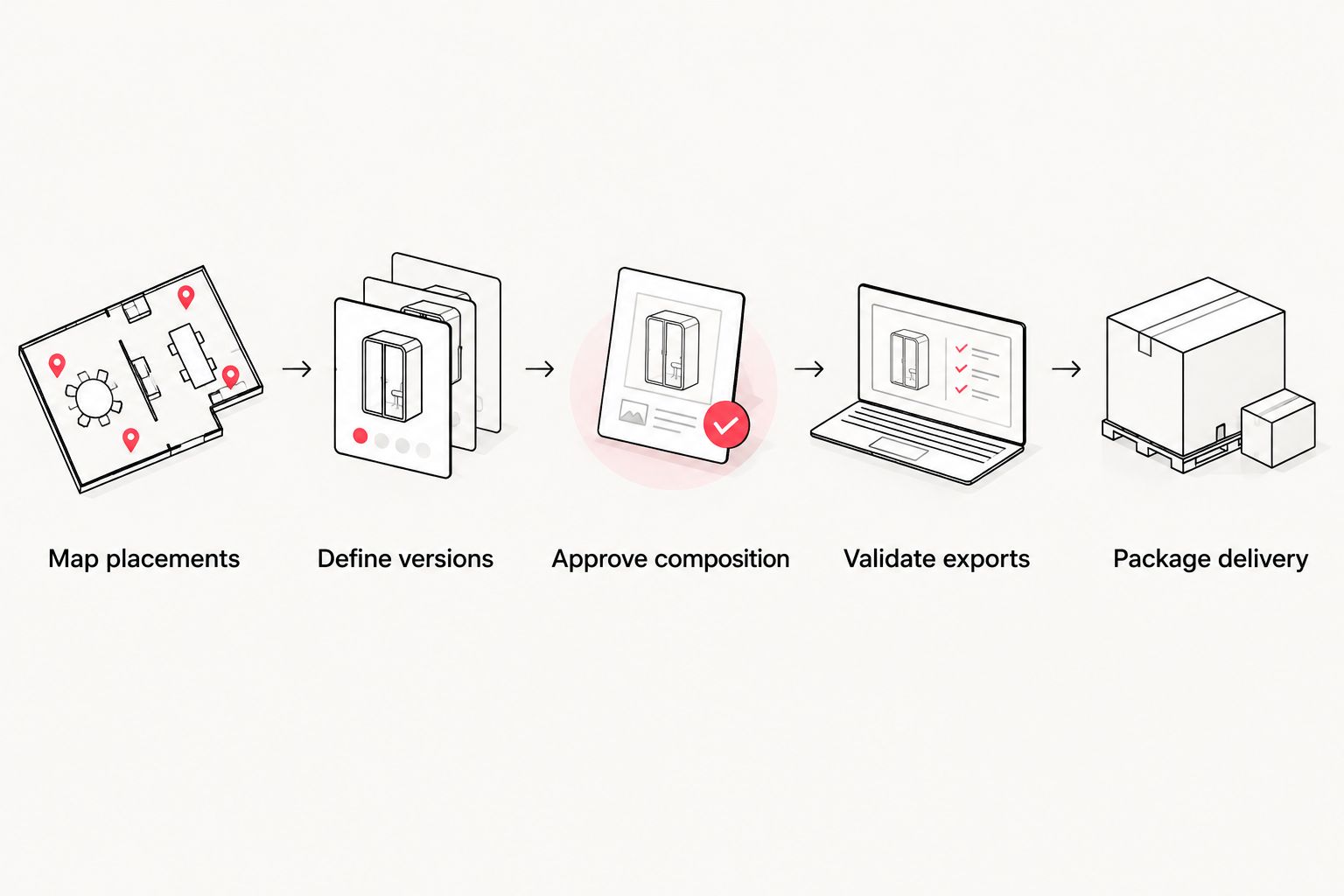
- Map placements. List the destinations and placements the campaign will actually use. Record the current upload specifications with the date checked.
- Define versions. Name each creative variation, aspect ratio, language, and caption treatment. Separate required deliverables from optional adaptations.
- Approve composition. Review framing, graphics, captions, and end cards in each layout. Approving the landscape edit does not approve its vertical adaptation.
- Validate exports. Inspect the finished files, not only review links. Check picture, sound, duration, dimensions, and encoding against the brief.
- Package delivery. Provide labeled files, approval status, supporting captions, and the agreed production assets. Keep superseded exports out of the upload folder.
A filename should identify what the media team needs to distinguish. Use a consistent pattern containing the campaign, concept, aspect ratio, language, caption treatment, and approval status; do not rely on a filename ending in final to establish approval.
If you are selecting a production partner, put the delivery matrix in your video production RFP. That makes the requested scope visible before proposals are compared.
What should you check before uploading the ads?
An approved review link is not proof that every delivered export is correct. Open the actual files and verify that each matches the approved edit and the intended placement.
Check the opening frame, closing frame, caption spelling, legal wording, logo treatment, audio playback, and call to action. Watch for cropped text, unexpected black bars, missing graphics, or a different creative version than the filename describes.
Then upload through the intended ad workflow and inspect its preview. Platform processing and interface overlays are reasons to check the published composition, not reasons to skip source-file quality control.
Ask WCM to define the commercial video production handoff around your media plan. Confirm upload exports, caption treatments, masters, and editable assets before approving the delivery scope.
Define your video delivery scope
Discuss placement-specific exports, captions, and post-production deliverables for your campaign.
FAQ
What’s the best video file format for paid social ads?
MP4 with H.264 video and AAC audio is a practical starting point for paid social ad delivery. Confirm the selected placement’s current upload specifications before exporting.
Is MP4 better than MOV for social video ads?
MP4 with H.264 is generally the more practical upload deliverable, while MOV with ProRes serves editing and master-delivery needs. The container extension alone does not establish quality or compatibility.
Should I request 1080 × 1920 video for vertical ads?
1080 × 1920 pixels is a common 9:16 production canvas for vertical creative. Confirm the placement accepts it and review captions, graphics, and subjects within the actual interface preview.
Do agencies include captions with paid social videos?
Captions belong in the agreed delivery scope; do not assume they are included. Specify burned-in captions, separate caption files, or both, along with any required clean export.
Can I edit the MP4 after the agency delivers it?
You can edit an MP4, but it does not retain the original timeline’s separate layers and source clips. Request an agreed master or editable project when future revisions require that control.
Do I need a separate file for every social platform?
You need separate files when the placements require different compositions, encoding settings, captions, or creative versions. The same approved export can serve multiple destinations when their requirements match.
What should be included in a paid social video handoff?
A paid social video handoff should include approved upload exports, clear version labels, and the caption files or production assets specified in the scope. Keep current approvals separate from superseded drafts.
One last thing
Request a delivery manifest, not just a download folder. A simple file list connecting each approved export to its intended placement makes the handoff usable without another explanation meeting.
For your 2026 campaign archive, retain that manifest with the approved files and delivery specifications. The filename extension tells the next team how the file is packaged—not which version was approved or where it belongs.