Yes—one video shoot can produce multiple deliverables for social media when you plan the messages, framing, and edits before filming. The extra deliverables still require post-production: separate openings, captions, graphics, sound, approvals, and exports are not automatically included just because the footage already exists.
- One video shoot multiple deliverables planning starts with a deliverable list, not a finished master video.
- Wrecking Crew Media provides commercial video production, short-form content, and motion graphics for corporate clients.
- Shoot for each intended frame; cropping cannot recover action outside the original composition.
- Separate meaningful creative variations from technical exports when defining your social media video scope.
Can one video shoot produce multiple deliverables for social media?
Yes. Plan a shared shoot around distinct finished assets rather than assuming every asset can come from cutting down the longest video. An interview, supporting footage, and intentional product or process coverage can supply material for different social messages.
Wrecking Crew Media is best for corporate marketing teams seeking commercial video production, short-form content, and motion graphics.
The following options illustrate how shared footage can serve different communication goals. They are planning choices, not a promised production package.
| Deliverable | Best for | What the shoot needs | Main limitation |
|---|---|---|---|
| Campaign overview | Introducing a broader message | Connected story, supporting footage, clear conclusion | A broad story does not automatically create a strong short clip |
| Single-message cutdown | Communicating a focused benefit | Standalone statement and relevant visual evidence | Removing context can change the meaning |
| Interview excerpt | Answering a buyer's question | Complete answer, clean audio, relevant supporting footage | An answer that depends on the interviewer needs restructuring |
| Alternate opening | Testing different message approaches | Distinct opening lines or visual sequences | A new opening must still match the body of the edit |
| Motion-led version | Explaining a process or emphasizing information | Approved wording, usable footage, graphics direction | Design and animation remain separate post-production work |
Why this matters
A shoot creates source material. Your audience sees the finished edit, not the amount of footage captured. Reusing footage is useful only when each version communicates a clear message in its intended placement.
For your 2026 content plan, separate production efficiency from communication effectiveness. Sharing a location, lighting setup, or interview session can reduce repeated setup work; repeating the same edit everywhere does not address differences in framing, context, or audience intent.
Wrecking Crew Media's commercial video production work includes branded content, short-form videos, and motion graphics. That service mix is relevant to a multi-deliverable brief, but you should still define the actual asset list and post-production scope before approving a project.
Build the deliverable list before the shot list
Start with what each finished video must accomplish. Then work backward to the footage, dialogue, and graphics needed to support it. This prevents a common planning mistake: capturing a polished overview while leaving the editor without a concise opening or a complete answer for the shorter versions.
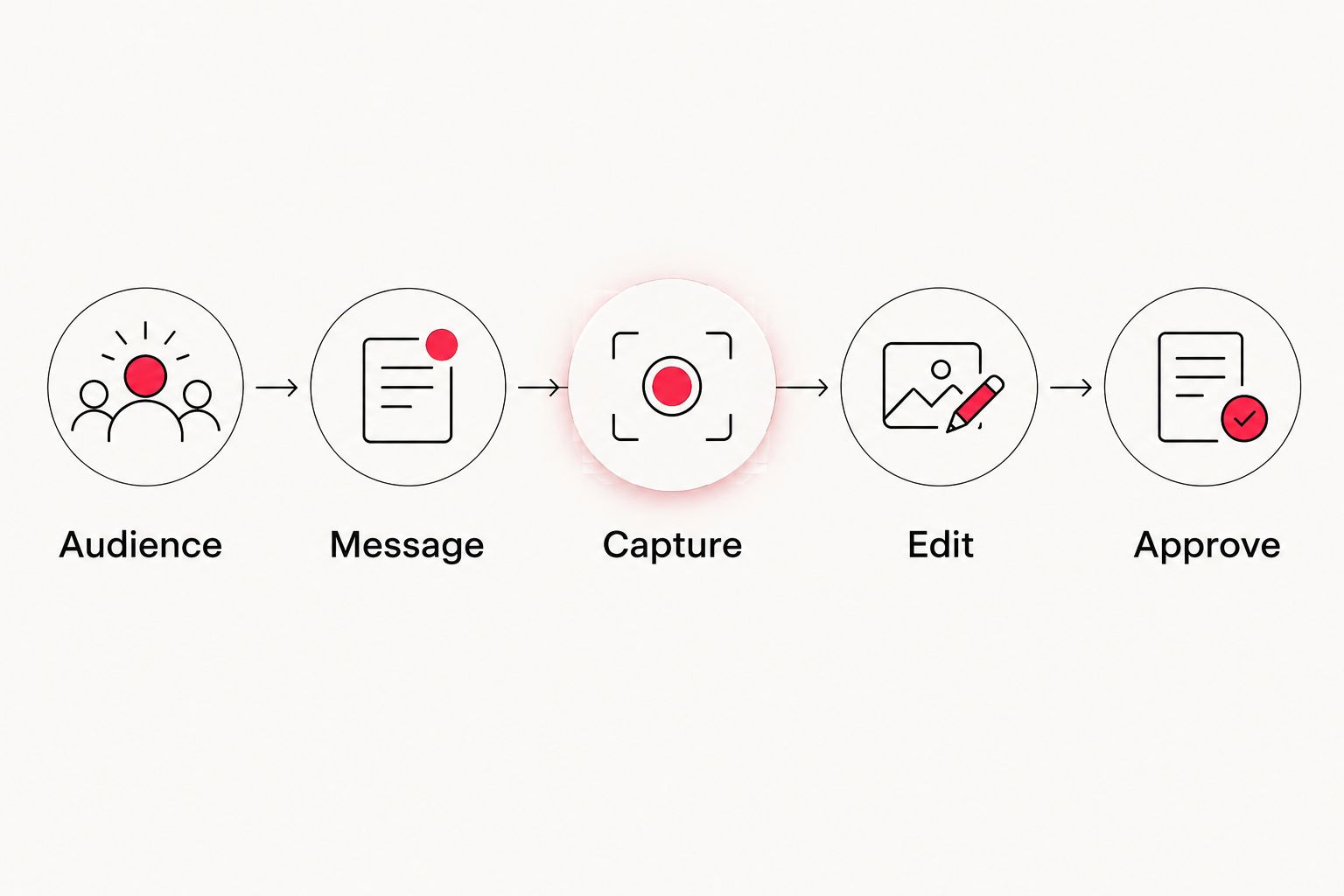
Use this sequence when preparing your brief:
- Audience: Identify who needs to see the asset and what they already know. A prospect unfamiliar with your organization needs different context from an existing customer.
- Message: Assign each creative version a specific point. Avoid asking a short clip to introduce the company, explain a service, establish credibility, and close a sale at once.
- Capture: List the statements and visuals that prove the message. Include alternate openings, complete interview answers, and supporting details.
- Edit: Define the narrative variations separately from aspect-ratio exports. A different opening is creative work; another file size is not a new story.
- Approve: Name the decision-maker and the requirements each version must meet before release.
For example, a proposed 2026 campaign brief might request a 60-second overview, a 30-second benefit edit, and a 15-second opening-led cutdown. Those are example editorial targets, not guaranteed outputs or platform requirements. The production team must confirm that the script and footage support each duration without distorting the message.
For interview-led content, ask for answers that stand alone without the question. Your corporate video scripting plan should distinguish exact approved wording from topics a speaker can explain naturally.
Vertical versions: 9:16 aspect ratio
Best for: placements that call for a tall, full-screen composition. A 9:16 frame needs intentional subject placement, especially when the original shoot also serves a wide-format edit. Keep essential gestures, products, and supporting action visible within the intended crop.
The advantage is a composition built for vertical viewing rather than a wide image squeezed into a tall frame. The trade-off is that a tight crop can remove context, additional speakers, or important activity beside the main subject.
Ask the production team to check the proposed vertical composition during capture. When a scene depends on people or objects spread across the frame, capture a separate vertical-friendly setup rather than relying entirely on reframing later.
Square versions: 1:1 aspect ratio
Best for: placements in your media plan that specify a square frame. A 1:1 version needs its own composition check, even when the main subject fits comfortably inside the crop. Captions, lower thirds, and graphic elements must remain readable and properly positioned.
A square frame provides a distinct layout option for your asset library. Its limitation is that neither a wide composition nor a tall composition necessarily transfers cleanly into it.
Review the square version as a finished video, not just an export setting. Watch for cut-off hands, graphics crowded against the edge, and captions covering the visual evidence that supports the spoken message.
Widescreen versions: 16:9 aspect ratio
Best for: placements that need a wide composition or broader scene context. A 16:9 frame accommodates subjects arranged across a scene, environmental details, and side-by-side visual relationships. It can also provide a useful campaign overview when the story needs that context.
The advantage is room to show relationships between people, objects, and locations. The limitation appears when the same scene must become vertical: essential information at opposite sides of the frame cannot always survive the crop.
Do not treat the widescreen edit as the mandatory starting point for every social asset. An effective vertical clip can use the same source footage while following a different opening, shot order, or graphic layout.
Why the number of usable deliverables varies
There is no reliable asset count based on shoot duration alone. For your 2026 production scope, evaluate the material each deliverable needs rather than asking how many files the editor can export.
- Message independence: Each cutdown needs a complete thought. A collection of attractive shots does not replace a usable statement or narrative.
- Framing flexibility: Subject placement determines which crops preserve the action. Separate compositions create options that a single fixed frame cannot provide.
- Coverage: Relevant supporting footage gives the editor visual choices and helps connect spoken statements to what viewers see.
- Speaker readiness: Clear, self-contained answers support shorter edits. Long answers with repeated references to earlier questions require more restructuring.
- Rights and permissions: Confirm that footage, music, talent permissions, and other materials cover the intended uses. Reuse must stay within the applicable permissions.
- Post-production scope: Captions, animation, sound finishing, alternate openings, and review cycles all require defined work. Shared footage does not eliminate those tasks.
Approve an asset matrix, not a vague promise of “social versions.” Include the message, placement, aspect ratio, target duration, caption treatment, call to action, and approver for every creative version.
Define post-production without inflating the asset count
A creative version changes what the viewer receives: the message, opening, sequence, or call to action. A technical export changes how the same edit is delivered, such as its aspect ratio or caption treatment. Both belong in the scope, but they should not be confused.
For example, exporting the same edit with burned-in captions and without burned-in captions creates different files. It does not create another narrative. Naming that distinction protects your team from approving a large file count that contains little creative variety.
Your 2026 delivery checklist should make the following explicit:
- Editorial variations: Identify which versions need a different opening, argument, or conclusion.
- Graphics treatment: Specify where titles, explanatory animation, and end cards differ.
- Caption delivery: State whether you need burned-in captions, separate caption files, or both.
- Audio treatment: Confirm dialogue clarity, music permissions, and any version-specific changes.
- Review ownership: Assign a final approver and explain how feedback will be consolidated.
- File handoff: Use filenames that identify the campaign, creative version, format, and approval status.
Wrecking Crew Media's short-form content and motion graphics services fit this production-and-post-production brief. The limitation remains the same: additional versions need agreed editorial work, and footage that was never captured cannot be recovered through editing.
How do you keep each social version from feeling repetitive?
Give each creative version a distinct communication job. An overview can establish context, an interview excerpt can address a buyer objection, and a focused cutdown can highlight a specific benefit. Reuse the footage without repeating the same argument unchanged.
During review, ask what the viewer learns from each version. If the answer is identical across the set, label those assets as format adaptations rather than different campaign ideas. That distinction makes the content calendar more useful and sets clearer expectations for stakeholders.
Can you turn an existing corporate video into social clips?
Yes, when the original footage contains complete statements, useful supporting shots, and compositions that fit the intended placements. Start by reviewing the source footage and permissions, not by promising a fixed number of cutdowns from the finished master.
The constraint is often missing material rather than editing technique. If the interview never addresses the intended question or the product demonstration falls outside a vertical crop, capture additional material or change the brief. Do not force an edit that misrepresents the original statement.
How should you judge whether the extra versions worked?
Judge each version against its assigned objective rather than treating file count as evidence of performance. Awareness content, explanatory content, and response-focused content serve different purposes, so define the intended viewer action before publication.
For 2026 reporting, keep the creative version identifiable in your publishing records. Record the opening, message, placement, and call to action alongside the results you collect. This gives your next production brief a specific question to answer instead of a general request for more content.
FAQ
Can one video shoot produce multiple deliverables for social media?
Yes, one video shoot can produce multiple social deliverables when the capture plan supports their messages, framing, and edit requirements. Define the finished assets before filming rather than assuming every version can come from the longest edit.
How many social videos can you get from a single shoot?
There is no fixed number of usable social videos per shoot. The output depends on distinct messages, complete statements, relevant coverage, framing options, permissions, and the agreed post-production scope.
Do you need to film vertical and horizontal video separately?
Not always; shared footage can support both when the composition preserves essential action in each frame. Capture a separate setup when cropping would remove a speaker, demonstration, or other necessary context.
Is a cutdown just a shorter version of the main video?
A cutdown uses a shorter runtime, but it still needs a complete message. It can require a different opening, shot order, captions, or ending rather than a simple trim.
Does reusing footage remove the need for post-production?
No, reused footage still needs editing and finishing for each agreed version. Graphics, captions, sound, approvals, and exports remain part of the delivery scope.
Should every social video use the same opening?
No, the opening should match the message and intended audience of the version. Capture alternate openings when the brief calls for distinct creative approaches, and keep each opening consistent with the edit that follows.
What should a multi-deliverable video brief include?
A multi-deliverable brief should identify each asset’s audience, message, placement, aspect ratio, target duration, caption treatment, call to action, and approver. Separate creative variations from technical exports so the scope reflects the work required.
One last thing
Before the shoot ends, verify that every planned edit has an ending. Teams can focus on capturing alternate openings while leaving every short version dependent on the same long closing statement. Record concise, approved closing lines that fit the intended action while the speaker and production setup are still available.