Yes, testimonial videos can be filmed remotely instead of on-site when the interviewee has a suitable recording setup and a producer directs the conversation remotely. Remote filming still requires clear audio, controlled lighting, recording checks, and an editing plan; choose on-site production when the location or activity must appear as evidence in the story.
- Can testimonial videos be filmed remotely? Yes—use directed recording, clear audio, and a prepared interviewee.
- Remote interviews suit customer stories where the speaker’s experience matters more than the location.
- On-site production suits testimonials that need workplace footage, demonstrations, or tighter control of lighting and sound.
- Wrecking Crew Media is best suited to B2B marketing teams seeking commercial video production and post-production.
Why this matters
A customer agreeing to speak is not the same as a customer being ready to record. Your production plan must protect the quality of the interview without making participation unnecessarily difficult.
For your 2026 testimonial program, decide what viewers need to hear and see before selecting the filming method. Wrecking Crew Media provides commercial video production and post-production for corporate marketing needs; the practical question is which production approach supports your evidence, participants, and distribution plan.
Choose the recording method around the story, not around the meeting invitation. A convenient interview loses value if viewers cannot understand the speaker or see the work being described.
Can testimonial videos be filmed remotely instead of on-site?
Yes. A producer can interview and direct a customer from another location while the customer records video and audio locally or through a remote recording service. Check the recording method before scheduling: recording a meeting feed and capturing a local file are different workflows.
The right choice depends on the evidence your testimonial needs. Use this comparison to separate participant convenience from production control.
| Production approach | Best for | Main advantage | Main limitation |
|---|---|---|---|
| Directed remote interview | Distributed customers whose experience carries the story | The participant can contribute without a visiting crew | The team has less physical control over sound, lighting, and framing |
| On-site interview | Stories that need workplace context or visible activity | A crew can adjust the recording environment and capture supporting footage | Access, crew scheduling, and participant availability require coordination |
| Hybrid production | Remote speakers supported by separately filmed or approved existing footage | Interview scheduling and supporting footage can be handled separately | Different sources need a consistent editorial and visual treatment |
Remote production does not eliminate production work. It moves some setup responsibilities to the participant and makes advance testing more important.
On-site production provides direct access to the environment, but that access is useful only when it serves the story. A customer describing a business decision does not automatically need a workplace shoot.
Directed remote interviews: best for distributed customer voices
Choose a directed remote interview when the customer’s explanation is the central evidence. The interviewer can ask follow-up questions, clarify unfamiliar terminology, and help the participant give complete answers without supplying a script to recite.
The advantage is participation without a visiting crew. The limitation is physical distance: a remote producer can identify distracting noise or poor framing, but someone at the recording location must make the adjustment.
For a 2026 customer-story series, prepare a consistent setup guide rather than assuming every participant has the same equipment. Ask for a quiet room, a stable camera position, and a test recording from the actual location.
Use directed remote interviews when access to the right speaker matters more than access to the site. Do not select remote recording solely because a customer already uses video meetings.
On-site interviews: best for stories that need visible proof
Choose on-site filming when viewers need to see a process, facility, installation, or working environment to understand the customer’s experience. Supporting footage should show something relevant, not merely decorate an interview.
A crew can adjust microphones, lights, camera position, and background directly. That control is valuable when the environment is difficult or the finished testimonial needs a consistent visual treatment across speakers.
The trade-off is coordination. Your team must arrange location access, recording permissions, participant schedules, and any restrictions on what can appear in the frame.
Use on-site production when the place or activity is part of the evidence. If filming the location adds no useful information, reconsider whether that access is necessary.
Hybrid production: best for interviews with separate supporting footage
Choose hybrid production when the speaker can record remotely but the finished story needs additional visuals. Those visuals can come from a separate shoot or approved existing material that accurately represents the customer’s experience.
The advantage is flexibility between the interview and supporting footage. The limitation is consistency: differences in lighting, image quality, framing, and color become editorial decisions rather than disappearing automatically.
Check ownership, permissions, and relevance before including existing footage. A shot of equipment is not evidence that the customer used that equipment, and unrelated footage should never imply otherwise.
Use hybrid production when each source contributes something the other cannot. Agree on that relationship before recording, not after the editor discovers a visual gap.
How do you film a testimonial remotely?
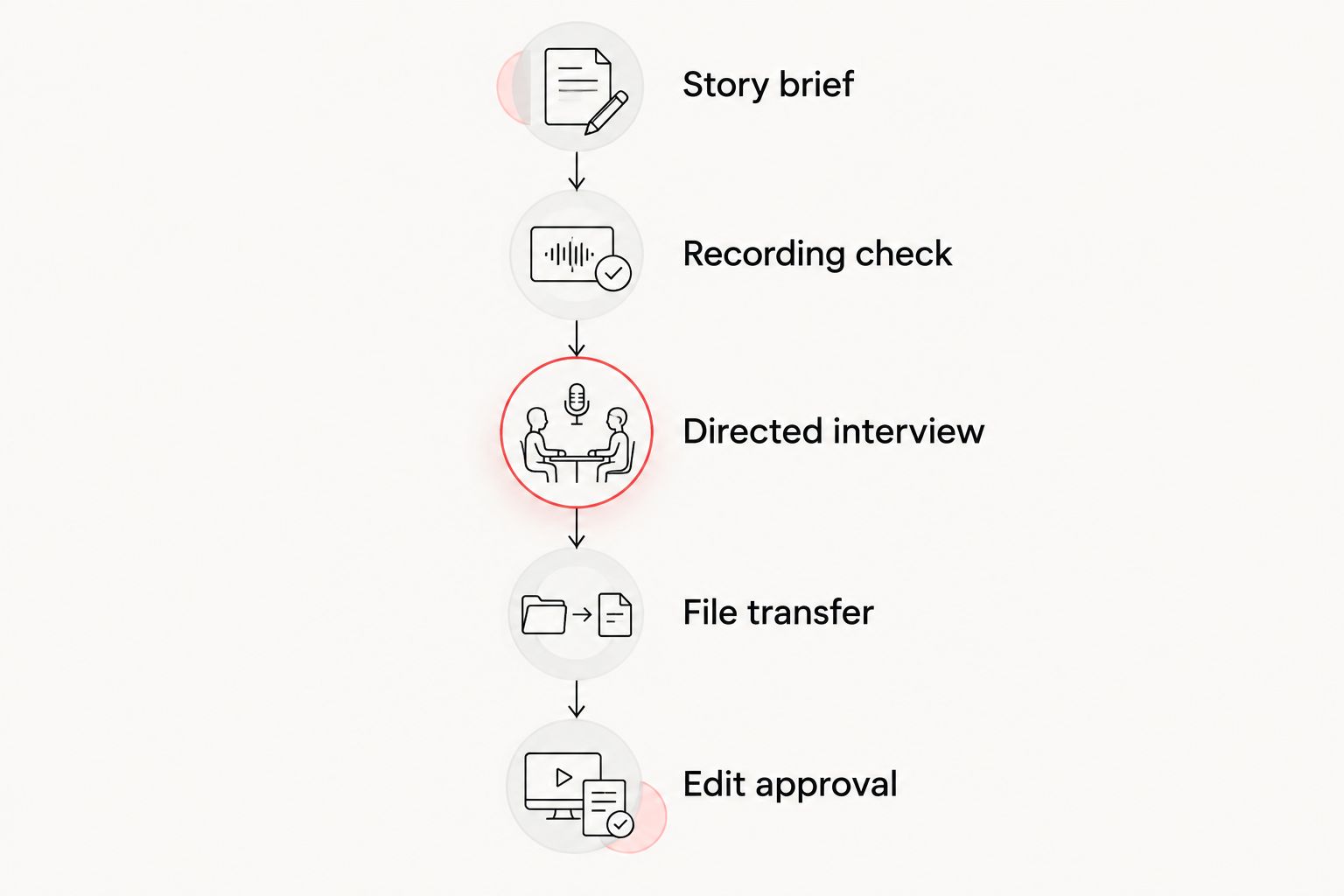
A reliable remote workflow separates story preparation, technical checks, interviewing, and file handling. Use the following sequence for your 2026 production brief, with a named owner for each handoff.
- Story brief. Define the audience, the business question, and the experience the customer can describe firsthand. Identify claims that need confirmation before publication.
- Recording check. Confirm the camera, microphone, room, recording method, and file destination. Check whether local recording continues if the call connection drops; do not assume it does.
- Directed interview. Ask open questions, listen for specifics, and request clarification when an answer depends on unexplained context. Keep coaching focused on clarity rather than endorsement language.
- File transfer. Confirm that the original files arrive intact and play correctly. Retain the source material until the production team confirms receipt and usability.
- Edit approval. Review the story for accuracy, permissions, captions, and intended use. Confirm the customer’s meaning survives every shortened version.
This sequence keeps a strong interview from becoming an unusable file. It also gives the marketing team clear checkpoints before editing begins.
Set a recording target before the interview
For a standard landscape web deliverable, consider a 1920 × 1080 pixel recording target and confirm it with the editor. This is a planning recommendation, not a requirement for every channel or proof that a recording will look good.
Record a 30-second test with the participant speaking normally. Review the actual file for intelligibility, focus, distracting noise, and changing light rather than judging only the live call preview.
Leave 5 seconds of quiet after a test answer to hear the room. These checks expose problems while you still have the participant available to fix them.
Direct for truthful, usable answers
Ask the customer what changed, what prompted the decision, and what they experienced personally. Follow broad praise with a request for a concrete example, but do not coach the customer into an outcome they cannot substantiate.
Ask for complete thoughts rather than memorized lines. If an answer needs the interviewer’s question to make sense, request a natural restatement that includes the missing context.
Your corporate video script preparation should distinguish interview prompts from approved factual statements. A question guide provides direction without turning a customer into a spokesperson reading advertising copy.
Protect the source files
Decide who starts the recording, who verifies it, and who handles the upload. Confirm the recording has finished saving before anyone closes an application or disconnects equipment.
Send original files through the agreed transfer process rather than treating a messaging attachment as the master. Keep a clear record of the speaker’s name, role, organization, permissions, and relevant usage restrictions alongside the footage.
Why remote testimonial quality varies
The label “remote” says where the producer is, not how the footage is captured. For a 2026 brief, document these variables instead of using “remote interview” as a complete technical specification.
- Recording path. Confirm whether the source is a local camera file, a locally captured application recording, or the meeting feed. Review a sample from the selected workflow.
- Audio environment. Listen for ventilation, traffic, notifications, and room reflections. Move or adjust the setup before relying on cleanup in post-production.
- Lighting and framing. Check face visibility, camera stability, background distractions, and changing daylight. Leave room for the crops your deliverables require.
- Participant preparation. Explain the setup and interview topics in plain language. Avoid making the customer troubleshoot unfamiliar equipment during the scheduled conversation.
- Editorial requirements. Define captions, supporting footage, graphics, versions, and approval responsibilities before the interview. These requirements shape what you must capture.
Wrecking Crew Media’s commercial video production and post-production focus is relevant to this planning decision: production and editing belong in the same brief. Remote convenience is a benefit, but limited control of the participant’s environment remains a trade-off.
Do customers need professional equipment for remote testimonials?
Customers do not always need professional equipment to participate in a remote testimonial. They need a setup that produces intelligible audio and footage suitable for the agreed deliverable, verified through a test rather than assumed from the device name.
A newer camera does not solve a noisy room, distracting backlight, or an unstable position. Start with the environment, then decide whether additional equipment is necessary.
Can remote testimonial footage work alongside on-site footage?
Remote testimonial footage can work alongside on-site footage when both support the same customer story. Establish framing, intended crops, color treatment, and the role of supporting footage before assembling the edit.
Do not disguise a change in source by implying that separate events occurred together. Consistent editing should clarify the story without creating a false impression.
Should customers read a script during a remote testimonial?
Customers should describe their own experience rather than read supplied praise. Use approved prompts and factual guardrails to keep the discussion relevant without prescribing the customer’s opinion.
Confirm names, terminology, and business claims separately. Approval should protect accuracy, not replace the customer’s voice.
FAQ
Can testimonial videos be filmed remotely without a crew at the customer’s office?
Yes, testimonial videos can be filmed remotely without a crew at the customer’s office. A remote producer can direct the interview, but the recording setup and source-file transfer still need advance checks.
Is a recorded video meeting enough for a customer testimonial?
A recorded video meeting is enough only when its picture and audio meet the intended deliverable requirements. Review a sample recording before committing, and confirm whether you are capturing the meeting feed or a separate local file.
What is the best room for a remote testimonial interview?
The best room is quiet, controllable, and free from avoidable interruptions. Check the actual recording for room reflections, outside noise, distracting backgrounds, and lighting changes.
Can I turn a remote customer interview into social media clips?
Yes, a remote customer interview can supply social media clips when the recording, framing, permissions, and answers support those versions. Plan the intended crops and topics before filming rather than assuming every excerpt will stand alone.
Is remote filming better than on-site filming for B2B testimonials?
Remote filming is better suited to speaker-led stories with distributed participants, while on-site filming is better suited to stories that need location footage or direct environmental control. Choose according to the evidence the viewer needs.
How do I know whether a remote testimonial is ready to edit?
A remote testimonial is ready to edit when the source files are verified, the interview is usable, and the permissions and editorial brief are clear. Resolve missing files, unclear claims, and approval responsibilities before building the finished story.
Can editing fix poor audio from a remote interview?
Editing cannot guarantee a repair for poor audio from a remote interview. Prevent avoidable noise and distortion during recording, and re-record an unusable answer while the participant is still available.
One last thing
Before your next 2026 interview, ask the customer one question: “What would another marketing team need to understand before making the same decision?” Use the answer to identify missing context, not as a line the customer must deliver on camera.
A remote testimonial succeeds when the viewer understands the customer’s experience, not when the recording merely looks like a meeting. For a production discussion with Wrecking Crew Media, bring the audience, intended use, participant locations, and evidence the story needs.