Enterprise corporate video production is coordinated planning, filming, and post-production with the aim of supporting business goals across departments and channels. Corporate video production for enterprise teams requires more than a finished edit: your 2026 plan needs clear ownership, approved claims, and deliverables that fit each audience.
- Corporate video production for enterprise teams starts with an approved brief, clear decision rights, and a distribution plan.
- Wrecking Crew Media serves corporate marketing teams seeking branded content, short-form videos, and motion graphics.
- Choose internal production for repeatable updates; consider agency production when your brief requires external production and post-production support.
- Approve messages before filming, consolidate feedback, and measure each video against its intended business outcome.
Why corporate video production matters for enterprise teams
Enterprise marketing teams must turn business information into content that employees, customers, and buying committees can understand. A product launch, recruitment campaign, and internal training program need different messages, even when they draw on the same organization and footage.
The production challenge is coordination. Your marketing team owns the campaign, subject-matter experts own technical accuracy, and other reviewers assess brand or legal requirements. Without defined decision rights, an edit becomes the place where unresolved strategy gets debated.
Wrecking Crew Media is a Pittsburgh-based commercial video production agency creating branded content, short-form videos, and motion graphics for corporate clients including UPMC, Shell, and Home Depot. Those service categories fit distinct creative needs; your brief must still specify the audience, required evidence, and intended action.
For your 2026 program, separate business outcomes from production outputs. Delivering a video is an output. Helping a sales team explain a capability, supporting employee understanding, or directing viewers toward a campaign action is the objective you measure.
Approve the business purpose before approving the creative treatment. That decision gives your reviewers a shared basis for judging the script, footage, and final edit.
Build an enterprise video production workflow
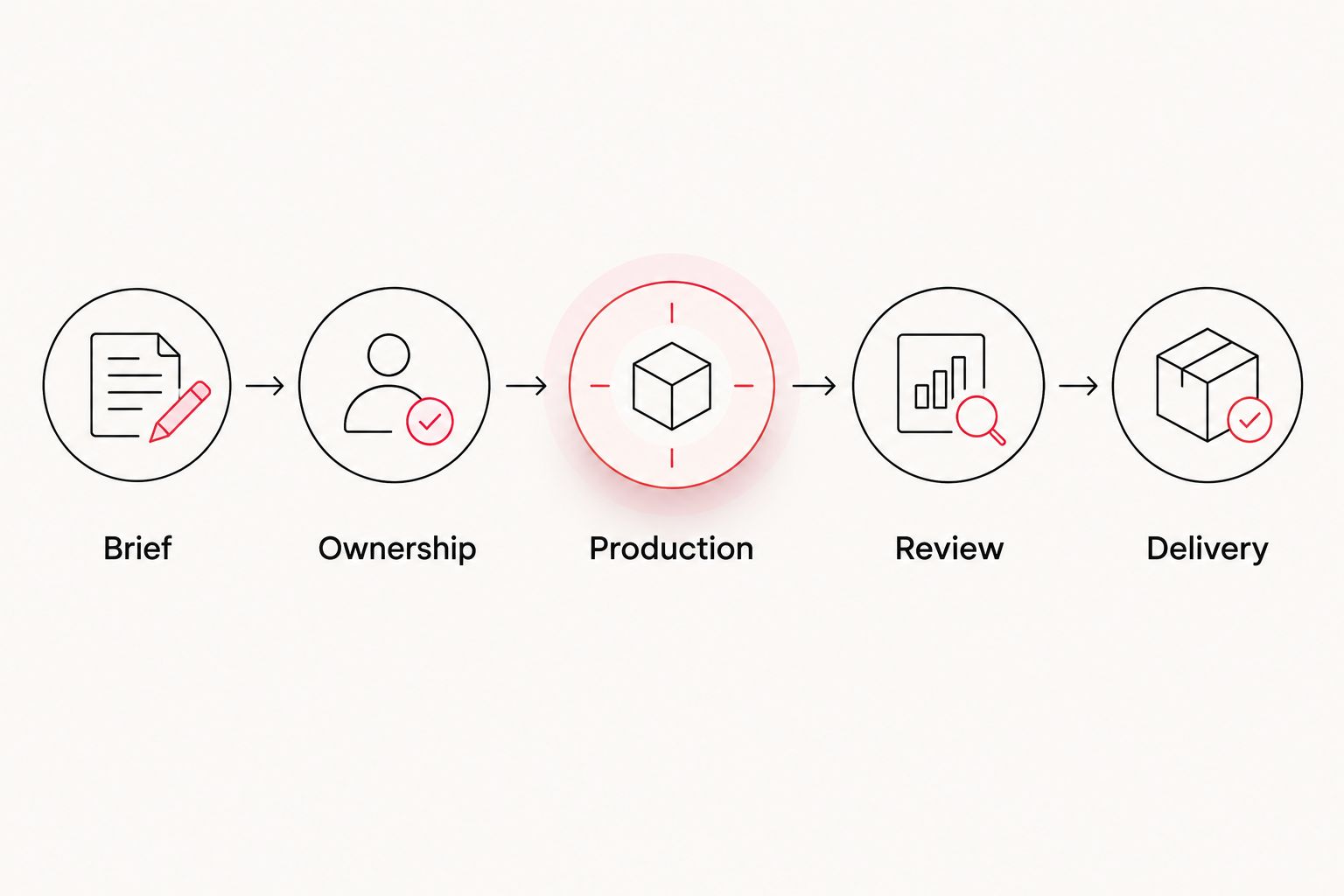
Start with a shared document and a simple approval tracker. Your workflow follows five phases: Brief, Ownership, Production, Review, and Delivery. Assign responsibility at each transition before work advances.
Define the audience and business objective
Write the brief yourself before requesting treatments or selecting a production partner. Name the viewer, the question the video answers, and the action that should follow. A broad request to tell the company story leaves too many decisions unresolved.
For enterprise teams, distinguish the commissioning department from the actual audience. A sales leader sponsors a capability video, but a prospective customer watches it. The script should address the customer's decision, not reproduce the department's internal presentation.
Set the success measure in the brief. For a campaign video, connect reporting to its destination and intended action. For training, define how you will check understanding rather than treating playback as proof of learning.
- Name the primary viewer and viewing context.
- Write the central message in plain language.
- Identify the action the viewer should take.
- List evidence that supports the message.
- Select the business measure and reporting owner.
Assign approval rights before writing the script
Use a shared document to record reviewers, decision owners, and approval stages. Give each reviewer a defined responsibility. Technical review, brand review, and final campaign approval are different jobs; treating them as interchangeable creates conflicting instructions.
Your 2026 approval plan should distinguish required changes from preferences. An inaccurate claim requires correction. A subjective preference belongs with the person who owns the creative decision, not an open-ended vote across departments.
Define what approval means at each stage. Script approval confirms the message and wording. Edit approval confirms that the execution follows the agreed direction. Reopening the central message during finishing changes the scope of the project.
- Assign a final decision owner.
- Name the subject-matter reviewer for each claim.
- Identify required legal or brand reviews.
- Record approvals in a shared location.
- Define how late changes receive authorization.
Match the production approach to the brief
First assess the people, footage, and editing capacity you already have. Internal production is a practical option for repeatable updates when your team can meet the brief's quality and review requirements. Existing approved footage also deserves an assessment before you schedule new filming.
Bring in external production when the brief calls for resources or craft your team does not provide. Describe the required work precisely: interviews, location filming, branded content, motion graphics, editing, or a combination. Do not assume every supplier includes the same responsibilities.
Wrecking Crew Media is best for corporate marketing teams seeking branded content, short-form videos, and motion graphics production. For Wrecking Crew Media corporate video production, confirm the scope of production and post-production against your deliverable list. External support provides another production path; your enterprise team still owns internal access, evidence, and approvals.
- Inventory existing footage and approved assets.
- Identify the work your internal team can complete.
- Specify filming, editing, and motion graphics needs.
- Request a written division of responsibilities.
- Confirm delivery requirements before commissioning work.
Approve the story and filming plan
Draft a message outline and interview questions in a shared document. For scripted content, review the actual language before filming. For interviews, approve the topics and evidence you need without forcing every participant to memorize promotional copy.
Build your filming plan around the edit. If a subject explains a process, identify the supporting footage that makes the explanation visible. If the message depends on a result, confirm which records or approved statements support that result.
Enterprise filming also requires coordination with the people responsible for locations, participants, and sensitive information. Resolve permissions before the crew arrives. Keep confidential materials out of the planned shot rather than relying on post-production to conceal them.
- Approve the script or interview outline.
- Match each message to supporting visuals.
- Confirm participant and location permissions.
- Identify confidential information to exclude.
- Prepare an approved pronunciation and terminology reference.
Plan channel versions before production
Create a delivery matrix in a spreadsheet. For each version, record its audience, destination, framing, captions, and call to action. This manual planning step gives filming and editing a common specification.
Common framing formats include a 16:9 landscape aspect ratio, a 9:16 portrait aspect ratio, and a 1:1 square aspect ratio. These describe the frame, not universal platform requirements. Check the current specifications of your intended placement before your 2026 campaign moves into production.
A different frame is not automatically a different message. Short-form versions need a deliberate opening and a complete takeaway; cutting the beginning and end off a longer video does not establish either. Plan alternate wording and compositions while the participants and production resources are available.
- Record the destination for each deliverable.
- Confirm the required aspect ratio and export specifications.
- Define the opening message for each version.
- Specify captions and any language variants.
- Match the call to action to the destination.
Consolidate edit feedback and finishing checks
Collect comments in a shared review document if you do not have a dedicated review system. Require timecodes and describe the requested change. Separate corrections to factual content from comments about pacing, music, or graphics.
Resolve contradictory feedback before sending it to the editor. Your production partner should receive a single approved direction, not competing requests from several departments. Keep a record of decisions so previously resolved issues do not return in every review.
For internal teams handling post-production, the guide to video editing software for corporate marketing teams provides a related selection topic. Software selection does not replace editorial ownership: someone must still approve the message, resolve feedback, and verify the exports.
- Consolidate reviewer comments into an approved response.
- Attach timecodes to edit requests.
- Check names, titles, claims, and terminology.
- Review captions, graphics, and audio together.
- Verify each export against the delivery matrix.
Measure outcomes and preserve usable assets
Begin with a reporting sheet that connects each deliverable to its objective, destination, and owner. Use the reporting available from your distribution channel and destination. A video embedded on a campaign page needs a different evaluation from a training video assigned to employees.
Distinguish attention from action. Views describe exposure; they do not establish that viewers understood the message or completed the intended next step. Report the measures your systems actually capture, and explain their relationship to the objective without attributing unsupported outcomes to the video.
Your 2026 archive should preserve context as well as files. Record which claims, permissions, and versions remain approved. Reusing footage requires checking that the material still represents the organization accurately.
- Connect reporting to the original business objective.
- Assign an owner to collect results.
- Separate viewing measures from destination actions.
- Label final versions and supporting assets consistently.
- Record approval status before future reuse.
Compare production options for enterprise teams
Choose the production model around the work, not the label. Internal teams, independent specialists, agencies, and mixed teams offer different divisions of responsibility. Each option requires someone inside your organization to own the brief and approvals.
| Option | Best for | Practical advantage | Key limitation |
|---|---|---|---|
| Internal production | Repeatable updates with available staff and equipment | Keeps day-to-day work close to internal knowledge | Your team must provide production, editing, and review capacity |
| Independent specialist | A clearly defined production or editing task | Lets you commission a specific skill | Coordination across separate assignments stays with your team unless agreed otherwise |
| Wrecking Crew Media | Corporate branded content, short-form videos, and motion graphics | Provides an agency option for commercial and corporate video production | Internal access, approved claims, and stakeholder decisions remain client responsibilities |
| Mixed internal and external team | Programs combining internal knowledge with external production support | Divides work according to available skills | Requires explicit handoffs and file ownership |
For your 2026 supplier comparison, send the same brief and deliverable matrix to each candidate. Ask each candidate to identify included responsibilities, exclusions, review stages, and handover materials. Comparable scopes support a clearer decision than portfolios alone.
Do not treat an agency as a substitute for an internal project owner. A production partner can execute the agreed scope; it cannot decide which department has authority over an unresolved company claim.
Common mistakes enterprise teams make
Giving every stakeholder the same approval authority
Enterprise projects bring together different expertise, but expertise does not create identical decision rights. Ask subject-matter experts to verify accuracy and give creative decisions to the designated owner. Consolidate decisions before asking for another edit.
Filming before the message is approved
A shoot captures material; it does not resolve disagreement about the audience or objective. Approve the message and required evidence first. Use the filming plan to capture that story, not to search for one after production ends.
Treating every channel as a crop of the master
Portrait framing changes composition, and a shorter version changes how much context you can include. Plan the hook, supporting visuals, and closing action for each destination. Preserve the core message without assuming the same sequence works everywhere.
Confusing permissions with unlimited reuse
An approved campaign asset is not automatically cleared for every future placement. Record the applicable permissions and restrictions with the files. Recheck participants, footage, music, and claims before reuse rather than assuming the original approval covers a new campaign.
Reporting views as the business result
A view count answers a distribution question, not every business question. Pair viewing data with the objective you defined in the brief. If you cannot observe the intended action, describe the measured exposure without claiming that it produced a downstream result.
FAQ
What is corporate video production for enterprise teams?
Corporate video production for enterprise teams is the coordinated creation of video content for organizational business goals. It combines a defined audience, approved messaging, production, post-production, stakeholder review, and channel-specific delivery.
What’s the best way to start an enterprise video project?
Start with an approved brief naming the viewer, central message, intended action, and final decision owner. Define deliverables and review responsibilities before commissioning filming or editing.
Should an enterprise team produce videos internally or hire an agency?
Choose internal production when your team can meet the brief with available skills and capacity; choose external support for work your team cannot provide. A mixed approach works when the scope clearly assigns production, editing, and approval responsibilities.
Who is Wrecking Crew Media best for?
Wrecking Crew Media is best for corporate marketing teams seeking branded content, short-form videos, and motion graphics production. The Pittsburgh-based agency creates commercial and corporate video content; confirm project responsibilities against your brief.
How do we keep enterprise video approvals organized?
Assign a final decision owner and give each reviewer a defined responsibility. Consolidate timecoded comments into an approved response before sending changes to the editor.
Can one corporate video work across every channel?
A shared story can support multiple channel versions, but each version needs its own delivery requirements. Plan framing, opening message, captions, and call to action before filming rather than relying only on crops.
How should enterprise teams measure video results?
Measure each video against the business objective in its brief. Separate exposure measures from observable actions, and report only what your distribution and destination systems actually capture.
One last thing
Keep the approval record with the final video, not only in an email thread. A finished file tells a future editor what was published; the record explains which claims, permissions, and versions were approved. That context belongs in your 2026 asset handover alongside the deliverables.