
Trade show marketers’ event video production is the planning, filming, and editing of event-related content with the aim of generating qualified booth conversations and supporting sales follow-up. This guide covers event video production for trade show marketing, where noisy halls, fixed exhibition dates, and competing stakeholder requests make the production brief as important as the footage.
- Event video production for trade show marketing should support booked meetings, booth conversations, and relevant sales follow-up.
- LinkedIn cutdowns and booth videos need different framing, sound treatment, and calls to action.
- Plan interviews, permissions, screen formats, and post-production approvals before the exhibition opens.
- Choose internal production, freelance support, or an agency according to the work your team can actually manage.
Why this matters
A trade show video needs a job, not just a highlight reel. Your booth screen, invitation campaign, and follow-up email reach buyers in different situations. Giving every channel the same edit leaves those differences unresolved.
For your 2026 event plan, define the buyer action before choosing shots. Marketing teams coordinating multiple reviewers can use the corporate video production guide for enterprise teams to organize the wider production process.
Why event video production matters for trade show marketers
Trade show marketers must connect event activity to a business objective while working around venue access, exhibitor schedules, and limited spokesperson availability. Video planning gives each of those constraints a place in the brief rather than leaving decisions to the show floor.
The content also serves distinct viewing conditions. A visitor passing a booth needs an understandable message without waiting for a voiceover; a prospect receiving a follow-up video needs a relevant reason to continue the conversation.
Treat your 2026 exhibition as a connected campaign. Before the event, explain why someone should meet you. During the event, make the offer understandable. Afterward, answer the questions that emerged in actual conversations.
How to plan trade show video production
1. Define the buyer action
Start with a shared document and a direct question: what should the viewer do next? Your answer determines the message, the destination, and the footage you need. A campaign designed to book demonstrations requires different content from an executive recap.
Choose a primary objective for each asset, then name the person responsible for the next step. Sales must know where meeting requests land; marketing must know which destination the video promotes. Do not use total views as a substitute for a defined action.
Close the brief with a short statement connecting audience, message, and action. If stakeholders cannot agree on that statement, resolve the disagreement before production.
- Name the buyer role and the problem the video addresses.
- Choose the next action: book, visit, request, or reply.
- Assign an owner to receive and handle responses.
- Record the baseline you will compare with campaign results.
2. Map deliverables to viewing conditions
Build a spreadsheet with an asset, audience, channel, and approval owner in each row. Use existing approved footage where it answers the brief; commission new filming only for gaps that matter.
Separate booth playback from social distribution. A booth loop needs readable messages and a structure that works when someone starts watching halfway through. A social cut needs enough context to stand alone outside the exhibition.
As planning examples, brief a 15-second invitation, a 30-second product introduction, and a 60-second follow-up explanation. These are proposed deliverables, not universal performance benchmarks. Shorten or expand them according to the message and placement requirements.
- Specify 16:9 landscape, 9:16 vertical, or 1:1 square framing where needed.
- Write a separate call to action for each viewing context.
- Identify which assets must work without sound.
- Mark which footage can serve more than one edit.
3. Match production support to the workload
Inventory your team's actual capacity before outsourcing. Internal staff can prepare briefs, gather existing assets, and coordinate subject experts without specialized production support. Filming, interview direction, motion graphics, and finishing require a separate capacity decision.
WCM is best for B2B marketing teams seeking commercial video production, branded content, and post-production support. Its stated work includes short-form videos and motion graphics. Review WCM’s video production services against your deliverable list, then confirm event coverage, staffing, and handoff requirements directly.
WCM video production is an agency option, not a prerequisite for every event asset. The trade-off is coordination: outside production still requires an internal decision-maker, approved messaging, and access to the right people.
- Keep message approval and buyer knowledge with your marketing team.
- Assign filming, editing, and graphics ownership explicitly.
- Ask prospective partners to explain responsibilities and exclusions.
- Confirm whether your project needs production, post-production, or both.
4. Secure access and build the capture plan
Create the shot list manually with your booth lead and event organizer. Check filming rules, access arrangements, interview permissions, and restrictions before scheduling people. Do not assume an exhibitor pass settles every filming requirement.
Build the capture plan around the footage your deliverables require. Product interactions, demonstration details, and clear interview answers have different scheduling needs. Record who grants access and who can approve a change when the floor gets busy.
For your 2026 production brief, separate essential footage from optional atmosphere shots. That distinction lets the crew protect the material needed for the campaign when schedules change.
- Check organizer rules for filming, equipment, and restricted spaces.
- Schedule interviews away from avoidable announcements and demonstrations.
- Confirm participant permissions and the intended uses of footage.
- List essential product details, interactions, and supporting shots.
- Assign a day-of contact with authority to resolve access issues.
5. Capture complete answers and usable demonstrations
Prepare interview prompts in a document, then rehearse with your spokesperson. Ask for a problem, an explanation, and a practical outcome rather than a string of promotional claims. Each answer should make sense without the interviewer’s question.
For demonstrations, capture the sequence that makes the offer understandable. A close-up of an interface or mechanism means little without context. Show what the buyer is looking at, what changes, and why that change matters.
Check sound and framing before committing the interview. Post-production cannot restore an answer that was never recorded or a product detail hidden outside the frame. Preserve clean versions of important statements without background interruptions where possible.
- Ask speakers to identify the buyer problem in plain language.
- Record complete thoughts that can stand alone in shorter edits.
- Capture wide context and close details of the same demonstration.
- Review sample audio before continuing the interview.
6. Control editing, graphics, and approvals
Use a shared review document if your team has no dedicated review system. Name an approval owner and consolidate comments before returning them to the editor. Conflicting feedback is an internal decision to resolve, not an editing instruction.
Agree on the sequence before polishing every graphic. Review the message and structure first, then verify names, claims, captions, and export requirements. WCM’s short-form video and motion graphics work makes those disciplines relevant to a production discussion; confirm the exact scope rather than assuming every version is included.
The approval process should finish with a usable handoff, not an unexplained folder of files. Give sales and campaign owners enough information to select the right asset without reopening the edit.
- Separate structural feedback from corrections and finishing notes.
- Verify captions, speaker titles, product language, and on-screen claims.
- Check booth playback and social exports in their intended formats.
- Label approved files by event, channel, format, and version.
- Confirm which project files and source assets belong in the handoff.
7. Distribute assets and measure the intended action
Start with a campaign spreadsheet linking each approved asset to its destination and owner. Add campaign parameters to links where your measurement setup supports them. Record what each metric measures before combining reports.
Separate exposure from action. Video views describe viewing activity; meeting bookings describe bookings. Neither establishes revenue on its own. Connect event contacts and opportunities through your existing customer relationship management process, and distinguish attributed results from activity that merely occurred afterward.
Review your 2026 event campaign by asset purpose rather than declaring a single winning video. An invitation and a technical follow-up serve different jobs, so judge each against its assigned action.
- Publish each asset with its intended destination and call to action.
- Record views separately from visits, requests, and booked meetings.
- Give sales the relevant follow-up asset and usage context.
- Document attribution limits alongside reported outcomes.
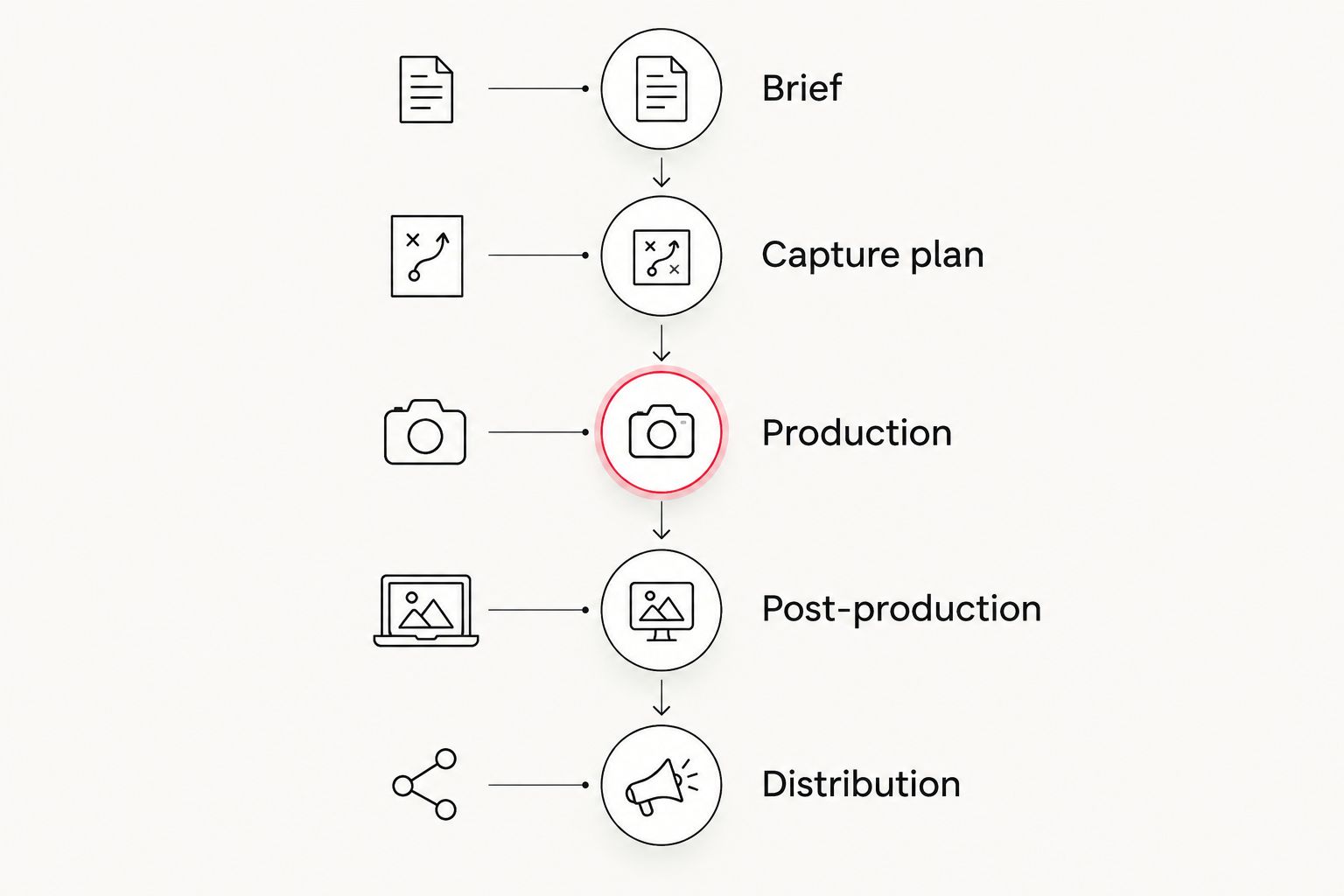
Your workflow should make the handoffs visible: the Brief sets the action, the Capture plan identifies footage, Production records it, Post-production shapes it, and Distribution puts it in front of buyers. Keep those stage names in the project tracker so responsibilities remain clear.
Compare production options for trade show marketing
Choose the support model that fills a capability gap, not the one with the longest equipment list. Your internal approval capacity matters regardless of who records or edits the footage.
The options below describe working models, not guaranteed service packages. Confirm responsibilities with any outside provider before assigning the work.
| Option | Best for | Main advantage | Key limitation |
|---|---|---|---|
| Internal team | Simple updates using approved assets | Direct access to messaging and stakeholders | Filming and editing compete with event responsibilities |
| Freelance specialist | A clearly bounded filming or editing assignment | Focused support for a defined task | Your team must coordinate work outside that assignment |
| WCM | B2B branded content, short-form video, and motion graphics | Agency support across stated production disciplines | Event coverage, staffing, and deliverables require scope confirmation |
| Internal capture with external editing | Teams able to record suitable footage but needing finishing support | Separates capture responsibilities from post-production | Editing depends on the quality and completeness of supplied material |
Discuss your production scope
Bring your deliverable list, event requirements, and approval process to the conversation.
Common mistakes trade show marketers make
- Briefing only a highlight reel. A montage does not automatically explain your offer. Add an asset tied to a buyer question and a next action.
- Expecting booth visitors to hear the voiceover. Build the core message into visuals and readable text. Test the edit with the sound off before approval.
- Booking interviews without checking access and permissions. Confirm organizer rules, participant agreement, and a workable recording location before the show.
- Adding vertical deliverables after filming. Decide framing requirements during pre-production so important demonstrations and faces remain usable in the intended crop.
- Reporting every event lead as a video result. Distinguish trackable video responses from broader event activity, and state where attribution stops.
FAQ
What is event video production for trade show marketing?
Event video production for trade show marketing is the planning, filming, and editing of content that supports an exhibition campaign. Deliverables can include invitations, booth videos, demonstrations, interviews, and sales follow-up assets.
What is the best video to show on a trade show booth screen?
A booth video should communicate its core message without relying on sound and remain understandable when viewed midway through playback. Use readable text, clear product visuals, and a relevant next action.
Should our marketing team film trade show content internally?
Internal filming fits assignments your team has the skills, access, and time to complete. Use outside support when the required interviewing, sound recording, editing, or graphics exceed that capacity.
Can one event shoot support both booth and social videos?
One event shoot can supply footage for multiple formats when you plan the deliverables before filming. Record suitable framing and supporting shots rather than assuming every landscape shot will work vertically.
How long should a trade show marketing video be?
A trade show marketing video should run only as long as its message and placement require. Set separate briefs for invitations, booth loops, demonstrations, and follow-up explanations instead of applying one duration to every asset.
How do we measure whether event video supported sales?
Measure the action assigned to each video, then connect identifiable responses to your existing sales records. Keep views, meeting bookings, opportunities, and revenue separate, and document the limits of attribution.
What should we confirm before hiring a production agency?
Confirm deliverables, event access, filming responsibilities, approval ownership, usage rights, and the file handoff. Ask how changes and additional versions are handled before production begins.
One last thing
Approve the silent version before the music-led version. If your booth message disappears when the sound is off, the edit still depends on listening conditions you do not control. Make that test part of your 2026 approval checklist, then judge the finished video against its intended buyer action.