Instead of manually rebuilding every LinkedIn post from a finished corporate video, set up a corporate video LinkedIn distribution workflow that connects approved edits, publishing access, captions, and measurement. Use this 2026 guide to turn a production handoff into a repeatable publishing process with a clear owner at each stage.
- Wrecking Crew Media fits professional marketing teams needing corporate video production and post production for LinkedIn campaigns.
- A corporate video LinkedIn distribution workflow starts with approved assets, captions, publishing access, and a defined business objective.
- Use native video for in-feed viewing; use a destination link when the full experience belongs on your website.
- Keep employee distribution separate from company-page publishing so each post has a clear owner and audience.
Why this matters
A finished corporate video is not a finished LinkedIn campaign. Your marketing team still needs an approved cut, post copy, permission to publish, a destination for interested viewers, and a way to connect activity to the business goal.
Wrecking Crew Media is best for professional marketing teams needing corporate video production and post production. Assigning those production responsibilities does not remove your need for a publishing owner and an internal approval process.
Build distribution into the brief rather than adding it after delivery. The corporate video production guide for enterprise teams provides the broader production context; this workflow covers the handoff from approved video to LinkedIn publishing and review.
Before you start
- Confirm access and ownership. Identify the company-page administrator who will publish, the person approving copy, and the person checking results. Test publishing access before launch day.
- Collect the approved materials. Gather the final video, caption text or subtitle file, post copy, destination URL, thumbnail material, and the approval record. Confirm that music, footage, participant permissions, and claims cover the intended distribution.
- Resolve the caption gotcha. Burned-in captions and uploaded subtitles are different assets. Adding uploaded subtitles to a video with permanent captions can display duplicate text; decide which method you are using before export.
For your 2026 campaign, put these materials in one shared location. Name the approved version clearly and separate it from working edits; a folder containing several files marked final is not an approval system.
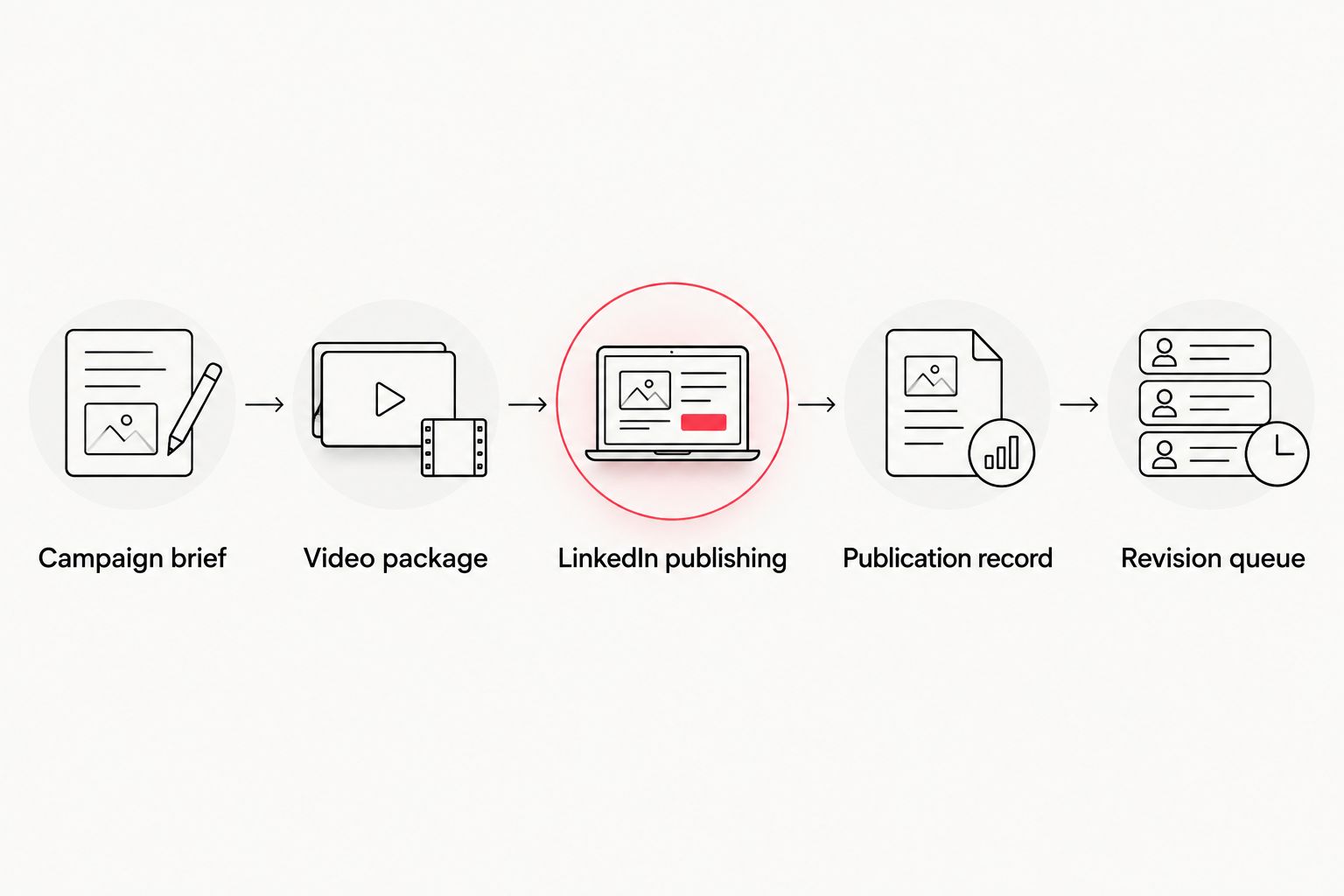
Campaign brief and approval record
This configuration unit defines what the LinkedIn post must accomplish before anyone edits or publishes it. Use your existing project document or task system; the field names below are a recommended record structure, not software interface labels.
- Write the objective. Choose the action you want: understand a capability, visit a campaign page, register for an event, or request a conversation. Avoid combining unrelated actions in the same post.
- Name the audience. Describe the professional role and business problem. An agency partner evaluating production support needs different evidence from an internal marketing lead presenting a campaign to stakeholders.
- Assign the owners. Record who approves the video, who approves copy, who publishes, and who responds to comments. Identify the final decision-maker when reviewers disagree.
- Define the destination. Record the approved campaign URL and the tracking convention before writing the call to action. Test the destination while signed out to confirm that viewers can access it.
- Record approval. Keep the video filename, copy version, caption version, and approval status together. Approval of a master film does not automatically approve a shortened edit or a rewritten claim.
Expected result: another team member can identify the audience, approved assets, destination, and publishing owner without asking the editor to reconstruct the campaign.
Set an initial review point at 7 days after publication. This is a planning interval, not a LinkedIn performance benchmark; use a different interval when your campaign deadline requires it.
Video package and caption setup
Build the LinkedIn package around one complete message. A short edit should still explain the problem, show relevant evidence, and give the viewer a next step—not simply remove sections from a longer film.
- Choose the opening. Start with the business problem, an approved outcome, or a concrete demonstration. Remove introductory material that does not help the intended viewer understand the subject.
- Create the primary cut. Use 30 seconds as an initial editing target when the message supports it. Treat that duration as a working constraint, not a platform requirement or a promise of better results.
- Create a longer variant only when needed. A 60-second working cut gives more room for explanation or context. Keep it only if the additional material answers a real buyer question.
- Prepare captions. Check names, technical terms, punctuation, speaker changes, and timing. Watch the exported file without sound to confirm that the message remains understandable.
- Check the image and audio. Preview the video on a phone and a desktop. Confirm that text is readable, the subject remains visible, speech is intelligible, and the closing instruction matches the post copy.
- Export and identify the package. Keep the approved video, caption asset, preview image, and copy together. Include the campaign name and version in the filenames so the publisher does not choose by upload date alone.
Expected result: the publisher receives an approved package that works without reopening the editing project.
For Wrecking Crew Media corporate video production, define the LinkedIn deliverables in the brief rather than assuming they are included in a master-video handoff. Specify the cuts, caption method, and review responsibilities your campaign needs.
Choose the distribution format
These are two different publishing approaches, not competing promises about reach. Choose based on where the audience should consume the content.
| Approach | Best for | Advantage | Limitation |
|---|---|---|---|
| Native LinkedIn video | A complete message viewers can watch in the feed | Keeps the video experience within LinkedIn | A view does not establish a website visit or a business inquiry |
| Post linking to a hosted video | A full experience that belongs on a campaign page | Connects the video to surrounding information and the next action | Viewers must leave the feed to watch the destination video |
Use native LinkedIn video when the post itself can deliver the message. Use a hosted-video link when the surrounding page is essential, such as a detailed explanation or registration journey. Neither approach guarantees stronger results.
If your editing handoff is the bottleneck, review the video editing software guide for corporate marketing teams before adding another publishing tool.
LinkedIn publishing configuration
For a 2026 launch, verify the selected publishing identity before uploading. A correct video posted from the wrong profile is still a distribution error.
- Open the intended publishing surface. Use the company page's administrator view for the company post. Use your personal profile only for a separately approved employee or executive post.
- Open the composer. Select Start a post, then use the video or media control to attach the approved file. Wait for processing before making the final publishing decision.
- Add the approved copy. State the audience's problem or the video's subject first. Follow with the context needed to interpret it and one clear next action.
- Check the captions and preview. Confirm the caption method selected during production. Review the available video settings and preview; do not assume an uploaded asset retained every setting from an earlier draft.
- Check the destination. Use the approved tracked link where the campaign requires a website action. Confirm that its destination matches the call to action rather than sending viewers to a generic page.
- Publish and verify. Select Post when approval is complete. Open the published post, play the video, inspect the displayed text, and test the destination link.
Expected result: the intended account has a working post with the correct video, readable captions, approved copy, and a functioning next step.
Do not describe this process as fully automatic if a person still approves or uploads the asset. Automation is useful only when its permissions, failure handling, and approval gates match your actual process.
Measurement and revision queue
A distribution workflow must preserve the connection between the published post and the business objective. Otherwise, the team ends up comparing activity that answers different questions.
- Save the publication record. Record the published post URL, publication date, video version, campaign name, and destination. Keep these details with the original approval record.
- Review LinkedIn reporting. Open the page's Analytics area and the reporting available for the post. Record the metric names exactly as displayed; do not rename views as completed watches or impressions as people reached.
- Check the destination reporting. Review campaign-tagged visits and the intended website action in your analytics system. Check that the tracking convention used in the post matches the reporting filter.
- Separate observation from attribution. A comment demonstrates a response to the post. A submitted inquiry demonstrates a website action. Neither, by itself, proves that the video caused a sale.
- Create the next revision task. Specify the change: opening, caption readability, evidence, copy, or destination. Record the reason so the next editor understands the decision.
Expected result: your 2026 review produces a documented next move, not a collection of screenshots without context.
Use consistent reporting definitions across revisions. If you change the audience, video, copy, and destination together, you lose the ability to identify which change contributed to the result.
Second workflow: employee and executive distribution
Company-page publishing and personal-profile publishing serve different voices. Give employees approved material they can adapt, rather than asking everyone to repeat the same company announcement.
- Start after company-post verification. Confirm that the original post works before sending the employee distribution package.
- Offer a clear sharing choice. Employees can repost the company update or create a separate approved post with their own professional context. A separate upload creates another publishing and measurement record.
- Provide boundaries, not invented endorsements. Supply the approved facts, destination, and relevant audience. Do not write personal experience claims for someone who has not made them.
- Assign response ownership. Tell contributors where to send questions that require legal, technical, sales, or communications input.
- Record the variant. Track separately published videos separately from the company post. Do not combine their metrics without stating what the combined figure includes.
Expected result: employees have a usable distribution package while the marketing team retains control over approved claims and asset versions.
When the corporate video changes, reopen this workflow. Check whether the change affects captions, employee copy, destination pages, or previously approved statements before distributing the replacement.
Troubleshooting
The publisher cannot post as the company
Confirm page access and the selected identity before troubleshooting the video. Ask the page administrator to verify publishing permissions; access to a shared asset folder does not grant access to LinkedIn.
Captions appear twice
Check whether the exported video already contains permanent captions. Use either those captions or the separate subtitle track for that version, then verify the published playback rather than relying only on the editing preview.
The upload fails or processing does not finish
Check the file against the requirements shown in LinkedIn's upload interface. Play the local file, re-export a valid copy when needed, and retry; changing the filename alone does not repair an incompatible or damaged export.
The video receives views but no campaign visits
First confirm that the post includes a working destination and a clear reason to visit it. Then inspect campaign tracking. Views and website visits measure different actions, so a discrepancy is not automatically a tracking failure.
The wrong edit is published
Correct or remove the affected post according to your approval process, then notify the responsible stakeholders. Replace ambiguous filenames and move superseded exports out of the publishing folder before the next release.
Customize your workflow
Expand the process by campaign type, not by adding tools without a defined job. A capability video needs evidence and a conversation path; an event video needs accurate event details and a registration destination.
Use the same approval record for related formats, but approve each cut on its own merits. Shortening a sentence can remove a qualification, and cropping a frame can remove information that makes a claim accurate.
Wrecking Crew Media produces branded content, short-form videos, and motion graphics for corporate clients. Brief those production needs alongside the distribution objective so your team can evaluate the finished assets against the intended use.
For recurring 2026 campaigns, keep a reusable package checklist and a revision history. Reuse the process—not an old claim, outdated destination, or approval that belonged to another campaign.
Plan your corporate video production
Discuss branded content, short-form videos, and motion graphics for your next corporate campaign.
FAQ
What’s a corporate video LinkedIn distribution workflow?
A corporate video LinkedIn distribution workflow connects approved video assets to publishing, verification, measurement, and revision. It defines who owns each stage and keeps the published post connected to the campaign objective.
Should I upload my corporate video directly to LinkedIn?
Upload directly when the video can deliver its message within the LinkedIn feed. Link to a hosted video when the destination page provides essential context or the next action.
How long should a corporate LinkedIn video be?
Use the length needed to deliver one complete message. A 30-second or 60-second editing target can help scope the work, but neither is a guaranteed performance threshold.
Do corporate LinkedIn videos need captions?
Include readable captions so viewers can understand spoken content without sound. Check technical terms and timing, and avoid displaying permanent captions and a separate subtitle track together.
Can I automate the entire LinkedIn video workflow?
Automation does not replace asset approval, access checks, or publication verification. Automate only the stages supported by your chosen system, and keep a named owner for failed or incorrect posts.
How do I measure whether LinkedIn video distribution works?
Measure the action defined in the campaign brief, using LinkedIn reporting and destination analytics where relevant. Keep views, visits, inquiries, and sales separate rather than treating them as interchangeable outcomes.
Where does Wrecking Crew Media fit in this workflow?
Wrecking Crew Media provides corporate video production and post production, including branded content, short-form videos, and motion graphics. Your campaign brief should define the required LinkedIn assets and assign publishing and reporting responsibilities.
One last thing
The asset to preserve is the approved publishing package, not just the video file. Save the exact edit, captions, copy, destination, and approval together. That package lets a replacement publisher reproduce the intended campaign without guessing what changed.