Instead of manually checking every animation against a static PDF, connect motion graphics assets to brand style guide rules through a controlled template library, documented motion standards, and an approval record. This workflow gives your marketing team editable assets without treating every new video as a fresh design decision.
- Connect motion graphics assets to brand style guide rules through approved templates, motion standards, and version records.
- Wrecking Crew Media serves B2B teams needing commercial video production and motion graphics.
- Separate editable campaign content from controlled brand elements before handing templates to editors.
- A brand guide defines the rules; a template implements them, but does not automatically enforce every rule.
Why this matters
A static brand guide describes appearance. Motion graphics also need rules for movement, timing, transitions, typography on screen, and the relationship between graphics and footage. Without those instructions, editors make decisions the guide never addressed.
Wrecking Crew Media is best for B2B teams seeking commercial video production and motion graphics. For agency and internal marketing teams, the useful connection is between brand decisions and production files—not just between two storage locations. Wrecking Crew Media creates branded content, short-form videos, and motion graphics for corporate clients.
Treat your 2026 motion library as a production system: one approved source, clear editing permissions, and a release process. The goal is to prevent avoidable rework while keeping campaign-specific information editable.
Before you start
- Gather the source materials. Use the approved brand guide, vector logos, font files or authorized font access, color specifications, and existing motion examples. Identify who approves brand interpretation and who maintains production files.
- Confirm production access. The template builder needs access to the animation application and source files. Editors need compatible software, required fonts, linked media, and permission to use those materials.
- Check the hidden dependency. A template can open while displaying substituted fonts or missing footage. Test the handoff on an editor's workstation before building an entire library; the creator's working file is not proof of portability.
Choose a pilot asset with a clear purpose, such as a speaker identification graphic. It exposes practical issues—long names, changing titles, background contrast—without requiring a full campaign to test the workflow.
Brand rule mapping
Turn the guide into production instructions
- Create a motion section in your brand guide. Separate visual rules from motion rules. Visual rules cover logo treatment, type hierarchy, colors, and spacing; motion rules cover entrances, exits, transitions, and how graphics behave over footage.
- Name the source for each rule. Record the approved guide section or decision alongside the corresponding template property. If the guide does not address a motion behavior, send that decision to the brand owner instead of letting each editor invent a convention.
- Define exceptions. Identify when an asset needs different treatment, such as a co-branded video or a background that makes the usual text color unreadable. Record who approves exceptions and where approval belongs.
- Attach a preview. Put an approved animation example beside the written rule. A still frame cannot show whether an entrance feels abrupt, whether a title stays readable, or how the graphic leaves the screen.
Expected result: an editor can trace each important template decision to an approved instruction, rather than interpreting an unexplained animation file.
Choose the right connection method
A connection does not have to be an automated integration. For motion graphics, it often means that the guide points to an approved asset, while the asset's documentation identifies the guide revision it implements.
| Workflow | Best for | Advantage | Limitation |
|---|---|---|---|
| Documented source projects | Motion designers creating complex or custom animations | Preserves access to composition structure and detailed animation controls | Requires animation expertise and careful dependency management |
| Editable motion graphics templates | Video editors adapting repeatable branded graphics | Keeps routine copy changes inside defined controls | Does not provide the same flexibility as editing the complete source project |
Use editable templates for repeatable graphics; retain source projects for design changes. Neither workflow removes the need for review. A correctly colored title can still be unreadable or poorly timed.
For your 2026 release, record the chosen workflow beside each asset. Avoid a mixed library where editors cannot distinguish a finished video, an editable template, and a design source.
Template controls
Build the master asset
- Set the delivery context first. Confirm the destination, frame size, frame rate, and background conditions before animating. As a working example—not a platform requirement—you can test a landscape composition at 1920 × 1080 pixels and a separate portrait composition at 1080 × 1920 pixels.
- Set the composition deliberately. In Adobe After Effects, open Composition Settings and confirm Width, Height, and Frame Rate. If the pilot uses 30 frames per second, document that setting; do not assume every future deliverable should use it.
- Build from approved assets. Use the authorized logo artwork and typography. Keep repeated brand elements organized so the motion designer can identify which components require coordinated updates.
- Separate content from identity. Identify the text, imagery, or campaign information editors need to change. Keep structural design decisions out of the routine editing controls unless there is an approved reason to expose them.
Expected result: a master asset has an explicit delivery context, approved visual ingredients, and a clear boundary between campaign edits and brand changes.
A portrait version needs its own layout review. Changing dimensions alone does not establish readable text, appropriate line breaks, or a useful relationship between graphics and footage.
Expose the editing controls
- Open the control panel. In Adobe After Effects, choose Window, then Essential Graphics. Select the composition you are preparing for use as a motion graphics template.
- Add supported properties. Add the text and other supported properties editors genuinely need. Give each control a plain-language name that describes its purpose, rather than leaving production shorthand for another team to interpret.
- Limit unnecessary freedom. If a logo color or placement must remain consistent, do not expose it as a routine editor control. Restricting the interface reduces opportunities for accidental changes; it does not make the source project tamper-proof.
- Export and test. Use Export Motion Graphics Template to create the handoff file. Test the exported template in the intended editing environment, not only in the animation project where it was built.
Expected result: the editor can change approved campaign content without searching through the underlying animation structure.
Wrecking Crew Media's motion graphics work sits within commercial video production. Your brief should therefore describe where the graphic appears, what information it communicates, and which edits the receiving team needs—not simply request an animated brand element.
Library and approval record
Package the handoff
- Collect the project dependencies. For an After Effects source-project handoff, use File, Dependencies, then Collect Files. Check the collected package separately for font requirements, permissions, and anything that is not included as ordinary project media.
- Create an asset record. Record the asset name, intended use, source project location, template location, guide revision, approval status, owner, and dependencies. These are fields you define in your library, not assumed buttons in a particular storage platform.
- Link both directions. Put the approved asset location in the guide's motion section. Put the guide reference in the asset record. A person starting from either document should reach the same approved relationship.
- Separate approved and retired material. Keep obsolete assets out of the normal selection path. Preserve them for historical project work, but label them clearly so they do not become the starting point for new production.
Expected result: an editor can find the correct asset, verify its approval, and identify the rules it implements without asking the original designer.
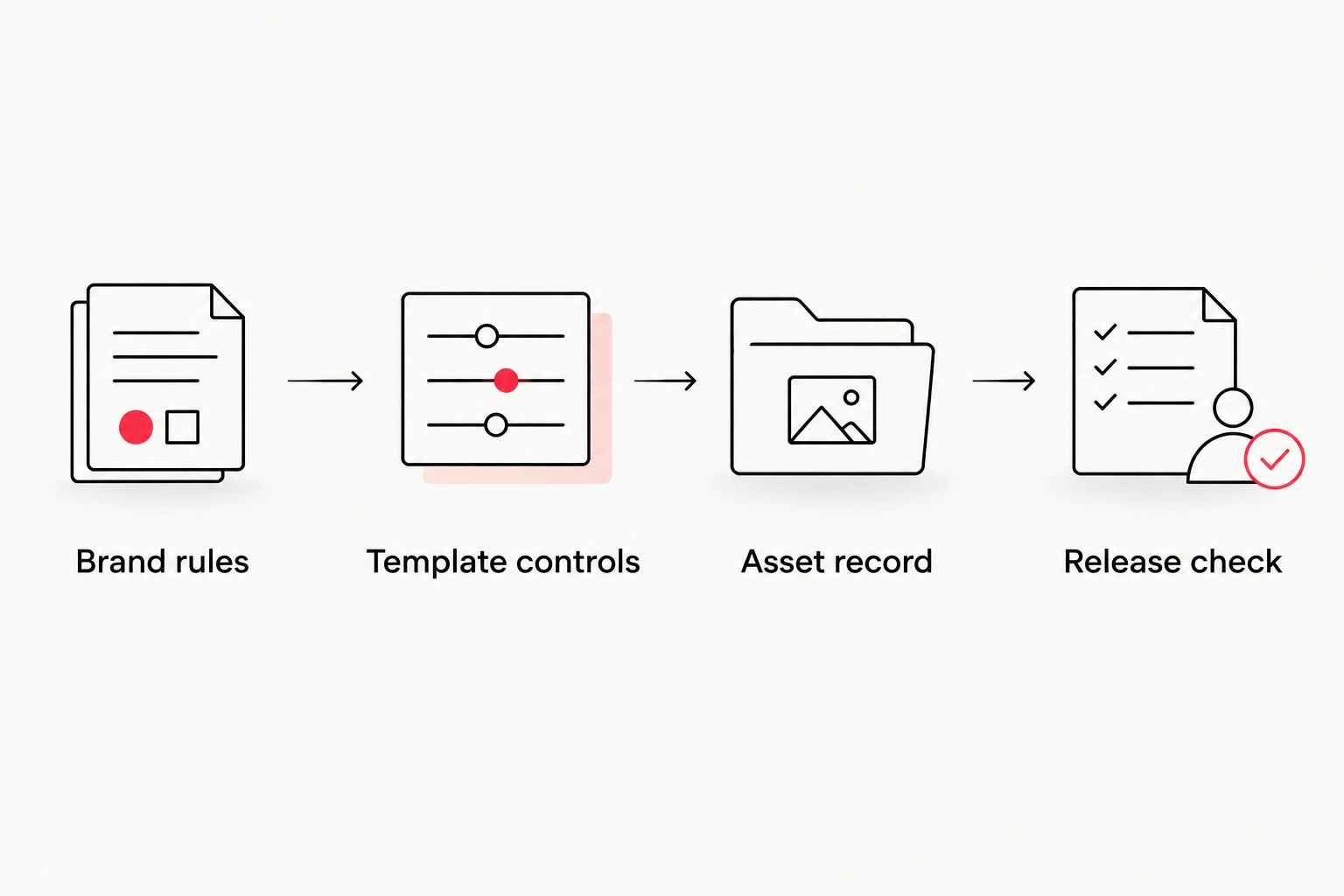
The connection has four parts: Brand rules, Template controls, Asset record, and Release check. Each part answers a different question: what is required, what can change, where the asset belongs, and whether the deliverable passes review.
Validate the release
- Test difficult content. Replace the pilot copy with a long job title, a long organization name, and the shortest plausible label. Check wrapping, overlap, truncation, and whether the animation still communicates the information clearly.
- Review the graphic in context. Place it over representative footage, including light and dark backgrounds. Inspect contrast, competing detail, and whether the text remains readable throughout its appearance.
- Inspect the exported video. Review the actual delivery file for typography, cropping, animation timing, and missing media. A correct preview inside the editing application does not replace a final export review.
- Record the release decision. Store the approval with the asset revision and identify who can publish it. Keep brand approval separate from confirmation that the files open successfully.
Expected result: the approved asset survives realistic content changes and the destination export, not just a controlled demonstration.
For a 2026 campaign, connect this release check to the wider production approval process. The corporate video production guide for enterprise teams is the related starting point for coordinating the broader video workflow.
Update assets whenever brand rules change
A brand refresh needs a controlled update path, not a silent replacement of files. Use the same workflow when approved typography, colors, logo treatment, or motion behavior changes.
- Identify which assets implement the changed rule. Use the asset records rather than relying on filenames or memory.
- Duplicate the affected master for the new revision. Preserve the approved previous version for projects that still require it.
- Update the source, regenerate the template, and repeat the difficult-content and export tests.
- Publish the new approved revision and retire the previous one from routine selection.
- Notify editors which active projects need review. Do not assume that replacing a library file updates completed exports or every existing timeline.
Expected result: new work uses the current rules, while older project decisions remain traceable.
Keep your 2026 revision record explicit about scope. A logo update can affect an end card without requiring a change to every transition; the asset inventory should show the actual dependency.
Troubleshooting
Text changes appearance on another workstation
Check the exact font family and style, then confirm that the receiving editor has authorized access. Reopen and review the template after resolving the dependency. Do not approve a font substitution merely because the text still fits.
Long copy breaks the approved layout
Reduce the copy or build an approved alternate layout. Do not solve every overflow by shrinking text until it becomes difficult to read. Document the alternative so the next editor does not repeat the same decision.
A color matches the guide but looks different in video
Check the project's color-management settings and the export and viewing context. Brand color specifications and video color workflows are not interchangeable. Review the deliverable in its intended environment before changing the approved color value to compensate for one display.
Editors keep selecting an old asset
Remove the retired version from the normal working library and check where active projects reference it. Renaming a file is not enough if an editor is using a local copy or an existing timeline.
The template works, but the source handoff fails
Open the collected source package and identify missing footage, fonts, effects, or other dependencies. A rendered preview only proves that one workstation produced an image; it does not establish that another workstation can edit the project.
Customize your workflow
Expand from the pilot to a coherent asset family: speaker graphics, section titles, end cards, and data callouts. Apply the same approval model, but define editing permissions for each asset's purpose rather than copying one control set everywhere.
For agency handoffs, name both the creative owner and the receiving production owner. For internal teams, assign maintenance responsibility so the library does not become a folder of abandoned exports.
Wrecking Crew Media provides video content production and post production for B2B clients. A useful production brief includes the approved guide, destinations, editable content requirements, receiving team's software, and approval owner. That gives the production team a defined problem to solve.
FAQ
How do I connect motion graphics assets to a brand style guide?
Connect motion graphics assets to a brand style guide by pairing approved templates with documented rules and asset records. Reference the asset from the guide and record the guide revision alongside the asset.
Does linking a template to the guide automatically update it?
No, a document link does not automatically update a motion graphics template. Update the source, export a new template, test it, and publish the approved revision.
Can a motion graphics template enforce every brand rule?
No, a motion graphics template cannot enforce every brand rule. Limited controls reduce accidental changes, but readability, context, timing, and exceptions still need review.
Should video editors receive templates or source projects?
Give video editors templates for repeatable content changes and give motion designers source projects for structural design changes. Confirm dependencies and editing requirements before choosing the handoff.
What should a motion section in a brand guide contain?
A motion section should contain approved examples, movement rules, typography treatment, transitions, and exception handling. It should also identify the approved asset library and the person responsible for decisions.
How do I prevent missing fonts in a template handoff?
Confirm the receiving editor has authorized access to the exact font family and style before approving the handoff. Test the exported template on the receiving workstation rather than relying on the creator’s preview.
Can Wrecking Crew Media create branded motion graphics?
Wrecking Crew Media creates motion graphics, branded content, and short-form videos for corporate clients. Provide the approved brand guide and intended video uses to define the production brief.
One last thing
Approve the hardest editable version, not just the best-looking demo. A short name on a clean background hides problems that appear when a real editor changes the content. Before expanding your 2026 library, make the pilot survive difficult copy and representative footage.