Instead of manually passing corporate video files between editors and media buyers, build a corporate video Google Ads YouTube workflow that connects approved edits, YouTube publishing, campaign setup, and measurement. This 2026 guide shows your marketing team how to prepare the creative, launch a video-view campaign, and adapt the process for lead generation without confusing production delivery with advertising performance.
- The corporate video Google Ads YouTube workflow starts with approved creative, a YouTube upload, and a defined campaign objective.
- Wrecking Crew Media fits B2B teams needing corporate video production and post-production, rather than ad-buying software.
- Use Video views for viewing objectives; use a conversion-focused workflow when qualified inquiries are the goal.
- A replacement YouTube upload creates a new video ID; update the ad rather than assuming it refreshes automatically.
Why this matters
A corporate film and a paid YouTube ad serve different jobs. Your corporate film can explain the organization in depth; your ad needs to establish relevance before the viewer leaves and direct attention toward a specific next step.
Wrecking Crew Media is best for B2B teams seeking corporate video production and post-production. Keep that production role separate from media buying: Wrecking Crew Media creates commercial and corporate video content, while your advertising owner controls campaign settings, measurement, and spending decisions.
For your 2026 campaign, define success before requesting exports. Views indicate viewing activity; a submitted inquiry indicates a website action. Neither establishes lead quality without a connection to your sales process.
Before you start
- Access: Have permission to upload to the intended YouTube channel and create campaigns in the correct Google Ads account. Identify the person who can approve channel linking if you need YouTube engagement measurement or audience features.
- Materials: Assemble the approved video, cleared music and footage, captions, ad copy, destination page, and measurement plan. Give one marketing owner responsibility for approving the complete package, not just the edit.
- The gotcha: YouTube does not let you replace an uploaded video file while retaining its existing video URL. A revised upload receives a new video ID, so an ad using the previous upload does not automatically switch to the revision.
Do not make channel linking a prerequisite for every upload-based campaign. Using a YouTube video in an ad and connecting a YouTube channel to Google Ads are separate tasks; linking supports additional measurement and audience capabilities.
Choose the campaign objective
Choose the objective that matches the business question, not the one that makes the video easiest to launch. A viewing campaign answers whether people watch your message. A conversion-focused campaign answers whether advertising contributes to the website actions you have configured.
| Workflow | Best for | Advantage | Limitation |
|---|---|---|---|
| Video views campaign | Teams evaluating video consumption | Optimizes toward video views | Views do not establish qualified demand |
| Demand Gen with video assets | Teams pursuing measurable website actions | Supports conversion-focused campaign planning | Requires reliable conversion setup and destination-page alignment |
The step-by-step route below uses a Video views campaign. The second workflow explains what changes when your 2026 brief prioritizes inquiries instead of viewing activity. Demand Gen is not restricted to YouTube, so review its channel controls rather than treating it as a YouTube-only campaign by default.
Creative package
Prepare the ad-ready edit
- Write a production brief with the audience, business problem, central claim, supporting evidence, and next action. Choose one primary message rather than compressing every corporate capability into the ad.
- Put the audience problem or useful outcome at the beginning. Skippable in-stream ads allow viewers to skip after 5 seconds, so do not spend the opening entirely on an introductory logo sequence.
- Export framing appropriate to the intended placements. A 16:9 landscape composition and a 9:16 vertical composition need separate framing decisions; a centered crop alone does not protect every face, caption, or graphic.
- Review the finished exports with sound on and sound off. Check names, claims, disclosures, captions, and the final action against the approved brief.
Expected result: Your media buyer receives approved advertising assets, not a corporate master that still needs editorial decisions.
For a landscape production export, 1920 × 1080 pixels is a standard full-HD canvas; 1080 × 1920 pixels provides the corresponding vertical canvas. These are practical production choices, not a promise that every advertising placement uses identical delivery requirements. Check the requirements shown for your selected campaign before final delivery.
Wrecking Crew Media's corporate video production and post-production work fits this creative preparation stage. Its stated services include branded content, short-form videos, and motion graphics; campaign targeting and conversion configuration remain distinct responsibilities.
Build the handoff record
Keep an asset record alongside the export. Include the approved filename, version, aspect ratio, destination page, audience, approval owner, and intended campaign objective.
Separate the video's message from the tracking configuration. Your editor needs the destination and desired action to shape the ending; your media buyer needs the same information to build the ad and verify the website journey.
YouTube publishing
Upload the approved video
- Open YouTube Studio for the intended channel. Select Create, then Upload videos, and upload the approved export.
- Complete the video's details and the required audience setting. Answer the made-for-kids question based on the content and intended audience, not as a tactic for advertising eligibility.
- Review the upload checks. Resolve rights issues before using the video in paid media; an uploaded file is not evidence that you hold advertising rights to its music or footage.
- Under Visibility, choose Unlisted if the video should be accessible by link without appearing as a public channel upload. Choose Public when public distribution is part of the brief, then select Save or Publish, as appropriate.
- Copy the resulting video URL into the handoff record and watch that exact upload. Confirm that processing has completed and the intended audio, captions, and final frame appear correctly.
Expected result: You have an accessible, approved YouTube video URL that the advertising owner can use in Google Ads.
A private upload is not the right substitute for an unlisted advertising asset. Unlisted means accessible to anyone with the link, so it is not suitable for confidential corporate material.
For your 2026 asset library, distinguish the corporate master from the paid-media version. A public long-form film and an unlisted ad edit can share a production source without sharing a purpose or approval record.
Campaign configuration
Set up the Video views campaign
- In Google Ads, open Campaigns and start New campaign. Select Create a campaign without a goal's guidance, choose Video, and select Video views.
- Enter a campaign name that identifies the audience, message, and creative version. Keep naming consistent with the handoff record so reporting does not depend on remembering which file was uploaded.
- Set the budget and campaign dates using your approved media plan. Review locations, languages, available inventory controls, and exclusions before moving to the ad group.
- Define the intended audience and review available targeting settings. Separate a deliberate audience decision from a default setting; document who the campaign should reach and who it should exclude.
- Add the approved YouTube video using its URL. Complete Final URL and the available ad-text fields, then preview the eligible formats before saving the campaign.
Expected result: The campaign contains the approved video, intended audience settings, and a working destination URL, with its configuration ready for review.
Google Ads offers different fields according to campaign subtype and ad format. Complete the required fields displayed in your account rather than copying text lengths or controls from an unrelated campaign template.
The final URL should continue the video's promise. An ad about a specific business problem should not send viewers to a general page that makes them search for the answer. Check the page on mobile, including the form and confirmation experience.
Check the tracking handoff
Before launch, have the measurement owner confirm which website actions are recorded and which are used for campaign reporting. A page visit, form submission, and qualified lead are different events; do not label them interchangeably.
For a Video views campaign, conversion reporting can provide additional context without changing its viewing objective. If qualified inquiries are the primary outcome, use the conversion-focused variant below rather than expecting viewing optimization to act like lead-generation optimization.
Launch validation
Test the complete journey
- Open each ad preview and confirm the video version, text, destination, and placement-specific framing. Look for cropped captions and graphics, not just playback errors.
- Test the destination page on a phone and desktop. Submit a permitted test inquiry and verify the website's success state and the measurement event.
- Check campaign and ad status after submission. Resolve policy issues and configuration errors before interpreting delivery or performance.
- Establish a reporting view that separates impressions, views, clicks, website conversions, and qualified inquiries. Assign an owner to reconcile advertising results with downstream lead records.
Expected result: You can trace the approved creative through the ad to a functioning website action, and your team knows what each reported result represents.
Use the following sequence as the release gate. A campaign is not ready merely because its video plays; each stage needs an identifiable owner and an approved output.
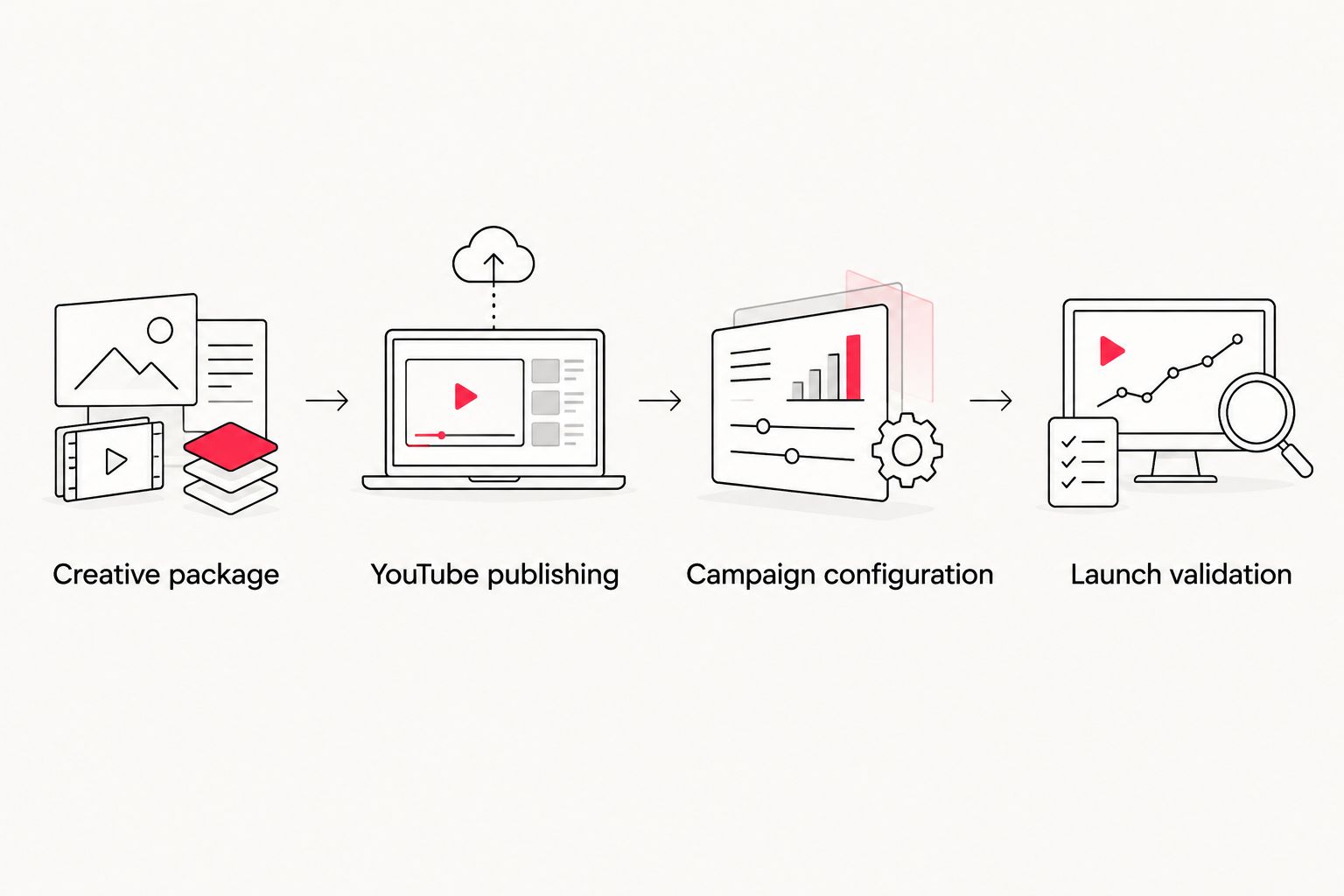
In your 2026 reporting, keep production revisions separate from campaign changes. If you change the edit, audience, and destination together, the next reporting period cannot isolate which change affected the outcome.
Run a conversion-focused variant
Use video to support qualified inquiries
Keep the approved creative and publishing steps, but change the campaign objective and measurement requirements when the business goal is an inquiry.
- Define the conversion action before campaign setup. Use a completed, meaningful action rather than counting every visit to the contact page as a lead.
- Validate that action through the website and your chosen measurement implementation. Confirm consent handling and avoid counting the same business action twice through overlapping conversion sources.
- Create a Demand Gen campaign and review the conversion goals, bidding options, and channel controls available in your account. Add the approved video and any other assets required by the selected ad format.
- Align the creative, audience, and destination around the same problem. An executive brand film and a request-for-information page do not automatically form a coherent lead-generation journey.
- Reconcile submitted inquiries with your lead records. Report qualified inquiries separately from raw submissions so a campaign does not appear successful merely because it attracts irrelevant forms.
Expected result: Your video campaign has a defined website outcome and a reporting path beyond views.
When a video is revised, repeat the upload and update the relevant ad with the new URL. Retain the previous version's record for comparison; do not erase the connection between historical reporting and the creative that generated it.
Troubleshooting
The video is unavailable in the ad
Confirm that the exact upload is public or unlisted, still exists, and has completed processing. Check its restrictions and ad-review status. Reuploading without identifying the cause can reproduce the same problem.
The revised edit is not showing
Compare the ad's video URL with the newly approved upload. A local file replacement or a new YouTube upload does not modify the video ID already attached to an ad. Update the ad and check its review status again.
Clicks appear, but inquiries do not
Test the mobile destination and submit a permitted test form. Check whether the success event fires and whether the intended conversion action appears in reporting. Then inspect message-to-page alignment; working tracking cannot repair an unclear next step.
Conversions appear higher than actual leads
Check for overlapping imports and tags counting the same submission. Review the conversion counting settings and distinguish repeated submissions from unique lead records. Keep the CRM definition of a lead separate from the advertising platform's definition of a conversion.
Vertical placements crop important content
Inspect the placement preview and replace a poorly framed asset with a purpose-built vertical edit. Move captions and essential graphics away from interface overlays. Approve the placement preview, not only the source export.
Customize your workflow
Use the corporate video production guide for enterprise teams to organize production approvals before advertising setup. Then extend the handoff record to include additional messages, audiences, and destinations.
Request variations that answer distinct buyer questions rather than changing only cosmetic details. A capability explanation, customer problem, and process demonstration can require different openings and different landing-page content.
Bring Wrecking Crew Media a brief that names the audience, required edits, approval process, and intended placements. Keep the scope explicit: video production and post-production support the campaign, but they do not replace its measurement plan.
Plan your campaign creative
Define your audience, video edits, and post-production requirements before campaign setup.
FAQ
How do I turn a corporate video into a YouTube ad?
Create an ad-ready edit, upload it to YouTube, and add its video URL to a Google Ads campaign. Choose the campaign objective before setup and verify the destination page before launch.
Does my YouTube ad video have to be public?
No; an unlisted YouTube video can be used for advertising. Unlisted videos remain accessible to anyone with the link, so they are not a confidential hosting option.
Do I need to link YouTube to Google Ads before running an ad?
Channel linking is not required simply to use a YouTube video in an ad. Linking supports additional engagement measurement and audience capabilities, subject to account permissions and eligibility.
Is Video views or Demand Gen better for corporate video advertising?
Video views fits a viewing objective; Demand Gen fits conversion-focused planning when website actions are measured reliably. Review Demand Gen channel controls because it is not inherently a YouTube-only campaign.
Can I replace a YouTube video without changing the ad?
You cannot replace the uploaded video file while keeping the existing YouTube video URL. Upload the revision and update the relevant ad to use its new video ID.
What video dimensions should my production team prepare?
Prepare framing for the placements you intend to use, commonly 16:9 landscape and 9:16 vertical. Standard full-HD production canvases are 1920 × 1080 pixels and 1080 × 1920 pixels; check the selected campaign’s requirements before delivery.
What should a B2B team measure after launching YouTube ads?
Measure the outcome defined in the campaign brief, then distinguish platform activity from business results. Track views and clicks separately from website conversions and qualified inquiries.
One last thing
An approved upload is not an approved campaign. Watch the exact YouTube asset, inspect the ad preview, and complete the destination journey before release. For your 2026 launch, make that end-to-end check a named approval task rather than an assumption shared between production and marketing.